Incoming Audio Missing on Small Number of Outbound Calls

monty_frankel_technology

Silver Partner
Joined
Oct 15, 2024
Messages
5
Reaction score
0
Looking for some assistance troubleshooting an issue with inbound audio occasionally missing on a small number of outbound calls. (Hopefully this is the right board for that.) We've collect some examples, and have yet to find a pattern but have learned the following information, and tried the following:
  • The callee / receivers are receiving the calls and they can hear the caller, but the caller cannot hear them.

  • Only a portion of the users are having issues (or at least only a portion are reporting issues).

  • Issue only occurs when calling external recipients, never internal calls.

  • All issues are reported when using desk phones. Only a very small number of users use phone apps or the web but they have no reported issues.

  • Currently, users simply hang up and call again, and are then able to hear without issue.

  • Issue has been going on for "quite some time", with no known start date but at least 3 or 4 months.

  • We've tried rebooting the PBX, rebooting the SBC, and rebooting all phones multiple times with no luck.

  • Checking call recordings, no incoming audio is recorded.

I believe we've somewhat narrowed the issue down: we've enabled call quality monitoring, and at least some of the problem calls, 3CX is reporting a problem: "Network problems from PBX to _________ SIP.US"

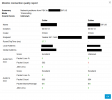
Additionally, looking at the call report, 3CX shows 0 packets received for "Audio from 3CX" under callee, visible here:
1756418740153.png

Any assistance troubleshooting this would be appreciated!
 
Hi,

Was the SIP provider set-up using the build in templates? If they deliver audio from multiple IPs on their side, have you allowed all in your firewall rules?

Best,
KS.
 
I knew I forgot to add some important notes.

We're using SIP.US. This is a 3CX instance running in lightsail. It was setup back on v16 and was upgraded to v18 and then again to v20. To the best of my knowledge it was setup using the built-in templates. It's using the standard Lightsail firewall setup, and from experience setting up new instances we've never needed to whitelist IPs with that setup? The firewall checker comes back as All OK.

Is there a way to see if we're using the built-in template?
 
Well,

The Trunks should not be showing anything other than Green for one part.

One think to check is if you have IPv6 on lightsail and disable it, as that can sometimes causes problems.
 
@monty_frankel_technology

Ignore the Unknown score towards callee as you're having problems in the opposite direction.
According to the statistics screenshot, the incoming RTP stream from the SIP trunk is great.
The only explanation of this is that the trunk sends silence, otherwise the report would be different.
To prove that, you need to catch such call with wireshark running and call monitor on and check if the corresponding stream towards PBX in the capture has audio.

So: enable call monitor on some extension, start Capture from the Dashboard and start calling out until you have no incoming audio.
Then locate the corresponding report in the Event Log (it will be the most recent one with that extension as caller to the external number you've dialled)
and use the Global Address (including port!) of the Callee to find the corresponding stream in the capture.
Then use Wireshark built-in stream player/analyzer to see if it indeed contains silence.

If it does, it is a proof that audio switching failed at the SIP trunk and we can do nothing about it.
 
Basically, this also indicates that incoming stream is silent as recorder just mixes two sources into one stream. What I described above should only serve as a final proof.
Checking call recordings, no incoming audio is recorded.
 

Members Online Now

Forum statistics

Threads
111,831
Messages
589,277
Members
164,660
Latest member
RJenkinsROCK