Incoming call notification every 5 seconds on iOS

Status
Not open for further replies.

pbit

Free User
Joined
Feb 3, 2014
Messages
12
Reaction score
0
Hi all,

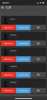
I hope this is posted in the correct category. I have no glue how to narrow the issue down for the moment. When I am logged on the WebClient on Chrome browser, it seems to be fine. As well as when I am using my iPhone in iOS only. But as soon as I start the 3CX app, I get like every 5 seconds an incoming call notification with numbers that make no sense. My extension length is 3 digits and the smallest incoming call notification has 4 digits.

No matter what I click, accept call or decline call it will not stop. Also when I check the call log and the activity log, I cannot trace those calls and they are also not in my extensions call history.

Did somebody of you ever had this issue and maybe can help me to solve this out?

Very thankful for advice in advance.

-Paul
 

Attachments

  • F3DBA9E3-FC33-4414-8F2E-D83941156709.png
    F3DBA9E3-FC33-4414-8F2E-D83941156709.png
    366.4 KB · Views: 13
Hi all,

I hope this is posted in the correct category. I have no glue how to narrow the issue down for the moment. When I am logged on the WebClient on Chrome browser, it seems to be fine. As well as when I am using my iPhone in iOS only. But as soon as I start the 3CX app, I get like every 5 seconds an incoming call notification with numbers that make no sense. My extension length is 3 digits and the smallest incoming call notification has 4 digits.

No matter what I click, accept call or decline call it will not stop. Also when I check the call log and the activity log, I cannot trace those calls and they are also not in my extensions call history.

Did somebody of you ever had this issue and maybe can help me to solve this out?

Very thankful for advice in advance.

-Paul
Are you using the 3CX tunnel in the app or the port 5060 directly?
 
Are you using the 3CX tunnel in the app or the port 5060 directly?
Hi Frederick Marcoux, thank you for your reply. That is a good question. I just now checked and it seems I use both. The Port 5060 is setup in the iOS app as well as using the 3CX tunnel when being external on port 5090. Since the PBX is hosted on amazon lightsail, in fact I always be external.

I just disabled the 3CX tunnel, but still the calls come up.
 
Hi Frederick Marcoux, thank you for your reply. That is a good question. I just now checked and it seems I use both. The Port 5060 is setup in the iOS app as well as using the 3CX tunnel when being external on port 5090. Since the PBX is hosted on amazon lightsail, in fact I always be external.

I just disabled the 3CX tunnel, but still the calls come up.
Do you see those calls in the Call Log of 3CX or in the Activity Log?

Also, make sure you're using the latest version. I suggest you try the latest beta too.
 
Do you see those calls in the Call Log of 3CX or in the Activity Log?

Also, make sure you're using the latest version. I suggest you try the latest beta too.

Nope, neither in the call Log nor in the activity log. I checked the version and currently 16.0.2.910 is installed. Version 3 Alpha could be installed. On the iOS device it is running 16.0.1.606.
 
Nope, neither in the call Log nor in the activity log. I checked the version and currently 16.0.2.910 is installed. Version 3 Alpha could be installed. On the iOS device it is running 16.0.1.606.
Try deleting the account in the app and reprovision with QR code.

Then, if still has issues, open a ticket at 3CX because this is not normal at all. If you are using the tunnel, those call shouldn't get in. (Some people SPAM the port 5060 of any IP addresses, called ghost calls).
 
Just to give a kind of final status, it seems to be almost okay. I put in a final conclusion for the moment, in case somebody has a similar behavior in the future.

Neither I can confirm, nor I can decline whether those are spam calls or not. For the moment I have one or two calls/notifications when I ended a call on the 3CX iOS app. Before it was like every 5 seconds.

What I did:
===========
  1. I re-installed the 3CX app several times on the iOS
  2. At one point I even deleted my extension in the 3CX admin console and reconfigured it with the same extension umber of course.
  3. Due to 2, I got kicked out of all queues and did not set me back for the moment.
  4. I checked "disallow connection from outside LAN" on my extension

Hopefully it stays or becomes better, not worse. That would be nice.
 
I have a feeling you had a loop in your system which took a call from the phone and diverted it back in the queue. Do you use forwarding from IP phones at all? It is common that this happens to users. IN this case, the queue will call your phone in a very rapid manner. You can (if on PRO) use the call log to follow the flow of the call you had prior...
 
  • Like
Reactions: Evolute IT
Thank you for the reply. Unfortunately this behavior has been fixed on my iOS device but now it reoccurs on a hard-phone at another user.

I checked and indeed we do use queues, but neither the other user nor me are assigned or logged to a queue.

I also checked on the CallLog, as I do have the enterprise edition, but those pings or calls are not logged in that system.

This extension where it happens now for instance, she is running 3CX Windows client as well as the hard phone on her desk. Those calls are exclusively on her hard phone and not at all on the 3CX Windows client.

Regarding the forwarding, I am actually sure that we do not use any forwarding. Just to be sure, where exactly can I look this up?

Thank you very much!
 
Hi @pbit

Moving thread to general since this is not related to iOS specifically. If you swipe away the app these should stop (in case the calls are not PUSH based, but rather directly going to port 5060 while the client is running in the foreground)

Since this happens to a deskphone, then you are in luck. Your deskphone should be able to run a packet capture and you can see where these invites are coming from, go ahead and do it now if you can.


Please provide some more information about your setup as per this post so we can have a better picture
https://www.3cx.com/community/threads/information-to-provide-when-requesting-help.67558/
 
  • Like
Reactions: Evolute IT
Hi JohnS,

thank you for your reply, I appreciate it and sorry for the delayed answer. I am currently not in the office all the time.

Just to confirm what you wrote about the calls being pushed. It appears to be correct what you are saying, the calls are not coming in actually, so yes I guess those are PUSH notifications within the app. Once the app is closed, the notifying stopped.

For the desk phone it is still the case, the incoming call numbers come up as soon as it is booted.

Hope the questions help further:
  • 3CX Version, Enterprise Annual 16.0.676
  • Server OS, Debian 9? (PBX Express)
  • Is the 3CX Server Hosted and where? Yes via amazon lightsail
  • IP Phone Digium D50 FW 2_2_2_2
  • Provisioning Method: Local but directly to the public IP of 3CX instance
  • Trunk Provider: SipGate and DIDLogic and AVOXI but will be disabled
  • Has the Firewall Checker passed: YES
  • Are custom Phone Templates being used: NO
 
your deskphones are not supported so may be problem is just here, do you have one supported to test with instead of Digium
 
  • Like
Reactions: JohnS_3CX
@pbit
Regarding iOS: can you confirm the issue you described occurs also when the iPhone is on 3G only or when it's on a truly out-of-office WiFi (for instance, you're at home)?

I might be wrong but I'm asking because, due to the fact that you have two kind of phones involved (a desk hardphone plus an iPhone) and calls don't appear in logs and on iPhone they stops when you close the app, to me it looks like a case of direct SIP call (technically, any SIP client can perform a SIP INVITE to another SIP client as long as it knows its IP : port)
 
Last edited:
Just to confirm what you wrote about the calls being pushed. It appears to be correct what you are saying, the calls are not coming in actually, so yes I guess those are PUSH notifications within the app. Once the app is closed, the notifying stopped.

It's the other way round :)

PUSH messages live outside of the app. They work even if the app is closed.

In your case, the calls appear only when the app is running, so they are not push, they are Direct SIP most likely. Vali posed a good question: when you are on 3G (not WiFi) and nobody knows your IP, do you still get the calls? We expect the answer to be no most likely.

Going back to what I said earlier, if you can run a packet capture on the deskphone, you will see precisely from which IP these calls are coming from.
 
Status
Not open for further replies.

Forum statistics

Threads
111,934
Messages
589,818
Members
164,811
Latest member
aurorasigntrtechitnet