


- Joined
- Dec 17, 2020
- Messages
- 8
- Reaction score
- 1
Hi
I am facing the issue of Incoming calls from on-premise SIP Trunk stops coming after 5 min of last outgoing call and resumes again after 27 min of last outgoing call and again stops after 5 min (cycle continues...).
Configuration is 3cx on Windows 10 with 2 NICs - One for internet and extensions, second for SIP Trunk (On-Premise, no authentication, IP Based).
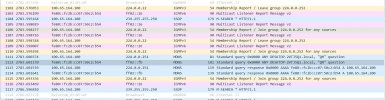
Wireshark capture on SIP Trunk Interface has revealed a pattern in the stoppage of incoming calls. There are packets of IGMP, ICMP and MDNS appearing every approx. 27 min, when this happens, incoming calls resume for next 5 mins, after which they again stop. Incoming starts and works for 5 min when either these packets appear or there is an outgoing call.
I dont have knowledge about these packets.
Picture attached.
Any advice how to resolve this?
I am facing the issue of Incoming calls from on-premise SIP Trunk stops coming after 5 min of last outgoing call and resumes again after 27 min of last outgoing call and again stops after 5 min (cycle continues...).
Configuration is 3cx on Windows 10 with 2 NICs - One for internet and extensions, second for SIP Trunk (On-Premise, no authentication, IP Based).
Wireshark capture on SIP Trunk Interface has revealed a pattern in the stoppage of incoming calls. There are packets of IGMP, ICMP and MDNS appearing every approx. 27 min, when this happens, incoming calls resume for next 5 mins, after which they again stop. Incoming starts and works for 5 min when either these packets appear or there is an outgoing call.
I dont have knowledge about these packets.
Picture attached.
Any advice how to resolve this?
Last edited:


