- Joined
- Feb 16, 2022
- Messages
- 12
- Reaction score
- 1
We have had quite a few reports of incoming calls from external callers where there is no sound when receiving the call (and/or) no sound in voicemails (voicemails are ~20 seconds long). I've taken a look at our Twilio SIP logs, and I'm seeing cases where there are "request timeouts" when our SIP provider is attempting to reach our on-premise 3CX system. This issue is intermittent, and most calls work properly, but some do not.
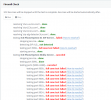
I have PCAPs from Twilio (SIP provider) for these instances, but I'm not seeing anything in them that is abnormal. I've also recently turned on verbose logging in 3CX to try to capture issues that I find there, but no issues have happened since I've enabled the verbose logging. When I get that information, I will post it here. But here's the log for the specific calls that the user reported yesterday:
Edit: Just had an incident happen, and I've attached an obfuscated log.
I spoke with the caller who was calling in and experienced the issues, and they are using a Verizon cell phone. The caller mentioned that they got a "Provider not available" message when they attempted to call.
We are using the latest release (18.0.3.461), and have all proper ports open, and 90% of calls are functioning properly... Just 10% or so are not connecting correctly.
Thanks in advance for helping me figure this tricky issue out!
I have PCAPs from Twilio (SIP provider) for these instances, but I'm not seeing anything in them that is abnormal. I've also recently turned on verbose logging in 3CX to try to capture issues that I find there, but no issues have happened since I've enabled the verbose logging. When I get that information, I will post it here. But here's the log for the specific calls that the user reported yesterday:
| 06/29/2022 11:17:58 AM - [CM503003]: Call(C:206): Call to <sip:[email protected]:0> has failed; Cause: 487 Request Terminated/INVITE from 127.0.0.1:5063 |
| 06/29/2022 11:17:57 AM - [CM503003]: Call(C:206): Call to <sip:[email protected]:0> has failed; Cause: 487 Request Cancelled/INVITE from OUR.LOCAL.IP.ADDRESS:5060 |
| 06/29/2022 11:17:30 AM - [CM503003]: Call(C:205): Call to <sip:[email protected]:0> has failed; Cause: 487 Request Terminated/INVITE from 127.0.0.1:5063 |
| 06/29/2022 11:17:30 AM - [CM503003]: Call(C:205): Call to <sip:[email protected]:0> has failed; Cause: 487 Request Cancelled/INVITE from OUR.LOCAL.IP.ADDRESS:5060 |
Edit: Just had an incident happen, and I've attached an obfuscated log.
I spoke with the caller who was calling in and experienced the issues, and they are using a Verizon cell phone. The caller mentioned that they got a "Provider not available" message when they attempted to call.
We are using the latest release (18.0.3.461), and have all proper ports open, and 90% of calls are functioning properly... Just 10% or so are not connecting correctly.
- 3CX Version, - 18.0.3.461
- Server OS, 3CX OVA Image for VMware.
- Is the 3CX Server Hosted and where? - On Prem
- IP Phone Make/Model/Firmware version, Yealink T54W - 96.86.0.72 & DesktopApp 18.8.508
- Provisioning Method: Local
- Trunk Provider or VoIP Gateway Make/Model, Twilio Elastic SIP Trunk
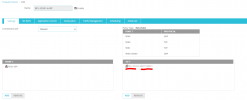
- Has the Firewall Checker passed: YES
- Are custom Phone Templates being used: NO
Thanks in advance for helping me figure this tricky issue out!