Solved Inconsistency in the reporting

Status
Not open for further replies.

Alphabetic

3CX MVP
Silver Partner
Advanced Certified
Joined
Jul 1, 2016
Messages
6,561
Reaction score
2,573
Good morning,


18.0.237

Customer reports that the Queue Answered Calls by Wait Time has inconsistencies.

They're exporting to CSV.

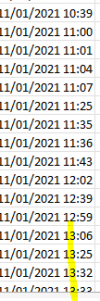
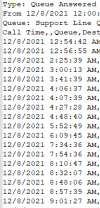
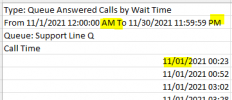
Despite logging in to the mgmt console and setting the region to UK, the date exported is US.

Also, the time stated flicks between AM/PM and 24 hours.
1639046916311.png

1639046927420.png
 
The HTML report shows the time as AM/PM but the CSV export is using 24 hrs
 
The HTML report shows the time as AM/PM but the CSV export is using 24 hrs
I'm fairly certain that the date/time values that are in the individual columns are being converted by Excel, or the corresponding program you are using to pen it with. The value at the top, because it isn't in a cell by itself, Excel doesn't detect it and convert it.

Open the file with a normal text editor like notepad and check the format like that.
 
I'm fairly certain that the date/time values that are in the individual columns are being converted by Excel, or the corresponding program you are using to pen it with. The value at the top, because it isn't in a cell by itself, Excel doesn't detect it and convert it.

Open the file with a normal text editor like notepad and check the format like that.
I'll agree on the time showing that way. But, what about the date format?

1639051919008.png
 
So it's not the inconsistncy between title line and column, you want the date/time format to show us dd/mm/yyyy HH:mm:ss, right?

If this is the question, the the date/time format is controlled by the OS Locale.

Judging by what you have now appearing, I am guessing you have the US locale.

What you need to do to change the Locale on Debian is:
  1. Important! Make a backup and download it to your desktop. It's aprecautionary measure in case you need to re-install
  2. Log on via SSH and run:
    Bash:
    sudo dpkg-reconfigure locales
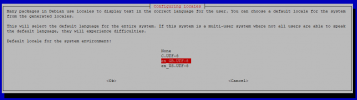
  3. in the list leave the existing selected options selected as they are, but additionally in your case, also select:
    "en_GB.UTF-8 UTF-8"
  4. Press OK, and in the next screen, select "en_GB.UTF-8 UTF-8" as your default locale and press OK.
    1639059988906.png
  5. Restart all 3CX Services, which from from the terminal can be done with these commands:

  6. Bash:
    sudo 3CXStopServices
    sudo 3CXStartServices
  7. Generate a new report and the date/time format should be as you want it.

Caution:
If not done correctly, like if you deselect the US locale, can cause the 3CX to stop working completely and require a re-install.
 
Thanks.

i'll have to reboot the 3CX tomorrow and let you know if this fixes it.
 
  • Like
Reactions: NickD_3CX
This is resolved now thanks.
 
Status
Not open for further replies.

Latest Posts

Forum statistics

Threads
111,964
Messages
590,000
Members
164,869
Latest member
hpgitsupport