- Joined
- Mar 18, 2021
- Messages
- 15
- Reaction score
- 3
Hi
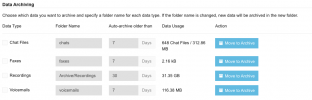
I’m currently using the 3CX recordings auto-archive feature which automatically archives and deletes call recordings older than a specified number of days. However, I noticed the system limits this retention period to a maximum of 30 days in the Management Console, and it doesn’t allow me to set it beyond 30 days (shows “Enter a number not greater than 30”).
Is there any official way, configuration setting, or workaround to increase this auto-archive retention period beyond 30 days? I want to keep recordings archived for up to 90 days or more if possible.
I’m aware that manual scripting or scheduled task modifications could be done on the server side, but I’m hoping for an official method or best practice recommended by 3CX.
I’m currently using the 3CX recordings auto-archive feature which automatically archives and deletes call recordings older than a specified number of days. However, I noticed the system limits this retention period to a maximum of 30 days in the Management Console, and it doesn’t allow me to set it beyond 30 days (shows “Enter a number not greater than 30”).
Is there any official way, configuration setting, or workaround to increase this auto-archive retention period beyond 30 days? I want to keep recordings archived for up to 90 days or more if possible.
I’m aware that manual scripting or scheduled task modifications could be done on the server side, but I’m hoping for an official method or best practice recommended by 3CX.