Solved Information about Outbound Calls Coming from Which IVR to User Extension through Digital Receptionist

Status
Not open for further replies.

Jawad Altaf

Free User
Joined
May 6, 2021
Messages
20
Reaction score
4
Hi,
I have Activated Digital Receptionist with IVRs. I have 6 Legacy PSTN Lines Connected with 8-Port Gateway Yeastar with 3CX.
Is it possible that when I call is originated on the Digital Receptionist to Specific IVR on an Extension Suppose Extension number : 772, the User Extension can know through which Line the Call is coming?
 
Hi @Jawad Altaf,

To confirm you want each PSTN line to route to a different IVR or to one IVR with separate sub IVRs? Can you explain what the end result should be?

Walk me through an example of the call flow?
 
Hi @VasilisV_3CX

We have Each Line With Different IVR.
When the Call is Originated at one Number e.g 123 (Saudi Arabia Landline Number) it lands to the Digital Receptionist.
Through that Digital Receptionist Say 306 by Pressing the 0 button the Call is transferred to the User Extension.

The User is Receiving Calls from Different Digital Receptionist on his Extension number.
I want that User Should be Intimated through Which PSTN Line or IVR the Call is Coming. If there is any Mechanism to sort it out.
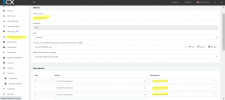
1632807321097.png
 
The scenario is detailed as follows:
We have a Customer Service agent with Extension number 772 and three (3) SIP Trunks are routed to that extension. If an inbound call is received, we want to determine which SIP trunk or PSTN line is being dialed by the caller so that the agent could easily identify it.
 
Hi @Jawad Altaf,

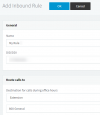
Why not create different inbound rules for each PSTN line / SIP Trunk and prepend the inbound rule to the caller information via the Contacts Options?

1632815369768.png

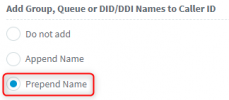
Then from the Management Console >> Advanced >> Contacts >> Options, choose Prepend Name.

1632814675140.png

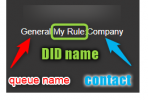
What you will see when receiving a call on that DID is the following:

1632815272538.png

Note in my example I routed my DID to my queue instead of an IVR and I had the external caller number added as a contact for illustration.

You will see the DIDs as numbers similar to:
  • FXO 1 indicates the dialed number: 000000
  • FXO 2 indicates the dialed number: 000001
  • FXO 3 indicates the dialed number: 000002
  • FXO 4 indicates the dialed number: 000003
You could name the rule your number that corresponds to the DID 0000000. This way you'd see your PSTN number appear when called.
 
Last edited:
  • Like
Reactions: ChrisC_3CX
Hi @VasilisV_3CX ,

Thanks a lot for your guidance.

We applied your suggestion and got the desired result.
 
Glad to hear you managed to achieve your desired result @Jawad Altaf. Feel free to open a new thread if you require any further assistance or information.
 
Status
Not open for further replies.

Forum statistics

Threads
111,974
Messages
590,081
Members
164,899
Latest member
mazet