"Install without config file" on v20

Status
Not open for further replies.

ebrownlee

Customer
Basic Certified
Joined
May 25, 2021
Messages
11
Reaction score
1
So with V20 going forward, is the only path going to be using one of 3cx's domain names for new installs?

I get why that's "easier" for some people, but that's going to be a non-starter for some of our clients.

Currently, to do a test install to test the V20 release for a client for their CRM integration, I am having to install from an old v18 ISO to be able to use their domain. **EDIT** it appears the last v18 ISO's don't allow you to use the FQDN either, so I'll have to go back yet another version.

Is this the final path forward that 3cx will be taking with the product? Or can we expect a return of an "advanced mode" or "yeah we own this" mode so one can use their own domain name?

This would be very good information to have to understand and evaluate 3cx as an option for clients moving forward.
 
Last edited:
Don’t have an answer, however v18u8b or 9 is required to activate.
 
  • Like
Reactions: ebrownlee
Don’t have an answer, however v18u8b or 9 is required to activate.
Thanks for that.

I'm really hoping someone can say "Advanced installer is coming in an update soon."

We, and most of our clients, manage certificates, DNS, etc all internally, and buying "Enterprise licensing" without it being an Enterprise product anymore would be good to understand and prepare for.

It's not that I can't see value in the wizard and such, and I could even understand having the "Advanced" installer be only available to Enterprise licenses, but not having it at all is a bizarre path to take and would have been nice to have been warned about.
 
  • Like
Reactions: ElementalWindX
You can use an custom fqdn no problem please see documentation
 
Do you have a link to the documentation. I am not able to find the process for using a custom domain.
 
Hi @masher812,

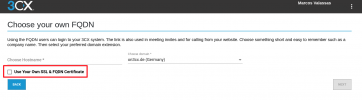
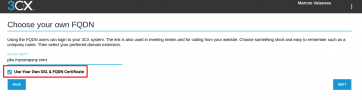
I just tried it with a trial through my partner portal...
FYI:

1710345170479.png

1710345308374.png
 
  • Like
Reactions: Charles_3CX
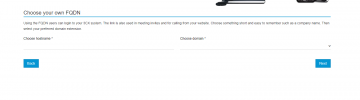
I do not receive that option at all. I opened a ticket and this was the response I received.

1710350727998.png

To add you own certificate and use your own FQDN you would need to download the setupconfig.xml from the portal when choosing to deploy a v20 system on prem.

Then Include the following in the setupconfig.xml

<option>
<code>CertificatePath</code>
<answer>
-----BEGIN CERTIFICATE-----
Enter your certificate data
-----END CERTIFICATE-----

-----BEGIN CERTIFICATE-----
Enter your intermediate certificate data from the CA
-----END CERTIFICATE-----

-----BEGIN CERTIFICATE-----
Enter your root certificate data from your CA
-----END CERTIFICATE-----

</answer>
</option>
<option>
<code>CertificateKey</code>
<answer>
-----BEGIN RSA PRIVATE KEY-----
Enter your private key
-----END RSA PRIVATE KEY-----
</answer>
</option>

Note 1: It can be the path to the file instead of the certificate contents

Note 2: This above changes will have to be made below the following option
<option>
<code>DnsSuffix</code>
<answer>b-gl</answer>
</option>

Note 3: If you will put the certificate as shown in the example above, the intermediate chains of the certificate will have to be added also as shown.
 
So far I can tell, the "response" are additional steps you will need to take after binding the "Custom FQDN" to the license key and it refers more towards the SSL Certificate you will need to provide for your Custom FQDN.
Don't forget you will need to manage the Certificate, ensuring the validity (exchanging it) and that the CA is also recognized regarding the hardphones you / the customer is using...

For sure using our services is easier, as this is a completely automated process and we ensure everything above, thus lowering your admin overhead.
Moreover, you/the admin will just obtain a mailer stating that the certificate has been successfully renewed...
 
  • Like
Reactions: Evolute IT
There is no option provided to use a custom FQDN.
 
This is from 2+ years ago but:
https://www.3cx.com/community/threads/custom-fqdn.84425/post-394906
"There is no option to define your custom FQDN using 3CX Deployment Wizard. Also not possible to use a custom FQDN on instances hosted by 3CX (only self-hosted or on-premise).

What you can do, is to set up your instance using Marketplace ISO from your cloud provider, and then you can define your custom FQDN."
 
@SteveITS You can no longer install that way. You have to use the setup file.
 
I do not receive that option at all. I opened a ticket and this was the response I received.

View attachment 40280

To add you own certificate and use your own FQDN you would need to download the setupconfig.xml from the portal when choosing to deploy a v20 system on prem.

Then Include the following in the setupconfig.xml

<option>
<code>CertificatePath</code>
<answer>
-----BEGIN CERTIFICATE-----
Enter your certificate data
-----END CERTIFICATE-----

-----BEGIN CERTIFICATE-----
Enter your intermediate certificate data from the CA
-----END CERTIFICATE-----

-----BEGIN CERTIFICATE-----
Enter your root certificate data from your CA
-----END CERTIFICATE-----

</answer>
</option>
<option>
<code>CertificateKey</code>
<answer>
-----BEGIN RSA PRIVATE KEY-----
Enter your private key
-----END RSA PRIVATE KEY-----
</answer>
</option>

Note 1: It can be the path to the file instead of the certificate contents

Note 2: This above changes will have to be made below the following option
<option>
<code>DnsSuffix</code>
<answer>b-gl</answer>
</option>

Note 3: If you will put the certificate as shown in the example above, the intermediate chains of the certificate will have to be added also as shown.
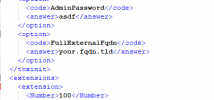
Likely also need this section:
1710353830820.png
 
Can we please get some support on this asap? I can't spin up a new system. :( I can't use my custom fqdn on a pro license.
 
Status
Not open for further replies.

Latest Posts

Forum statistics

Threads
111,949
Messages
589,881
Members
164,842
Latest member
abdullah.alshehri@rewaa