Solved Installed system in azure through 3cx and it is only using port 443

Status
Not open for further replies.

OBT

Silver Partner
Advanced Certified
Joined
Nov 18, 2021
Messages
30
Reaction score
8
Hi,

I installed the system on Azure using the install option in my customer portal, I did not change any settings, but the poort 5001, is in the firewall, but client and maintenance is using port 443

How can I change this to use 5001?

Thanks
 
Reinstall
 
  • Like
Reactions: Evolute IT
I installed the system on Azure using the install option in my customer portal, I did not change any settings, but the poort 5001, is in the firewall, but client and maintenance is using port 443

How can I change this to use 5001?
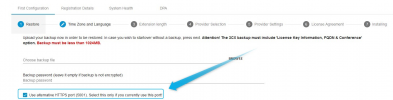
To change the port you would indeed have to re-install, but bear in mind that if you're using the 3CX Customer Deployment Wizard it always uses TCP Port 443 for new installations. What you can do is select "Yes" when it asks you if you want to restore a backup and then enable port 5001. If you don't want to restore a backup simply do not upload one and click on next. It should deploy with tcp port 5001:

1647251394467.png
 
Thanks ChrisC,

I was wondering how it happened, I had deployed 2 other ones and they used 5001, now I see the difference is the other two we used the 3cx template in azure to deploy it.
difference is it does not setup the audio ports on the network rules through Azure setup.

Good to know the why....
 
You're very welcome! Glad I could help!
 
Status
Not open for further replies.

Forum statistics

Threads
111,974
Messages
590,081
Members
164,899
Latest member
mazet