Installing 3CX on Linux using 3CX Debian ISO

Status
Not open for further replies.

Bianca Allery

Staff member
Joined
Dec 9, 2015
Messages
74
Reaction score
37
This guide covers all the configuration required to install 3CX using a Debian Linux ISO. It covers system requirement checks, including supported VM platforms, network and firewall requirements and supported hardware.

Read the Guide.
 
  • Like
Reactions: AlecM
I followed the instructions, including creating a bootable 3cx usb. But is didn't work for me, kept getting an error in the debian config..
 
Yes but what error?
 

Attachments

  • 20170531_095539 rresized.jpg
    20170531_095539 rresized.jpg
    161.4 KB · Views: 97
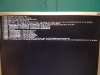
It gives me this error after I press install:
Kernel Panic not syncing - when you see words like kernel panic or blue screens you dont need to come to the 3CX forum. For sure the problem is in the kernel which is in the lower bowels of the operating system.
https://en.wikipedia.org/wiki/Kernel_panic

A kernel panic (sometimes abbreviated as KP[1]), also known as computer death or PC death, is an action taken by an operating system upon detecting an internal fatal error from which it cannot safely recover. The term is largely specific to Unix and Unix-like systems; for Microsoft Windows operating systems the equivalent term is "Stop error" (resulting in a "Stop error screen," or colloquially, a "Blue Screen of Death").
 
Hi

I'm following these steps and was just wondering when to remove the USB stick as the first install I've done the server rebooted after the debian installation with the USB drive still connected to the server and it started all over again.#

Kind Regards
Cornelius
 
Hi

I'm following these steps and was just wondering when to remove the USB stick as the first install I've done the server rebooted after the debian installation with the USB drive still connected to the server and it started all over again.#

Kind Regards
Cornelius

After OS is installed, and it reboots, you need to remove the USB otherwise as you stated, the install will load from USB again and it will erase everything again (You make the ISO Os bootstrap think that you want to reinstall again. )

You need to remove the USB after the first reboot.. Which is normally after the OS has been installed.
 
After OS is installed, and it reboots, you need to remove the USB otherwise as you stated, the install will load from USB again and it will erase everything again (You make the ISO Os bootstrap think that you want to reinstall again. )

You need to remove the USB after the first reboot.. Which is normally after the OS has been installed.


Hi Nicky

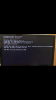
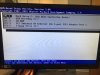
I've tried that now, removed the USB before it reboots. When the server reboots it gets stuck on "CLIENT MAC ADD" and DHCP.../. then says no boot file name received. I've checked the boot order and have set it to HDD but still no luck, the 3cx installation does not start. I've attached two pictures, one showing the no boot file received and the other is the boot order.

Kind Regards
Cornelius
 

Attachments

  • image2.PNG
    image2.PNG
    515.1 KB · Views: 24
  • image1.JPG
    image1.JPG
    99.6 KB · Views: 22
What is the hardware? Can you send the exact specs?
Is it a mini pc? What is the make, model?
The reason I'm asking is because it could be some drivers are required... Send exact hardware setup where you see this problem.
 
Hello,

The 3CX Debian Installation from ISO instructions are very well done. Thank you!

For what it is worth, i would like to just add one minor comment for anyone who is trying to install on a VLAN and needs to add a VLAN tag to the eth0 (or whatever the nic card is named) before being allowed access on the network.

By default, the debian configuration included in the ISO package does NOT support VLAN tags without having to:
1. add VLAN support to the system.
1.1. $ sudo apt-get install vlan
1.2. $ sudo modprobe 8021q
1.3. $ echo 8021q | sudo tee -a /etc/modules
(Note: insteat of the echo command in 1.3you can use vi or another text editor to add the above-mentioned 8021q kernel module to the /etc/modules configuration file to load it at the boot time)​
2. modify the /etc/network/interfaces file (below is an example or what the interfaces files should look like)
2.1
# This file describes the network interfaces available on your system
# and how to activate them. For more information, see interfaces(5).

# The loopback network interface
auto lo
iface lo inet loopback
# The primary network interface
allow-hotplug eth0
iface eth0 inet dhcp
# add vlan 700 on eth0 - static IP address
auto eth0.700
iface eth0.700 inet static
address 10.100.10.77
netmask 255.255.255.0
3. Restart network with VLAN tag configured
3.1 $ /etc/init.d/networking restart

4. Verify that internet access (DNS resolution specifically) works.
4.1 $ ping 8.8.8.8
4.2 $ ping google.com

5. continue with the 3CX installation (meaning start from the Debian step that downloads the 3cx proconfig file)

Thank you for your attention.
 
  • Like
Reactions: autohaus
Hello

After 15. step i ook an error what should i do ?

UDjBZQWKT7eSpzjZkGmIIg.png
 
Hello

After 15. step i ook an error what should i do ?

UDjBZQWKT7eSpzjZkGmIIg.png

You did this manually?
in 3cxpbx.list it should be :
http://downloads.3cx.com/downloads/debian stretch main

seems you put:
http://downloads.3cx.com/downloads/debian stretch Release

Also debian repositories in /etc/apt/sources.list are broken. Here's a sample of how it can be in stretch:

deb http://ftp.gr.debian.org/debian/ stretch main contrib
deb-src http://ftp.gr.debian.org/debian/ stretch main

deb http://security.debian.org/ stretch/updates main
deb-src http://security.debian.org/ stretch/updates main

deb http://ftp.gr.debian.org/debian/ stretch-updates main
deb-src http://ftp.gr.debian.org/debian/ stretch-updates main

Copy all this carefully and you should be ok.
 
You did this manually?
in 3cxpbx.list it should be :
http://downloads.3cx.com/downloads/debian stretch main

seems you put:
http://downloads.3cx.com/downloads/debian stretch Release

Also debian repositories in /etc/apt/sources.list are broken. Here's a sample of how it can be in stretch:

deb http://ftp.gr.debian.org/debian/ stretch main contrib
deb-src http://ftp.gr.debian.org/debian/ stretch main

deb http://security.debian.org/ stretch/updates main
deb-src http://security.debian.org/ stretch/updates main

deb http://ftp.gr.debian.org/debian/ stretch-updates main
deb-src http://ftp.gr.debian.org/debian/ stretch-updates main

Copy all this carefully and you should be ok.

where is 3cxpbx.list locate ?

i edit source.list and then what should i do ? I am new at linux sorry for that :(
 
Hey, i have one Problem, after installing from iso Debian 9 3cx, a can not see 3cx configuration page in the linux console. i see only : login. why is it so ?
i have 3 time rebooted...or more.. no changes...
thank you very much for your help
 
Install 3CX Again - this should work out of the box.
This is a symptom of some system d services not starting - Can you check?
or reinstall 3CX?
 
Hello


Thank you very much


Ok, i have already installed this appl again, and it works


I cannot login me into linux to create ssh access: to do


Apt-get install openssh-server

And change the sshd_config file.


I see only 3CX configuration tool


But i can not see login


Can you help me here please ? is keyboard key, but which ? J


Thank you for your help


Best regards

Leonid
 
not like this - linux already has an SSH server.
You need to download putty (sshclient) and connect with putty to your linux machine.
 
re: "Do not install system updates via the command line! This is done by the 3CX system via updates after they have been tested!"

Per https://www.3cx.com/community/threads/3cx-debian-vm-crash.79543/post-366846 I suggest updating the doc page to say that security updates are only installed if automatic updating is enabled, and not when 3CX updates are installed manually.
 
re: "Do not install system updates via the command line! This is done by the 3CX system via updates after they have been tested!"

Per https://www.3cx.com/community/threads/3cx-debian-vm-crash.79543/post-366846 I suggest updating the doc page to say that security updates are only installed if automatic updating is enabled, and not when 3CX updates are installed manually.
To be precise, this is being discussed here:
https://www.3cx.com/community/threa...-only-installed-via-automatic-updating.79651/
 
Status
Not open for further replies.

Forum statistics

Threads
111,952
Messages
589,896
Members
164,845
Latest member
tdzski5