Installing 3CX on Linux using 3CX Debian ISO

Status
Not open for further replies.

Bianca Allery

Staff member
Joined
Dec 9, 2015
Messages
74
Reaction score
37
This guide covers all the configuration required to install 3CX using a Debian Linux ISO. It covers system requirement checks, including supported VM platforms, network and firewall requirements and supported hardware.

Read the Guide.
 
  • Like
Reactions: AlecM
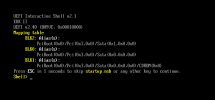
I am trying to install from your downloads/debian9iso/debian-amd64-netinst-3cx.iso on TrueNAS virtual machine (bhyve) and it does not even boot from install ISO. Vents right into UEFI Intaractive shell.

Maxthon Snap20210306105615.pngIs there some workaround or alternative ISO?
I can boot/install from other ISOs... including latest offical clean DEBIAN ISO.
 
Last edited:
So latest official Debian would be Debian 10. See if you can boot from Debian 9 (stretch).
 
I seem to remember that Debian 9 had issues booting on UEFI. Try switching to "Legacy BIOS", most Hypervisors have this option. Debian 10 is OK with UEFI.

I see 2 options here:
 
  • Like
Reactions: Evolute IT
I seem to remember that Debian 9 had issues booting on UEFI. Try switching to "Legacy BIOS", most Hypervisors have this option. Debian 10 is OK with UEFI.

I see 2 options here:
tried ALPHA

https://downloads-global.3cx.com/downloads/debian10iso/debian-10.7.0_a7a268d-amd64-netinst-3cx.iso
does not boot...

this one boots fine:
https://cdimage.debian.org/debian-cd/current/amd64/iso-cd/debian-10.8.0-amd64-netinst.iso
 
Problem with your hardware or VM. In fact you are not using a VM that we are supporting. So try on a supported VM platform or other hardware.
 
Problem with your hardware or VM. In fact you are not using a VM that we are supporting. So try on a supported VM platform or other hardware.
Oh, really? So the official Debian from debian.org - boots fine, your ISO does not, and it is problem with my hardware? What interesting logic...
 
Problem with your hardware or VM. In fact you are not using a VM that we are supporting. So try on a supported VM platform or other hardware.
May be this will help:

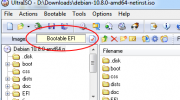
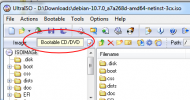
The boot section of original DEBIAN iso is Bootable EFI. And 3CX iso is old "Bootable CD/DVD"
Maybe you should consider checking it? So it will be available on larger number of VM and hardware?
 

Attachments

  • Maxthon Snap20210306124548.png
    Maxthon Snap20210306124548.png
    31.8 KB · Views: 16
  • Maxthon Snap20210306124631.png
    Maxthon Snap20210306124631.png
    36.6 KB · Views: 15
  • Like
Reactions: dogsbody
Problem with your hardware or VM. In fact you are not using a VM that we are supporting. So try on a supported VM platform or other hardware.
Just FYI,
I have managed to install 3CX in the SAME VM and HARDWARE. So now, you can say it runs on BHYVE Virtual Machine running on TrueNAS/FreeNAS.

Just by using original DEBIAN ISO file with Bootable EFI, and replacing everything inside by the content of 3CX ISO.

You are welcome :)
 
  • Like
Reactions: dogsbody
@XStrafer It just means you got past the install point by ignoring our recommendations and tricking the warnings that came up. It does not mean it runs reliably overtime with all functions tested and working.
 
@XStrafer It just means you got past the install point by ignoring our recommendations and tricking the warnings that came up. It does not mean it runs reliably overtime with all functions tested and working.
That means, with all respect, you don't even read what I said. Or don't try to understand the issue.

There was no warnings, it just did not boot because you use not the debian's original boot section, but some outdated one on your 3CX distro ISO.

Everything else in the image was replaced by the complete content of 3CX distro. So the installation went just like it should.

And by the way, "your recommendations" by NickD_3CX from support team was meant to overcome this boot problem.

As for the reliable run overtime - it will depend only on how good was your software made, and not by the boot loader used once at install.

Cheers!
 
  • Like
Reactions: dogsbody
As for the reliable run overtime - it will depend only on how good was your software made, and not by the boot loader used once at install.

Nope. You are running a real time piece of software (3CX) on a completely untested VM software/system. Anyway, do what you got to do, but dont say we didnt warn you. :)
 
Last edited:
After install it just takes me to the login screen?
 
After install it just takes me to the login screen?
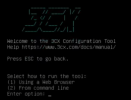
During the installation process, after the Debian OS was installed, did you get this screen?
1628246773659.png

Also, what device/hypervisor are you installing the ISO on?
 
FWIW I have just had exactly the same issue and (yes I know bhyve is unsupported) gotten this to work by doing as @XStrafer says and recreating the official ISO in the image of Debian 10 ISO.

There is a wonderful guide here which shows how you can define how the Debian ISO was packed up so I followed that in order to repackage the 3CX ISO in the same way.

I'm posting here so that it maybe of use to someone else and hopefully to also help the excellent staff at 3CX should they wish to start supporting more and newer setups in the future.

My method...
Bash:
orig_iso=debian-10.10.0-amd64-netinst.iso
3cx_iso=debian-amd64-netinst-3cx.iso #v18
new_iso=debian-amd64-netinst-3cx-modified.iso

new_files=debian-amd64-netinst-3cx
mbr_template=isohdpfx.bin

# Mount the 3cx ISO so we can view the files
mkdir "$new_files"
sudo mount -o loop "$3cx_iso" "$new_files"

# Extract MBR template file to disk
dd if="$orig_iso" bs=1 count=432 of="$mbr_template"

# Create the new ISO image
xorriso -as mkisofs \
    -r -V 'Repackaged 3CX amd64 n' \
    -o "$new_iso" \
    -J -joliet-long -cache-inodes \
    -isohybrid-mbr "$mbr_template" \
    -b isolinux/isolinux.bin \
    -c isolinux/boot.cat \
    -boot-load-size 4 -boot-info-table -no-emul-boot \
    -eltorito-alt-boot \
    -e boot/grub/efi.img -no-emul-boot -isohybrid-gpt-basdat -isohybrid-apm-hfsplus \
    "$new_files"

I hope it helps
 
  • Like
Reactions: SweetAction
  • Like
Reactions: dogsbody
Do you plan to release the Debian 11 3CX version? More and more new PCs has new ethernet adapters, like Intel i219-V or others e1000e..., that are not supported by the Debian 10 kernel. As we are not allowed to install any other packages, the Debian 10 becomes unusable!
 
I am trying to install 3CX linux V18, but i'm running into that it is not possible as the installation contact all kinds of public IP numbers. The company firewall bloks all outing ip's so I have to apply for firewall openings, and has to argu for why I need the opening. This is difficult when I donot have a list. Can 3CX supplie a list? The only ip I have acces to now is downloads-global.3cx.com but it is defenitly not enogh.
 
I am trying to install 3CX linux V18, but i'm running into that it is not possible as the installation contact all kinds of public IP numbers. The company firewall bloks all outing ip's so I have to apply for firewall openings, and has to argu for why I need the opening. This is difficult when I donot have a list. Can 3CX supplie a list? The only ip I have acces to now is downloads-global.3cx.com but it is defenitly not enogh.
You need all debian IPs and a lot more. It makes no sense to block everything outgoing for the PBX. Just follow the instructions on how to properly configure your firewall.
 
Status
Not open for further replies.

Forum statistics

Threads
111,973
Messages
590,076
Members
164,895
Latest member
jasonkkrause