Solved Installing 3CX on Raspberry Pi

Status
Not open for further replies.

dekwa

Free User
Joined
Aug 9, 2021
Messages
10
Reaction score
0
Hello,

I had to reinstall my Raspberry Pi4 due to reasons, but now I can't install the PBX anymore. (this is a test environment)
I followed the info from https://www.3cx.com/docs/installing-pbx-raspberry-pi/

When I get to the actual installation I use the command:

Code:
wget https://downloads-global.3cx.com/downloads/misc/d10pi.zip; sudo bash d10pi.zip --fix-missing

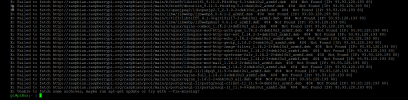
and get the output below...
1629629281137.png
Could it be that the server is inaccesible?

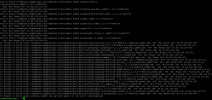
1629629492646.png
all files to be fetched return that error...
 
Pinging the ip does return an answer...
 
Just reflash it.
 
As above, just reinstall 3cx and restore your backup
 
that's... that's precisely what I did... that's why I was reinstalling...
this happens ON the install of 3cx...
 
What is "piBox"?
I think you are installing some custom distro, not what we tell you to do in the guide:
https://www.3cx.com/docs/installing-pbx-raspberry-pi/

Re-flash again, this time using the proper image, then try again and you should be fine.
I just re-flashed a RPi4 per the guide to double-check and everything installed just fine.
 
  • Like
Reactions: Evolute IT
@NickD_3CX piBox is the name of the device...

I'll try reflashing again...
 
Well, the default name of the device if flashed per the guide should look like this:
1629721526866.png

Try no changing anything after you install, just run the command you mentioned.
 
while it says to set the hostname, I wasn't aware I couldn't set my own...

for what it's worth though, it doesn't help. I reflashed, and get the same errors...
1629722969398.png
 
You can change the hostname, but it so happens that "piBox" is also a 3rd-party distro for raspberry Pi's that obviously is not supported and anyone should expect problems if using it.

As this is not the case here and the host name you chose just happened to resemble this, it should be OK.

Generally what "Failed to Fetch" means is that is contacted the repository, but the specific package was not found.
What is the output of these commands?
Bash:
cat /etc/apt/sources.list.d/raspi.list
cat /etc/apt/sources.list
 
  • Like
Reactions: Evolute IT
ah, I did not know about piBox being 3rd party. hought it sounded original...
commands return the following:


Code:
pi@raspberrypi:~ $ cat /etc/apt/sources.list.d/raspi.list
deb http://archive.raspberrypi.org/debian/ buster main
# Uncomment line below then 'apt-get update' to enable 'apt-get source'
#deb-src http://archive.raspberrypi.org/debian/ buster main
pi@raspberrypi:~ $ cat /etc/apt/sources.list
deb http://raspbian.raspberrypi.org/raspbian/ buster main contrib non-free rpi
# Uncomment line below then 'apt-get update' to enable 'apt-get source'
#deb-src http://raspbian.raspberrypi.org/raspbian/ buster main contrib non-free rpi
pi@raspberrypi:~ $

Should I follow the sugestion?
 
welp. I must have had an old flashfile...
it works now... thanks!
 
Excellent! Glad you got it sorted out :) .

Settings as "Solved".
 
  • Like
Reactions: Evolute IT
Status
Not open for further replies.

Forum statistics

Threads
111,974
Messages
590,081
Members
164,899
Latest member
mazet