Installing Live Chat to Gator.com

skymusikco

Free User
Joined
Nov 11, 2024
Messages
8
Reaction score
0
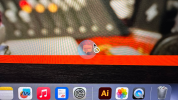
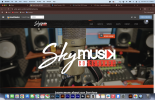
Hi to everyone, I am having an issue installing Live Chat into my web http://skymusik.us, I currently use Gator.com NOT Host Gator. At the end of the day they are the same company. I am able to see the chat Icon but I can not press it as shown on the picture and it's faded.

does anyone have an idea how I can fix that?
 

Attachments
  • Screenshot 2024-11-10 at 11.58.59 PM.png
    Screenshot 2024-11-10 at 11.58.59 PM.png
    7.2 MB · Views: 9
  • IMG_5853.png
    IMG_5853.png
    6.7 MB · Views: 9
Last edited:
https://app.gator.com this is were I design the website to be honest I do not know sorry!

and when it comes to the PBX I am new to this so I would not know at all

thank you for your help!
 
From your screenshot it is showing Https://editor.gator.com.

You would have to put https://app.gator.com,https://editor.gator.com as well as any other variations you are using.
 
  • Like
Reactions: Evolute IT
where exactly do I need to put those variations?

Can you please help me? Or is there any tutorial I can watch?
 
Navigate to Admin > Voice and Chat > Select the chat
under General tab there is a field Your Website* add all the variations in there

Regards
Keith
 
How can you tell and also sorry for the dumb question but what do you mean the HTTP entries baby might be redundant?

Sorry for asking too many questions and thank you for your help and professionalism!
 
As your site runs a secure connection with SSL you only need the https:// urls.
The http:// links redirect to https://
Also are you sure you need the two gator.com urls as that appears to be accessing their site not yours?

I would suggest you add just the following:
https://www.skymusik.us,https://skymusik.us/
to the Your Website* field

Regards
Keith
 
From your screenshots at the beginning there are no errors

This is what a secure connection would look like

1731340521549.png

This is what an unsecure connection looks like

1731340500571.png

Since you are doing the editing and testing from the gator.com sites, you could add these in, but your main site would be the skymusik sites.

Sites generlaly use a secure connection, but you mentioned HTTP but that would give you an error if you added that in instead of HTTPS.
 
It's my first time designing websites, and I feel like you are talking to me with information that I do not understand well, but thank you so much for the help.

I just need to know exactly what I need to put in the "Your Website* field
for Example:
1. Put this: https://www.skymusik.us,https://skymusik.us/ (wish I did and still did not work)
2. Put this: https://editor.gator.com, https://app.gator.com, https://www.skymusik.us, https://skymusik.us/ (wish also did not work)

what am I doing wrong everything I do seem not to be working.
 
Hi
Ok, option 1 is the correct one,
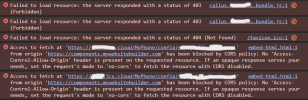
But the config is not your issue, looking at your site I see the following errors that will be stopping the chat button from working
Screenshot 2024-11-12 112840.png
You need to sort out the CORS error with the gator website builder to allow the script from your 3cx system to run.

Regards
Keith
 
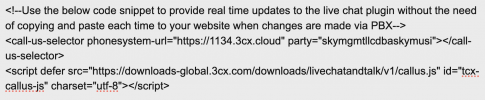
This is what I am pasting,
 

Attachments

  • Screenshot 2024-11-13 at 6.18.47 PM.png
    Screenshot 2024-11-13 at 6.18.47 PM.png
    122.5 KB · Views: 3
Hi
Ok, option 1 is the correct one,
But the config is not your issue, looking at your site I see the following errors that will be stopping the chat button from working
View attachment 45041
You need to sort out the CORS error with the gator website builder to allow the script from your 3cx system to run.

Regards
Keith
What are the CORS? Do you think you can teach me how to do this? I am willing to pay.
 
Hi,
I'm not familiar with the gator website builder, so I can't really advise about that.
The code you are pasting looks correct as far as I can tell.
The issue appears to be with the way the web builder includes the external content.

It appears to be included via an <iframe> linking to https://components.mywebsitebuilder.com so it would be worth adding
https://components.mywebsitebuilder.com
to the Your Website* field.

That may work, but the down side to that is that anyone using the same web builder could then embed your chat/call button

Regards
Keith
 

Forum statistics

Threads
112,147
Messages
590,961
Members
165,167
Latest member
Finatra.us