Installing Live Chat

KaterinaK_3CX

Joined
Feb 24, 2016
Messages
246
Reaction score
36
The 3CX Live chat software allows you to answer calls and messages from website visitors directly from 3CX. This guide walks you through configuring live chat in 3CX and enabling it on your website.

Read the guide.
 
  • Like
Reactions: NickD_3CX
Hi, how do i can add the chat to Magento?
 
Hi, how do i can add the chat to Magento?
I would think your best bet would be to try the "Code Generator" option that is described here:
https://www.3cx.com/docs/manual/live-chat/#h.bvvp30eibm1

[EDIT]
If you still have problems, they may be blocking access to the script.
In this case, you would need to open the Developer options in your Chrome browser with F12, focus on the Console tab and navigate to your website to see if any errors come up. The Network tab may also reveal useful information.
 
Hello there is any option to notify the agent when new message is received ?
 
Hi @AABB,

For any chat notification that they're not seeing in the Web Client because they're away from their desk for instance, you can install the 3CX Mobile Client which will notify them of the incoming message on their mobile device as well.
 
  • Like
Reactions: AABB and NickD_3CX
Hi, regarding the latest version of the 3cx chat (and manual/documentation), it would be useful to have some info on how Chat works with ring groups/extensions/queues around office hours, agent status etc... so users can easily determine how to force the chat messaging to after hours/away and troubleshoot why their chat may always appear to be online even outside the phone system office hours...
 
I am using wordpree 6.1.1 version. My big problem is the 3CX Live Chat app Does not work. I had to make a link on my website Like this Chat or Call , Right now I have the app activated so when you click on it you can see what I'm talkin about. I spent endless hours and two accounts to try to figure out what was going on with this. The bottom line is the URL works but the app doesn't within the website. Maybe easier if somebody could actually call me My website is itelectrician.com
 
maybe easier if somebody could actually call me
 
The 3CX Live chat software allows you to answer calls and messages from website visitors directly from 3CX. This guide walks you through configuring live chat in 3CX and enabling it on your website.

Read the guide.
I am using wordpree 6.1.1 version. My big problem is the 3CX Live Chat app Does not work. I had to make a link on my website Like this Chat or Call , Right now I have the app activated so when you click on it you can see what I'm talkin about. I spent endless hours and two accounts to try to figure out what was going on with this. The bottom line is the URL works but the app doesn't within the website. Maybe easier if somebody could actually call me My website is itelectrician.com
 
I am using wordpree 6.1.1 version. My big problem is the 3CX Live Chat app Does not work. I had to make a link on my website Like this Chat or Call , Right now I have the app activated so when you click on it you can see what I'm talkin about. I spent endless hours and two accounts to try to figure out what was going on with this. The bottom line is the URL works but the app doesn't within the website. Maybe easier if somebody could actually call me My website is itelectrician.com
Seems to be working now. I see the chat on your website.
 
Last edited:
No CLICK on it. it has something to do with the application on the website a thing because the URL works LOOK https://1179.3cx.cloud/callus/#LiveChat115329
I clicked on it and it did work. It wouldn't even show up if the URL wasn't valid.

Also, stop trying to have someone call you lol this is a forum for that. If you need phone support, you'll get billed by the person for sure!
 
Have you installed the wordpress plugin as per the instructions? I went to your website URL and we could reproduce it. I will escalate to check it
 
  • Like
Reactions: Evolute IT
Have you installed the wordpress plugin as per the instructions? I went to your website URL and we could reproduce it. I will escalate to check it
YES and I tried the WordPress plugin and the snippet no luck, I was told to check with hosting also. The URL works https://1179.3cx.cloud/callus/#LiveChat116743 May be has to do with the new wordpress 6.1.1 version. but the web app has the problem I think
 
Looks like your web-server (or wordpress) adds additional headers that affects embedded scripts, including 3CX Live Chat.
I am investigating but I have some questions:
Where do you host your web-site?
Did you made additional configuration manipulation in WordPress?
 
Last edited by a moderator:
  • Like
Reactions: Evolute IT
The problem is related to the web-site hoster configuration.
3CX Livechat works as it should, but connection to your 3CX is blocked due Content Security Policy header added by the hoster.

Details:
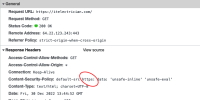
Your hoster configures web-server to add this Content security policy header by default:
Content-Security-Policy: default-src https: data: 'unsafe-inline' 'unsafe-eval'

"https:" here prohibits downloads/connections to any resource other than "https" while 3CX Livechat uses "wss:" to connect to PBX.
The solution is to modify this header (delete https: or add wss: ). Depending on hoster infrastructure, it can be placed in .htaccess file inside web-site directory or in customer panel.
 

Attachments

  • Снимок экрана 2022-12-30 в 16.27.55.png
    Снимок экрана 2022-12-30 в 16.27.55.png
    52.6 KB · Views: 13
Last edited by a moderator:
Hi There,
How do we install livechat in an already existing 3CX setup.

The tutorial only shows how to install on a new installation. But we have already been running 3CX pro for several years, and cannot find the chat function anywhere in the admin console. (except for the internal chat log).

PS: Our current version is "18.0 Update 6 (Built 908)"

What to do ?
 

Forum statistics

Threads
112,147
Messages
590,959
Members
165,167
Latest member
Finatra.us