Installing Live Chat

KaterinaK_3CX

Joined
Feb 24, 2016
Messages
246
Reaction score
36
The 3CX Live chat software allows you to answer calls and messages from website visitors directly from 3CX. This guide walks you through configuring live chat in 3CX and enabling it on your website.

Read the guide.
 
Hello, JasonW
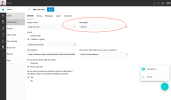
In version 18 Update 6 you can manage livechats in Webclient only. You need to set appropriate role for a user (extension) and go to Admin / Voice & Chat section. There you have "Add LiveChat" button to create new LiveChat.
 
  • Like
Reactions: Evolute IT
Hello, JasonW
In version 18 Update 6 you can manage livechats in Webclient only. You need to set appropriate role for a user (extension) and go to Admin / Voice & Chat section. There you have "Add LiveChat" button to create new LiveChat.
Could you elaborate what "appropriate role for a user" be?

Also, I found "Team answering chat" article but it does not show how I can set so that a Live Chart routed to a specific queue.

Thanks.
 
Could you elaborate what "appropriate role for a user" be?

Also, I found "Team answering chat" article but it does not show how I can set so that a Live Chart routed to a specific queue.

Thanks.
Roles with permission to manage livechats: "group admin", "group owner", "system admin", "system owner".
To route LiveChat to queue, you should open LiveChat configuration and choose this queue as a destination.
 

Attachments

  • Screenshot 2023-02-08 at 10.26.45 AM.png
    Screenshot 2023-02-08 at 10.26.45 AM.png
    353.4 KB · Views: 22
Last edited by a moderator:
  • Like
Reactions: Evolute IT
Finally I have the appropriate role configured and now see Voice & Chat button in my web client admin panel however when I click it I get redirected to the log in page. I would really like to get Live chat working today. Any ideas what I have missed?
 
Hello, Tuatara,
Which role has your user?
 
Thanks for the quick reply, the highest role I seem to be able to set in any group is "Group Administrator"
3cx.png
 
If you have "Group manager" role in other groups, it will use Group manager.
Try to set Group Administrator role for each group and then retry to open Voice&Chats
 
The DEFAULT group is Manager with no option to change the roll the other 2 groups are set to Group Administrator.
Rolls.png
Group Manage.png
 
Ok, in this case it's recommended to have system admin or system owner role.
 
That seems where I am stuck at, I am sure there must be an option to change the roll to system admin or owner but I can not find it.
I only have group admin or group manager available. Can you tell me what I am missing?? Something obvious I guess..
 
Any clues to adding system admin or owner??
Sorry if this is a noob question but I am stuck.
Rights.png
 
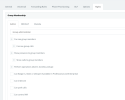
It appears I have no (“Management Console > Security > Root credentials”) option in my management console and no ‘Rights’ tab and select “System Owner” role in the ‘Group Membership’ section as per: the advanced manual
I am beginning to wonder if there is something broken on my server installation.
Hoping someone can help shed some light on this please.
 
Hi 3CX Support

I have notification from customer about chat via Facebook integation. With Update SP 6. about "Conversation History"

about 3CX V.18.0.5.418 in chat
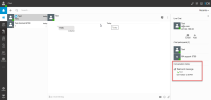
If chat income via Queue, Extension, and click information. Its show Conversation History.
1676614422528.png
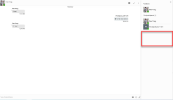
about 3CX V.18.0.6.908 in chatIf chat income not show at information.
1676614437728.png

SP6 with problem if not show. Agent not known when incoming chat from Queue service way. If have many queue income to chat.
Please check about detail and update for information.

Thank you.
Suebpong Saengthongsuk.
 
Hi 3CX support,
Is anyone able to offer a hand to get the live chat working on my system??

Best Regards
 
Hello, I am trying to "install" live chat on my website which is running on VueJS 3.

This is the snippet I added to my index.html

Code:
    <!--Use the below code snippet to provide real time updates to the live chat plugin without the need of copying and paste each time to your website when changes are made via PBX-->
    <call-us-selector phonesystem-url="http://localhost:3000/tw3cx/https://telcowise.3cx.cz:5001" party="LiveChat309330"></call-us-selector>
    <!--Incase you don't want real time updates to the live chat plugin when options are changed, use the below code snippet. Please note that each time you change the settings you will need to copy and paste the snippet code to your website-->
    <!-- <script defer src="/src/plugins/callus.js" id="tcx-callus-js" charset="utf-8"></script> -->
    <script defer src="https://downloads-global.3cx.com/downloads/livechatandtalk/v1/callus.js" id="tcx-callus-js" charset="utf-8"></script>
right above the </body> tag ...

I have proxy in my VITE config

Code:
 proxy: {
      '/tw3cx': {
        target: 'https://telcowise.3cx.cz:5001',
        changeOrigin: true
      },

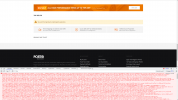
But it says
1678348677701.png
I tried to proxy the script as well ... but no luck ...

Any idea?
 
Hi 3CX Support

I have notification from customer about chat via Facebook integation. With Update SP 6. about "Conversation History"

about 3CX V.18.0.5.418 in chat
If chat income via Queue, Extension, and click information. Its show Conversation History.
View attachment 34330
about 3CX V.18.0.6.908 in chatIf chat income not show at information.
View attachment 34331

SP6 with problem if not show. Agent not known when incoming chat from Queue service way. If have many queue income to chat.
Please check about detail and update for information.

Thank you.
Suebpong Saengthongsuk.
Hi 3CX Support

Sorry about that i have request to resolved problems with my customer. Please feedback or reply something about this question. Now 3CX Version 18.0.7.312 about incoming chat from Facebook' message.

SIP 3CX integration via Facebook ( 2 Stores) and has 2 accounts and routecall to 2 queue chat with one by one. ( Agent in queue has same member services)

Question : If has chat via facebook incoming. At 3CX Chat has popup and show this message from facebook, But I don't know what this message from store A? or Store B?
Remark : In 3cx Version 18.0.5.418 chat has info about incoming chat for Q name.

Thank you.
Suebpong Saengthongsuk.
 
Hi
I'm trying to install live chat in Magento2(Adobe Commerce).
I pasted the snippet before close tag</body>. I'm getting script error in Console.
Uncaught Error: Mismatched anonymous define() module: () - in require.js
Seems conflict with jquery. Please help me to resolve.
 

Attachments

  • Screenshot from 2023-06-28 21-00-03.png
    Screenshot from 2023-06-28 21-00-03.png
    375.9 KB · Views: 5
Hi
I'm trying to install live chat in Magento2(Adobe Commerce).
I pasted the snippet before close tag</body>. I'm getting script error in Console.
Uncaught Error: Mismatched anonymous define() module: () - in require.js
Seems conflict with jquery. Please help me to resolve.
Hi, did you resolve this? If so, can you tell me how you resolved.

Many thanks.
 
Hi . There is any way to send and replay from my web site ..
Just i need my clints send messages from web site .. and i can replay this messages from my web site without return to dashboard in 3cx!?
 
I am loving the live chat feature, but I do have a request/stumbling block

Right now my site is in WIX, and I am moving to WP (WIX messes with MX records)

The question I have is WP allows me to stage a site, so domain.com and dev.domain.com
I can't seam to be able to put the live chat for both domain.com and dev.domain.com or *.domain.com

Is this intentional? or is there a workaround I am missing?

worst case I can just ignore the dev.domain.com, the plugin says it is happy and the icon shows up. so all in all I am happy, would just be nice to have dev.domain.com working as when I push the staged to live it copied everything to the live site including plugin settings.
 

Forum statistics

Threads
112,147
Messages
590,959
Members
165,167
Latest member
Finatra.us