Solved Instance Manager not working !!!

Status
Not open for further replies.

johnvam

Platinum Partner
Basic Certified
Joined
Apr 3, 2019
Messages
122
Reaction score
21
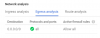
Please check the attached image!
Thank you

11470
 

Attachments

  • 1.PNG
    1.PNG
    29.9 KB · Views: 54
hi johnvam

Is this a Debian PBX that has just been added to your instance manager or was it already working?

Have you checked the network at the PBX end that it still allows the traffic to pass for those ports?
 
hi johnvam

Is this a Debian PBX that has just been added to your instance manager or was it already working?

Have you checked the network at the PBX end that it still allows the traffic to pass for those ports?
3CX is hosted on Google cloud with other 15+ instances that work perfect! This is Debian installation. Instance is working for more than 1 week.
 
Ok then, can you check the instance is indeed still online and working (no stopped services or anything) and also ensure that the FQDN of the PBX matches its IP address that it holds currently in the Google Compute Engine panel?
 
Ok then, can you check the instance is indeed still online and working (no stopped services or anything) and also ensure that the FQDN of the PBX matches its IP address that it holds currently in the Google Compute Engine panel?
Instance Public IP is Static! Also FQDN matches the Public IP of the instance!
 
Could be a number of things at play here, for a quick test you can disable instance manager on the host machine and press ok to save, then enable it again and allow it to reconnect.
 
Could be a number of things at play here, for a quick test you can disable instance manager on the host machine and press ok to save, then enable it again and allow it to reconnect.
I have done it many times... also tried to reboot the server many times...
 
Please check the VM firewall options in this case, I believe on the Google firewall the Egress will be 'allow all' if you haven't made any changes.
11472

Can you also let me know what version that specific PBX is running?
 
Please check the VM firewall options in this case, I believe on the Google firewall the Egress will be 'allow all' if you haven't made any changes.
View attachment 11472

Can you also let me know what version that specific PBX is running?
Which ports are used for instance manager for ingress and egress?
Thank you
 
Perhaps you gave us the answer since begining in your screen copy
11493
 
Fixed!

Firewall issue.

Thank you all
 
Status
Not open for further replies.

Latest Posts

Forum statistics

Threads
111,932
Messages
589,805
Members
164,804
Latest member
fcentral