Integrate ZOHO to 3cx

Status
Not open for further replies.

Brian Cai

Bronze Partner
Basic Certified
Joined
Sep 6, 2023
Messages
11
Reaction score
0
Hi there,

I integrate ZOHO to my 3CX system, look up contact is working well, but there is no log if the phone number is not matching.

Is this possible to configure automatically record logs or record number, because there is no point to integrate CRM and not allow to record number, so CRM person will not know new number.

Thanks
 
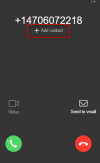
When the caller's number can't be matched to a CRM contact, the Web Client / Desktop App will let you create it in the CRM. You will see the "Add contact" link in that case:
1694002194124.png

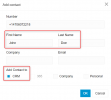
Then you fill the dialog and check the CRM option:
1694002221567.png

This will create the contact in your CRM, and then the call will be logged for it.
 
When the caller's number can't be matched to a CRM contact, the Web Client / Desktop App will let you create it in the CRM. You will see the "Add contact" link in that case:
View attachment 37107

Then you fill the dialog and check the CRM option:
View attachment 37108

This will create the contact in your CRM, and then the call will be logged for it.
Hi Edoss,

It will affected all CRM like Zendesk, Freshdesk or Connectwise. Please help to advise is there any CRM can be used.
 
@Brian Cai This behavior applies to all CRM integrations.
 
I must be mis-using the webclient. I can see the add contact button, but until I answer the phone I dont know who is calling me, as soon as I answer the phone i loose the option to input the details.

How can I get the customers details ?

I suppose I could open the CRM, look up the customer details and fill out this page that way
 
Last edited:
I must be mis-using the webclient. I can see the add contact button, but until I answer the phone I dont know who is calling me, as soon as I answer the phone i loose the option to input the details.

How can I get the customers details ?

I suppose I could open the CRM, look up the customer details and fill out this page that way
If the caller's number is matched to a CRM contact, you will see the contact details automatically. This "Add contact" link is shown only when no contact is found in the CRM.
 
  • Like
Reactions: Evolute IT
Yes, once have input the details, which I would need to talk to the customer to get. How do I get these details and enter them into the 3CX CRM.

call flow: incoming call, no match in CRM so +add shows. Click +add and enter the details, but I dont seem to be able to answer the phone to get the details.
 
I'm not sure to understand what you describe. You receive the call, and not contact is matched, then you see the "Add contact" link. So far so good. Here you should answer the call, and then once you're talking to the customer, you ask their name, click "Add contact", fill the details while you speak with the customer, and click "OK" to create the contact in the CRM. At that point, 3CX will show a "CRM" link, which you can click to open the contact record in the CRM. From that point you can continue adding notes in the CRM while you speak with the customer.
 
Hi, just want to know, if the contact is not matching with CRM, it should be records as missed call from number xxxx on CRM but now 3CX is not allow to do it any more. This is because of 3CX or because of CRM software blocked it?
 
If there is no contact matching returned there will not be any call journal.
 
Status
Not open for further replies.

Latest Posts

Members Online Now

Forum statistics

Threads
111,852
Messages
589,386
Members
164,691
Latest member
Daz1964