Integrating ZOHO CRM and 3CX - issue with URL redirect

Status
Not open for further replies.

NEIL DEVONPORT

Customer
Joined
Jan 28, 2021
Messages
17
Reaction score
0
I can see this issue has come up many times in the forums, and the answers are not as clear as I need (forgive me if I am not quite understanding them). I have completed the sever side on zoho crm, and setup in 3CX V18 for zoho.

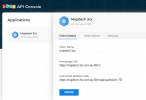
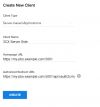
The area that seems to be the issue is the 'home page url' and 'authorised redirects uri's'. Neither of these terms seems to be used in 3CX and assuming its the FDTN, we have used that. The graphic in zoho's help article is generic and, doesnt specify when to get this information - does anyone have any suggestion?

Many thanks Neil
 

Attachments

  • zoho 3.png
    zoho 3.png
    21.9 KB · Views: 32
  • zoho 2.png
    zoho 2.png
    56.4 KB · Views: 30
  • zoho 1.png
    zoho 1.png
    92.3 KB · Views: 26
When doing the signin from the PBX side, what do you use? IP or FQDN?
 
I
When doing the signin from the PBX side, what do you use? IP or FQDN?
im not sure what you mean by the sign in... if you mean the home page url or the url redirect, I have used the FQDN, any suggestions?
 
I can see this issue has come up many times in the forums, and the answers are not as clear as I need (forgive me if I am not quite understanding them). I have completed the sever side on zoho crm, and setup in 3CX V18 for zoho.

The area that seems to be the issue is the 'home page url' and 'authorised redirects uri's'. Neither of these terms seems to be used in 3CX and assuming its the FDTN, we have used that. The graphic in zoho's help article is generic and, doesnt specify when to get this information - does anyone have any suggestion?

Many thanks Neil
According to the screenshots, in order to make this work, when you access the 3CX Management Console you need to be using the following URL:
https://mojotech.3cx.com.au:5001

Are you using that URL? Or you access the Management Console without the port number?

The Redirect URL you configure in Zoho must be the 3CX Console URL, appending "/api/oauth2crm".
 
We are having a similar issue connecting 3CX to Zoho. We have connected the platform to one another. The issue we are having is the screen does not pop when calls come in. But Zoho does enter the call into the Contacts section. We just need to have the screen pop in order to update the name, view the notes, etc.
 
We are having a similar issue connecting 3CX to Zoho. We have connected the platform to one another. The issue we are having is the screen does not pop when calls come in. But Zoho does enter the call into the Contacts section. We just need to have the screen pop in order to update the name, view the notes, etc.
Do you see the contact card icon when the call is in progress? It would be right beside the timer. Also, what client are you using?
 
Can you send me a screen shot of what this would look like? We are not seeing anything like this.
 
FOr this to work, we have to have the 3CXPhone Desktop extension opened on the computer, correct?
 
According to the screenshots, in order to make this work, when you access the 3CX Management Console you need to be using the following URL:
https://mojotech.3cx.com.au:5001

Are you using that URL? Or you access the Management Console without the port number?

The Redirect URL you configure in Zoho must be the 3CX Console URL, appending "/api/oauth2crm".
Hi Emesto, thanks for coming back to me. We access 3CX management console using https://mojotech.3cx.com.au no port required. I have tried this with and without the port number, I am really convinced the instructions are wrong but, maybe its just me and user error.
 
Hi Emesto, thanks for coming back to me. We access 3CX management console using https://mojotech.3cx.com.au no port required. I have tried this with and without the port number, I am really convinced the instructions are wrong but, maybe its just me and user error.
Instructions are correct. In your case, you must configure your Zoho app with the following values:
Homepage URL: [URL='https://mojotech.3cx.com.au:5001/']https://mojotech.3cx.com.au[/URL]
Authorized Redirect URIs: [URL]https://mojotech.3cx.com.au/api/oauth2crm[/URL]

Then proceed with the authorization flow by clicking the Authorize button in the 3CX Console. If you're getting an error, please check the description, because with the values above, the Redirect URL will be fine, and the error might be something else. For example, another common error is configuring the Zoho URLs in the 3CX console using a wrong location. Check the URL you use when you're in Zoho. Does the URL end in ".com"? Does it end in ".eu"? The same ending must be configured in 3CX, otherwise you will be pointing to a different data center and Zoho will not find your data.
 
Instructions are correct. In your case, you must configure your Zoho app with the following values:
Homepage URL: [URL='https://mojotech.3cx.com.au:5001/']https://mojotech.3cx.com.au[/URL]
Authorized Redirect URIs: [URL]https://mojotech.3cx.com.au/api/oauth2crm[/URL]

Then proceed with the authorization flow by clicking the Authorize button in the 3CX Console. If you're getting an error, please check the description, because with the values above, the Redirect URL will be fine, and the error might be something else. For example, another common error is configuring the Zoho URLs in the 3CX console using a wrong location. Check the URL you use when you're in Zoho. Does the URL end in ".com"? Does it end in ".eu"? The same ending must be configured in 3CX, otherwise you will be pointing to a different data center and Zoho will not find your data.
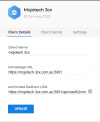
the url ends in .com.au for both 3CX and ZOHO. The values you have suggested were already present, see attached. Can you please clarify where 5001 is coming from?
 

Attachments

  • zoho 3cx.png
    zoho 3cx.png
    125.9 KB · Views: 14
You need to remove the :5001, that's what's causing the issue. If you're accessing the console without the 5001, then remove it from the authorized URL.
 
  • Like
Reactions: Evolute IT
You need to remove the :5001, that's what's causing the issue. If you're accessing the console without the 5001, then remove it from the authorized URL.
I got further into the verification process and then got this:
Error occured while accessing CRM. Please check log provided.
Started OAuthGetAccessToken
Request text: https://accounts.zoho.com/oauth/v2/token
Request form value code set to 1000.1863fd519931c42af1c53867c27b414e.9b426ff34f04b5d122c693fe78f1ed94
Request form value grant_type set to authorization_code
Request form value client_id set to 1000.J7QRKYGBRF77H6599LZA7VJPN0HTBM
Request form value client_secret set to 3ccf87d481d946099b752e918ee3eea6957d2b8181
Request form value scope set to ZohoCRM.modules.accounts.all,ZohoCRM.modules.leads.all,ZohoCRM.modules.contacts.all,ZohoCRM.modules.calls.all
Request form value redirect_uri set to https://mojotech.3cx.com.au/api/oauth2crm
Request form value state set to 8b7e7bc0-ed3c-4b42-b679-f1353c82e67f
Response text: {"state":"8b7e7bc0-ed3c-4b42-b679-f1353c82e67f","error":"invalid_client"}
Response finished
Finished OAuthGetAccessToken
System.Exception: CRM call result is empty or null
at ManagementConsoleJS.Controllers.OAuth2CrmController.OAuth(String state, CrmProcessorFactoryDelegate crmProcessorFactory, IMemoryCache cache)
 
It would seem the config for the integration isn't working. "invalid_client" is usually because the ClientID and ClientSecret don't match.

Are you using the base Zoho template built-in?

Please remove the client_id and secret from your post along with the FQDN. This is a security breach waiting to happen.
 
  • Like
Reactions: edossantos
From the logs I can see that you're configuring 3CX with the URL https://accounts.zoho.com, however you mentioned that your Zoho instance is in zoho.com.au. That's why the Client ID can't be found, it's in a different Zoho instance....
 
  • Like
Reactions: Evolute IT
From the logs I can see that you're configuring 3CX with the URL https://accounts.zoho.com, however you mentioned that your Zoho instance is in zoho.com.au. That's why the Client ID can't be found, it's in a different Zoho instance....
I changed to .com as .com.au wasnt working either. Has anyone actually got this working?
 
It would seem the config for the integration isn't working. "invalid_client" is usually because the ClientID and ClientSecret don't match.

Are you using the base Zoho template built-in?

Please remove the client_id and secret from your post along with the FQDN. This is a security breach waiting to happen.
I agree but the client id and secret are def correct. I am using the base template, have you done this integration before?
 
I agree but the client id and secret are def correct. I am using the base template, have you done this integration before?
Zoho? Yes quite a lot. We also modified the template when needed for custom needs.
 
  • Like
Reactions: edossantos
Zoho? Yes quite a lot. We also modified the template when needed for custom needs.
is there any chance you can assist me with a remote session to get this working?
 
We have had our local 3CX partner working on trying to integrate this for a month and has been chatting the with 3CX team as well but we have still not been able to create the screen pop.

Now I see 3CX is pushing this integration on the Zoho marketplace - https://marketplace.zoho.com/app/crm/3cx-for-zoho-crm#screenshots. Perhaps we would be able to get help implementing? A screen share with our partner would be great to work out these issues.
 
Status
Not open for further replies.