Integration with Caller ID

HM_User

Premier Customer
Joined
Oct 16, 2026
Messages
11
Reaction score
0
So we have resolved the integration it looking up the numbers.

The CRM system require the lookup in the format of Inbound: (44

However the caller isn't appearing on the handset because the formatting possibly.

In the logs we have the below

Inbound: 079717***** (4479717*****)

How would we ensure that the inbound number is checking the API call using 44 then the number?
 
Hi @HM_User in the sip trunk you can reformat the incoming caller id so it can match the contact number in the CRM.

Please check this guide about caller id reformatting.

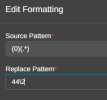
If your voip provider sends as caller id 079717***** and you need it as 4479717***** then you could use the inbound reformatting as follows:

1792419222533.png

So any number starting with 0, then will be reformatted with 44

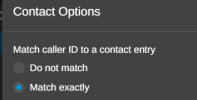
Then, navigate to the system menu --- phonebook --- options --- check MATCH EXACTLY

1792419292723.png
 
We have the formatting so that it is changing to 44 but in the logs its still looking like its using the number with 0.

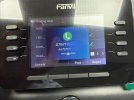
The lookup is confirmed as working when using the CRM test and using 44 number. It looks like the below when coming up on the handset

IMG_4638.jpeg

19/10/2026 15:19:04 000-801 4479717*****Reading (0033)Inbound QueueUnanswered-00:00:0000:00:240.00Inbound: 079717***** (4479717*****) → Via trunk: SIP (0203*) → Ended by 079717***** (4479717*****)
 
@HM_User please note that the Caller ID reformatting rule on the SIP trunk only applies to the Caller ID number, it does not modify the Caller Name / Display Name. The value you see that still has the leading '0' is the Display Name; the actual Caller ID was reformatted correctly.
 
  • Like
Reactions: Evolute IT
Would we not expect to see the display name as the name that the CRM integration looks up in the background and only show the number if the name is not returned?
 
Because you are using a desk phone, incoming Caller IDs are matched against its local phonebook. If you add your CRM contacts to the PBX phonebook, the desk phone will sync that directory file and perform contact lookups directly from its internal memory.

Have a great day!
 
  • Like
Reactions: Evolute IT
Ok, so it won't show up the contact directly from the CRM integration?

We have around 400,000 contacts that we would have to load into the local PBX phone book and there is a lot of work to keep this updated.

Is there plans for the CRM integration to appear on desk phones?
 
Please keep in mind that physical desk phones have strict memory limitations for contact lists. To get full CRM functionality, we recommend pairing the desk phone with a 3CX app (Web Client, PWA, or Windows desktop app) using desk phone control mode. This allows agents to keep using their physical handset while gaining instant access to CRM contact pages, full call history, and live note-taking on their computer.
 
  • Like
Reactions: Evolute IT
That sounds like a solution.

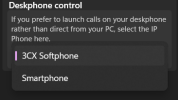
Is there a setting for the desk phone control mode?
 
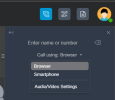
From the web client, PWA click on the dialer and select the deskphone provisioned with the user extension.

1792423517627.png

From the windows softphone, click on settings ---- general options --- deskphone control

1792423566847.png
 
  • Like
Reactions: Evolute IT

Latest Posts

Forum statistics

Threads
112,283
Messages
591,696
Members
165,406
Latest member
ARKC