Internal calls dropping 3 seconds after answering, receiving phone gets no audio

Status
Not open for further replies.

lightspeedhosting

Bronze Partner
Basic Certified
Joined
Nov 26, 2019
Messages
27
Reaction score
2
  • 3CX Version - 16.0.676 (running on VM in Chicago, Vultr)
  • Using FQDN
  • Phones being used: Yealink T54w with firmware version 96.84.0.35

I have an office we just did an install for. 12 phones and calling in from external works great, and calling external numbers and dialing out works fine.

But anytime an employee calls another employee using their four digit extension, the receiver gets the ring ,they pick up and the receiver and sender both cannot hear anything and 3CX drops the call within 3 seconds. This is ONLY happening for internal extension calling another internal extension.

One final note, if an internal employee calls another employee using their full DID then it works for about 30 seconds and drops. The issues with this installation ONLY seem to appear on internal calls and happens every time.

I have a pcap I captured during it, and I took a pcap from one of the phones as well to see if it had any other information.
 
Key question since it sounds like you are using a hosted platform - how are the phones connected to the system ?
STUN SBC or VPN connection?
 
They're connected using STUN.
 
Sounds like you are using the phones with STUN. Phones using STUN are always a pain when calling each other in the same location. Put in a 3CX sbc and it will fix this and also improve external calls as well.
 
For context, we have a system at our own office using almost identical phones, 3CX etc. We have no experienced this issue at all. This customer rides on our fiber and is directly connected to our data center over L2, so in my mind it didn't make sense to me that this problem only affected them.

If I may inquiry, why would this problem only affect STUN connected phones?

Should we add a SBC in our data center and use it with all of our clients vs one SBC per client?
 
Agree completely that this is what it sounds like however in my experience never assume anything but chances are high as the issue almost definitely is NAT/port forwarding/firewall related.
 
Great, thanks for confirming, for this amount of phones each endpoint will require it's own set of incremented ports (2 for SIP around 19 for RTP) and each endpoint requires it's own statically assigned IP address for port forwarding (static or DHCP linked).
 
Should we add a SBC in our data center and use it with all of our clients vs one SBC per client?
The SBC connects the client to their server, so it runs at the client. It also keeps some audio onsite, etc. Phones connect to it, it connects to 3CX.
 
In the case of a full blown provider/hosted SBC there are possibility's.

The only I am aware fully implemented with 3CX is NAT Pass SBC: http://www.natpass.com
 
If you have a L2 connection to the data center, why STUN? I would assume L2 would be routed (no NAT) so STUN should not be involved.
 
Their 3CX instance doesn’t live on our Cloud. We’re using a Chicago based location for the 3CX installs. So their site goes to us over L2 over a VLAN and we assign them a voip VLAN and a data VLAN.

This is how we setup nearly all of our fiber optic customers. This customer is the only one we’re having issues with after starting to switch customers. BUT most of the first offices we switched are like 1-5 phones. So to the earlier point on this thread, the quantity might play into why this office has the issues and others didn’t.

I will create a SBC VM in our cloud and place it on their VLAN and network and test to see if going thru it helps.
 
Great, thanks for confirming, for this amount of phones each endpoint will require it's own set of incremented ports (2 for SIP around 19 for RTP) and each endpoint requires it's own statically assigned IP address for port forwarding (static or DHCP linked).

So for this install using STUN, you would statically adding a local 192.168.. address or 10.0.. depending on network size/subnet and then in the firewall assign a port and port forward so that 3CX when talking back to the clients static IP is sending data back to the unique port for each?

For 12 handsets that’s 252 port forwards lol. It sounds a lot simpler to just use SBC, no?
 
  • Like
Reactions: craigreilly
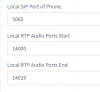
SBC is much easier. For the number of ports, that's subjective. Basically on the phones page the ports listed here need to be unique per phone behind the same NAT device:

13675

You don't actually need 19 ports but you do need 2 ports for each leg of an active call. So for a device that can't or won't do more than 2 calls you could shrink that down to 4 ports. Whatever is in these fields is what would be provisioned to the phone. That being said the number of ports isn't really the issues so much as the administrative headache of assigning static IPs or DHCP with reservation + per device port forwarding. Hench why 3CX recommends a SBC when there is more than one device.
 
SBC is much easier. For the number of ports, that's subjective. Basically on the phones page the ports listed here need to be unique per phone behind the same NAT device:

View attachment 13675

You don't actually need 19 ports but you do need 2 ports for each leg of an active call. So for a device that can't or won't do more than 2 calls you could shrink that down to 4 ports. Whatever is in these fields is what would be provisioned to the phone. That being said the number of ports isn't really the issues so much as the administrative headache of assigning static IPs or DHCP with reservation + per device port forwarding. Hench why 3CX recommends a SBC when there is more than one device.

Any reason why we can’t just put a SBC on a small Thin client or Pi or something similar AMD Park I’m Clients network rack?
 
SBC is supported on Raspberry Pi and would be the better option (single port 5090 required only) you can virtulize also if you want.

Note: raspberry pi version supports 20 phones/endpoints. Opening the provisioning port is required also however can be temporary just for the auto provisioning process.
 
You don't actually need 19 ports but you do need 2 ports

Agreed, but this is what 3CX auto allocates on default settings, if you wanted to use less you would need to go through every extension and reallocate the port numbers.
 
Agreed, but this is what 3CX auto allocates on default settings, if you wanted to use less you would need to go through every extension and reallocate the port numbers.

Yep as evident in my screenshot. I wasn't correcting you, just adding some information to the math @lightspeedhosting was discussing for the # of ports.

Note: raspberry pi version supports 20 phones/endpoints. Opening the provisioning port is required also however can be temporary just for the auto provisioning process.

Actually the Pi can do more than that. They were originally rated up to 20 but that increased with the multi-thread re-write of the SBC and the Pi 3.

https://www.3cx.com/docs/recommended-hardware-specifications-for-3cx/

And just to clarify for @lightspeedhosting no ports need to be opened at all (inbound/forwarded) to the SBC. Just the recommended ports on the PBX side (5090 TCP/UDP and 443 or 5001) as well as those same ports outbound on the SBC side if you are doing that type of restriction but it doesn't sound like you are (at least for provisioning) since it's an audio issue and not a provisioning issue you are having with STUN currently.
 
Just wanted to update now that it's solved. I wound up getting a Pi4 and installed 3CX SBC on it. Got all phones reprovisioned to use the SBC and now we're good.

I think for future installs I'm going to setup a VLAN over L2 and run VM's or find a different device than a Pi4, as I've seen these die in the field. This client rarely has more than a few calls at a time, ever, so that Pi4 shouldn't be taxed much at all, but to have an operation running through a proxy on a Pi, to me, just seems like a single point of failure I don't love. But certainly I thought it was important to solve this issue for the client right away and it was cheap and available.

Thanks for the help!
 
We have a number of Pi devices out and I don't recall any dying. Of course we buy reputable kits with quality power supplies. They are cheap enough to have a cold spare onsite or even set them up redundantly with good results. And you're using a Pi 4? Only the Pi 3 is supported currently.
 
I hadn’t considered a Pi3 since the pricing on the CanaKit Pi4 is almost the same price. With power supply etc and obviously more juice.
Recently we had a Pi running a slide show on a customer entrance TV and she just up and died - so I am a bit nervous; maybe it was a fluke.

Regarding redundancy, the Yealink T54W phones only have one spot for proxy, so with redundancy SBC, how would that be configured?
 
Status
Not open for further replies.

Forum statistics

Threads
112,366
Messages
592,134
Members
165,538
Latest member
3K8iMGWviZ