• We do not provide troubleshooting help for unsupported phones. Please try with a supported phone.
  • V20 Update 10 Release Candidate 2 Learn more

Solved "Internal server error occurred, please contact administrator" - HTEK UC924

Status
Not open for further replies.

Alphabetic

3CX MVP
Silver Partner
Advanced Certified
Joined
Jul 1, 2016
Messages
6,733
Reaction score
2,694
Hi support

I recently updated 3CX to U10 B1765

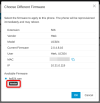
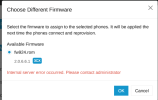
When I come to try upgrade firmware or choose different fw on these phones, I get this:
1793953389098.png


They're currently running 2.0.6.5.30 and 2.0.6.5.45

Im going to try update them manually and see If I can perform these actions again.
 
Solution
Hi,

1. Go to the Admin Console > Phones > Firmware page and find your FW for this model
2. If its assigned to any phones it will show a number, click it to view them unassign it first to free up the file.
3. Now back to the firmware page, delete the FW file.
4. Ensure no other models have this same exact filename shared on the Firmware page, otherwise delete those entries too.
5. Go to System > Maintenance and click Purge Unused Firmwares to ensure no leftovers remain.

  • You can now get FW directly from the manufacturer's website for these, and upload it to 3CX from the Firmware page, then upgrade your phones.
  • When you now Choose different firmware you will no longer get such an error and the firmware will be set...
Hi,

1. Go to the Admin Console > Phones > Firmware page and find your FW for this model
2. If its assigned to any phones it will show a number, click it to view them unassign it first to free up the file.
3. Now back to the firmware page, delete the FW file.
4. Ensure no other models have this same exact filename shared on the Firmware page, otherwise delete those entries too.
5. Go to System > Maintenance and click Purge Unused Firmwares to ensure no leftovers remain.

  • You can now get FW directly from the manufacturer's website for these, and upload it to 3CX from the Firmware page, then upgrade your phones.
  • When you now Choose different firmware you will no longer get such an error and the firmware will be set. Reboot the Htek once you set it, otherwise it will take some time for it to realize there is a new FW to upgrade to. They require some patience these specific models.

Important Note: these phones have a predefined filename for the firmware. This means you can only have a single firmware for them on your 3CX at any given time. If you want to upgrade to another version, you must delete the one you have now, and then add the next one and so forth.
 
  • Like
Reactions: KyriacosS_3CX
Solution
Hi John!

it was showing as 0 Bytes.

I've grabbed the firmware from here

I note the name is now fw920M and not fw924 and i've tried both file names and i've rebooted the HTEK about 5 times now and I still cant press the button to upgrade.

More patience or something wrong?
 
1. Zero bytes means that the file was not correctly uploaded. This justifies the error 3CX shows. This is the part we should now focus on, not the actual phones.

2. Check whether at some point you made manual changes on the filesystem, and now the PBX no longer has rights to read/write to the firmware folders. I'm reading that fw920M.rom file at 13574Kb here and it uploads correctly on my machine.

Did you delete all the htek firmware from your machine exactly as I described earlier, before uploading the fresh one?
 
1. Zero bytes means that the file was not correctly uploaded. This justifies the error 3CX shows. This is the part we should now focus on, not the actual phones.

2. Check whether at some point you made manual changes on the filesystem, and now the PBX no longer has rights to read/write to the firmware folders. I'm reading that fw920M.rom file at 13574Kb here and it uploads correctly on my machine.

Did you delete all the htek firmware from your machine exactly as I described earlier, before uploading the fresh one?
Sorry, the 0 bytes was before I went in, deleted and uploaded the firmware as per your suggestion.

ahh okay this might be where I didnt listen (only 1 coffee in). I left the UC923. Let me delete all and try again.
 
Ok so at this point, did the 'internal server error' problem go away?
 
Yeah that message went away and i can assign the vendor FW now, I just cant press the upgrade botton
 
With your own uploaded firmware, you need to click "Choose different firmware" for your phone and it will allow you to choose the file as a Vendor provided file.

1793958440659.png

Note regarding filename: Htek replaced this model phone with a new hardware variant at some point if I recall correctly. Depending on which one you have, the file you send to it might be rejected by the phone. Their documentation would describe the differences, and link you to which latest FW each hardware variant had. You might have to do some digginng on their site to figure this one out I'm afraid.

Either way, we can mark the 3CX error as solved now since it is no longer shown.
 
Status
Not open for further replies.

Forum statistics

Threads
112,427
Messages
592,506
Members
165,625
Latest member
Augenzentrum