Solved Invalid Email Address - using more than one email address v18

Status
Not open for further replies.

Thiek

Premier Customer
Joined
Dec 5, 2017
Messages
134
Reaction score
27
Yes, I see the other threads (below) saying this is no longer allowed on v18 and was never intended to work this way on previous versions. HOWEVER, it has been working for many years and now someone decided to pull it? I'm not seeing a good reason as to why other than, "it might cause issues". Like what issues? We did not know it wasn't indented to be like this, to us it was a feature of 3CX so we used it to the full potential at all 16 of our 3CX installations. For example, Customer Service reps are not available the caller has an option to leave a voicemail which is setup on a virtual ext. designed to send the message to multiple people. We do the same in Human Resources, Receiving, and Inventory Depts. This is, or was, a huge benefit for the local site phone admin as they could quickly update the email addresses on those virtual extensions when needed. If the admin has to use a distribution list, they won't have access to this. They will now have to log a ticket with the corp. office and hope it gets routed to correct dept. and if it does it will be addressed in 4 or 7 days. This creates a lot more work as well as potential for things to go wrong.

I vote to bring this feature back, please! If not, then why and does that really outweigh the benefit of being able to do this? I'm seriously reconsidering the upgrade to v18. Not to mention I will have to submit a ticket to have a min. of 64 distribution lists created.

https://www.3cx.com/community/threads/cannot-add-second-email-address-to-extension.86240/
https://www.3cx.com/community/threads/adding-multiple-emails-to-one-extension.85684/
https://www.3cx.com/community/threads/multiple-email-for-voicemail.82767/
 
Last edited:
It was removed for MS 365/Google integration. When you integrate with either it looks at the primary email address on MS 365 or Google for sync/SSO.
 
Hi @Thiek,

I understand your scenario, some of the suggestions in the threads you posted may work for you - such as using queues / ring groups to notify multiple extensions via mail etc.
 
Thank you jcostlow for MS365 explanation. And yet I hate to say it, but taking away functionality is a very bad move by 3CX, like I said we’ve been using this for a few years and rely on it. The creation and maintenance of distribution lists will be awkward and difficult to manage. Instead of seconds to setup we’re looking many days. Perhaps 3CX should add a secondary email field to allow additional email addresses, this way the additional or secondary emails are not integrated with MS365? Seems like an easy fix.

VasilisV, I’m not following the suggestions/workarounds? Today, someone selects IVR option Customer Service it will ring 4 extensions for example, and if they cannot pickup it routes to an new IVR that gives the option to leave message or press 0. If they leave a message, that extension is setup to email the VM attachment to those 4 people in Customer Service. But now this functionality is gone for the MS365 integration, something we will never use.

It’s “gotchas” like this that make me hesitant to upgrade to new versions, but in this case we have to as I have received a few 3CX emails saying things might stop working come end of Feb. 2022.
 
Are you using 3CX SMTP?
 
No, we have our own.
 
Hi @Thiek,

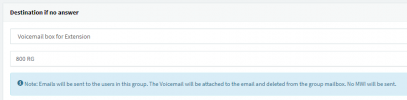
This can still be done, I apologise if I didn't explain it well enough the first time. If you have the users set up on the PBX (as in each email address is associated to an extension) and you've added the 4 agents to a Ring Group that the IVR points to, in the Ring Group options, you can set the Destination if no answer for the extension to the Voicemail Box for the Extension and point it to the RG. This will send each user in the RG an email.

1644238382522.png
 
  • Like
Reactions: Evolute IT
The creation and maintenance of distribution lists will be awkward and difficult to manage.
Still the best solution. Also, if that's such a big deal to manage, I can't imagine managing the 3CX...
 
Hi @Thiek,

This can still be done, I apologise if I didn't explain it well enough the first time. If you have the users set up on the PBX (as in each email address is associated to an extension) and you've added the 4 agents to a Ring Group that the IVR points to, in the Ring Group options, you can set the Destination if no answer for the extension to the Voicemail Box for the Extension and point it to the RG. This will send each user in the RG an email.

View attachment 27723
 
Thanks Vasilis, we typically avoid dumping customers to voicemail. If nobody in the ring group picks up we will not dump to voicemail, instead we route to a new IVR that quickly indicates all reps are busy press 1 for voicemail or 0 for the operator - we give them a choice. Even individual ext. voicemails are frowned on unless mid or upper mgr., otherwise, for outside calls at the ext. level they route back to the operator.

As for ConceptsWeb comment, that probably works great at the small office installs you do where the single IT admin has full admin rights to all platforms. For a large company with tight security polices, the on-site locate admins at our 13 individual 3CX installs do not have this access (as pointed out earlier). Now that 3CX removed this functionality, which was a single click on the ext. then add/remove someone's email, done in 10 seconds, they now have to go to a web page, sign in, navigate to thru the self help portal, find the Security Mgmt. form, fill it out and submit which triggers an email to their mgr. and waits for approval, once approved the ticket waits in queue until completed; 4 to 7 days.

The best solution, add a secondary email field at the ext./user level so multiple emails can be added, thus return the functionality taken away.
 
I can't speak on the policies since we are an MSP and typically manage everything for a customer but @VoIPTools might have something to help in the meantime.
 
  • Like
Reactions: Evolute IT
Hi @Thiek,

I think the above posts cover a range of options available to you now, as of V18U2. I can't say if that option will ever be added again, so I'll focus on trying to find you a solution that is acceptable for you.

Not the most elegant option but maybe what you could do is route your IVR that provides the choice for voicemail to a new Queue / RG that has a 1 second timeout which then mails all of the users in the group as mentioned before?
 
I was thinking about something similar, a new Ring Group with no answer in 1 seconds and then send caller to VM as you mentioned above. I'll have to test this tomorrow to see how well it works. Unfortunately the "3CX admin lite" rights (what I call it) that we give to the on-site admins, it basically only allows for editing of exts., they won't be able to access Ring Groups but nonetheless better than the red-tape for a distribution list.

jcostlow, thanks for the suggestion of Voiptools, but for 16 sites (I said 13 above, typo) that solution would be $2,119/year x 16 = $34,000 fix. Plus 2 more sites end of year... close to $40k.
 
Hi @Thiek,

Keep me updated as to if it will work for you. If you need anything, let me know!
 
It works and easier to maintain than going thru the corp. red-tape to maintain a distribution list. The only slight downside, that 1 second split ring on all phones before routing to voicemail but they will get used to it. Might serve as a nice audible that a call went to voicemail, check your email ;)
 
  • Like
Reactions: VasilisV_3CX
Glad to hear it @Thiek, if you require any further assistance, feel free to open a new thread!
 
Status
Not open for further replies.

Members Online Now

Forum statistics

Threads
111,832
Messages
589,283
Members
164,662
Latest member
DejanMDS