- Joined
- Mar 31, 2020
- Messages
- 2
- Reaction score
- 0
Dear All
I was on a call today that suddenly dropped. I wanted to see if I could investigate the cause using the 3CX Log Reader. I noted down the time, duration and destination of the call to help me look this up.
When I downloaded the support file earlier today (a couple hours after my dropped call), it only contains about 12 lines and none of them seemed very relevant. We've been using our phone system since March so I was surprised to not see loads of lines in here. I did happen to notice in the Event Log the following message which occurred less than 1 minute after my dropped call:
I've just carried out a system update because I noticed there was one waiting and thought I'd try downloading the logs again. This time, I have tonnes of lines in the log but all from the last 5 minutes and I think are related to update just carried out. There aren't any lines for the rest of the day or for previous days despite our phone system being used quite heavily.
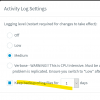
Is it possible we haven't configured logging correctly and they are being lost or am I trying to access them incorrectly? Do you think it was pure coincidence that the logs and temporary files were deleted less than a minute after my dropped call or could this be related?
Thank you so much for your help.
Dan
I was on a call today that suddenly dropped. I wanted to see if I could investigate the cause using the 3CX Log Reader. I noted down the time, duration and destination of the call to help me look this up.
When I downloaded the support file earlier today (a couple hours after my dropped call), it only contains about 12 lines and none of them seemed very relevant. We've been using our phone system since March so I was surprised to not see loads of lines in here. I did happen to notice in the Event Log the following message which occurred less than 1 minute after my dropped call:
Event Notification Manager ID: 10025
3CX logs and temporary files were deleted to conserve disk space.
I've just carried out a system update because I noticed there was one waiting and thought I'd try downloading the logs again. This time, I have tonnes of lines in the log but all from the last 5 minutes and I think are related to update just carried out. There aren't any lines for the rest of the day or for previous days despite our phone system being used quite heavily.
Is it possible we haven't configured logging correctly and they are being lost or am I trying to access them incorrectly? Do you think it was pure coincidence that the logs and temporary files were deleted less than a minute after my dropped call or could this be related?
Thank you so much for your help.
Dan