Solved invitations not going in to calendars

Status
Not open for further replies.

GBC_James

Premier Customer
Advanced Certified
Joined
Feb 3, 2017
Messages
132
Reaction score
24
Hi
3Cx v16.0.7.930 on a Windows Server 2019 Standard box in house.
Email is Custom SMTP server linked to an account on our in house exchange server.

So everything has been fine until now. a user contacted me today to say when he schedules a meeting, he gets his notification email, but at the top it says "You haven't sent this meeting invitation yet" and no entry in his Outlook calendar.
All internal users added as participants get a similar email. No entry in their Outlook calendars either.

External participants get their email with an attachment as normal (Which puts the meeting into their calendars when clicked)

However, what's weird is they do get an outlook reminder pop up, 10 minutes before the meeting! Even though nothing is showing in the calendar.

This is the same for web meetings and audio conference calls.

I tested with a couple of audio conference calls and got the same problem. The conference call did go ahead automatically. Everyone's phones rang at the right time.

I hope that's enough info for you.

Like I said, everything was working ok before. Any help much appreciated.

Thanks
James
 
Hi James,

I would also try using the 3CX SMTP and comparing the two results.

As for outlook, you would have to provide a screenshot example so we can better understand what you mean
 
Hi James,

I would also try using the 3CX SMTP and comparing the two results.

As for outlook, you would have to provide a screenshot example so we can better understand what you mean
Thanks for the quick reply.

I have changed to 3CX SMTP and get the same result.
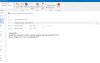
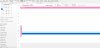
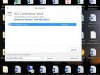
Here are some screen shots of the email I receive, the empty calendar, and also a popup reminder despite an empty calendar.
3cx1.JPG3cx2.JPG3cx3.JPG
 
p.s. the pop up reminder was for a different test, which is why it's named differently.
 
slight update, I also have my work email on my iphone, using the ios native email app, and there is a meeting request waiting in the ios calendar!
So something is working. Just not with MS Outlook on windows 10
 
Hi James,

I think what you are describing to us is actually the behavior of Outlook rather than of 3CX.

It seems 3CX was doing the same thing it was doing from before: sending out emails with an .ics file attached. What happens after that is purely an Outlook matter

Remember, the *.ics file contains the meeting info, but its up to your OS or Mail app to decide how to handle it.
 
Hi James,

I think what you are describing to us is actually the behavior of Outlook rather than of 3CX.

It seems 3CX was doing the same thing it was doing from before: sending out emails with an .ics file attached. What happens after that is purely an Outlook matter

Remember, the *.ics file contains the meeting info, but its up to your OS or Mail app to decide how to handle it.
Thanks,
I think the same. I just have to convince our Exchange admin guy.....

I will keep you posted of anything relevant.

thanks again
 
Thanks,
I think the same. I just have to convince our Exchange admin guy.....

I will keep you posted of anything relevant.

thanks again
Any updates on this from the side of exchange by chance? I am looking into this as well and working with my exchange guy too.
 
Do you have any way of confirming whether the *.ics file is being stripped?
 
It isn't going to the right folder is what it tells me. It is not recognized as a calendar request. However, an hour before the meeting, I got the reminder. I never accepted the meeting though. I can say, if I go to my antispam and download the email that was scanned and just open it, it goes right into my calendar. I'm not sure exactly what is getting modified as of yet. I don't see the ICS as an attachment within outlook.
 
Our Exchange guy still hasn't figured this one out.
However, our problem has got worse this week.
Before, the person creating the conference got an email saying "this invitation sent been sent yet. If they manually added the attendees into the To: box and manually sent the invitation, everyone got the email and their calendars were updated as normal.

For some reason, this has changed and now, when clicking send, an error pops up saying "This meeting is not in the calendar folder for this account. Responses will not be tallied". Then if you click send anyway, the operation fails.
 
Our Exchange guy still hasn't figured this one out.
However, our problem has got worse this week.
Before, the person creating the conference got an email saying "this invitation sent been sent yet. If they manually added the attendees into the To: box and manually sent the invitation, everyone got the email and their calendars were updated as normal.

For some reason, this has changed and now, when clicking send, an error pops up saying "This meeting is not in the calendar folder for this account. Responses will not be tallied". Then if you click send anyway, the operation fails.

Any updates from your exchange team? I still haven't figured it out either.
 
this is an long-standing outlook issue that if you are the creator of a meeting and outlook has not generated it then it goes completely "bananas".

In v16 U7 we made many changes in ICS, not sure if this makes outlook happy, certainly everyone else.
 
  • Like
Reactions: Evolute IT
this is an long-standing outlook issue that if you are the creator of a meeting and outlook has not generated it then it goes completely "bananas".

In v16 U7 we made many changes in ICS, not sure if this makes outlook happy, certainly everyone else.

Would this be version 16.0.1074?
 
Any updates from your exchange team? I still haven't figured it out either.
No, we are unable to figure this one out. We have a lot of unhappy users
 
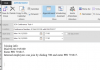
We are having the same issue since the update over the weekend. 3CX isn't attaching the ICS file to the invite email. I have tested by sending a meeting request from my Gmail account and that populates my Outlook calendar with an attached invite.ics file.
 

Attachments

  • 3CX Invite.PNG
    3CX Invite.PNG
    59.7 KB · Views: 14
  • Google Invite.PNG
    Google Invite.PNG
    48.3 KB · Views: 14
In v16 U7 we made many changes in ICS, not sure if this makes outlook happy, certainly everyone else.
Stefan, this is... not good. My clients are literally freaking out and they asked me to make it as it was before. Can you please tell me what should I do? Should I downgrade them to 16.0.6 and never upgrade again or is your advice something else? Thank you.
 
Status
Not open for further replies.

Forum statistics

Threads
112,293
Messages
591,749
Members
165,420
Latest member
x1515