Solved IP address change on debian

Status
Not open for further replies.

belikecopper

Joined
Dec 20, 2016
Messages
14
Reaction score
1
I installed the Debian instance of 3CX, however it assigned its IP address using DHCP. So I manually updated the /etc/interface/networking config file with a static IP.

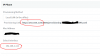
The IP address has changed and 3CX is accessible via the new IP address. However, when 3CX generates an IP phone provisioning URL the address is wrong.

Screenshot attached.

Is there a way to fix this?
 

Attachments

  • IP3CX.PNG
    IP3CX.PNG
    24.1 KB · Views: 319
  • Like
Reactions: demel42
Dear belikecopper,

In order to change the local ip address of your pbx you have to uninstall it, then change the ip address and reinstall it with the static ip address.
 
Hi there,
You can take a backup without including license and FQDN un-install and re-install using the correct internal IP address. It's not silly if you want your PBX running smoothly. Besides the whole process takes 15 minutes when using a backup.
 
i just meant it is silly that the debian ISO instance only assigns an IP by DHCP.

i ended up installing a fresh debian. setting manual IP address then manually downloading and installing 3cx on top.
 
Actually we are going to add the question. Enter ip or DHCP.
 
  • Like
Reactions: bp1
To set a fixed IP addresse would be great, because with DHCP in different Networks it is not working. When did the new Version will be deployed?
 
Since we use a preseed file network install, debian changes it's reasoning and starts to reason in a very blunt and straight forward way:
Reasoning is like this.

Since this is a network install and a file needs to be downloaded from the internet, I will set my network settings to automatic and do what is best for this install.
This is why the static ip dialog does not come up.

However I will upload a video now - and at second 0:22 you can see that if you press escape, (before the link local screen) you will be allowed to enter the network settings.
http://downloads.3cx.com/downloads/support/net-conf-debian-installer.mp4

So Debian is quite graceful - it does what it thinks is safe to do (because to be fair we at 3CX made a NETWORK ISO INSTALLATION) until it gets the files it needs. But then you have the option to put your settings if you like.

hope this helps..
 
Status
Not open for further replies.

Forum statistics

Threads
112,035
Messages
590,398
Members
164,987
Latest member
hd001