IP blacklist restart on march 30

Status
Not open for further replies.

AWS2P

Silver Partner
Basic Certified
Joined
Jan 9, 2014
Messages
5,076
Reaction score
1,096
Hi ,
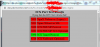
since several months nothing new was collected in pbxs blacklist,(great) today march 30 i've seen 2 same IP blacklisted on several pbx.

1585605179639.png

Is there a way to know if these IPs had already been blocked in 3CX global blacklist and freed after a while and restarting to attack pbxs or if they are completely new ?

Could it be posible to give in 3CX console, in blacklist section, an history info on this in front of each IPs ?
 
BTW given cheaper cost (and billing in my $ vs USD$) and as they have a network firewall (that allows up to 19 rules to be applied via webGUI) keep on meaning to move from LightSail to OVH VPS SSD.

Would anyone know if PBXpress works with OVH VPS SSD, as all the 3CX docs refer only to setting up a OVH 'Project' (different costs)?
Also is there a definitive guide to moving from one cloud hoster to another, ones I've seen appear a bit vague?
 
3CX can be hosted on any Openstack compatible hoster. See the example guide for OVH.

If OVH uses the same platform for their VPS then it should be fine.


Backup and restore works for migrations to/from any supported platform.
 
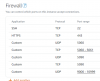
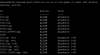
Have done UFW install on lightsail and OVH with same rules, port 5060 has IP but removed here of course.
1586604916490.png

Experts, is it enough rules for PBX with no STUN use ?
 
Seem this has not positive effect on new IPs to continue to increase blacklisto_O, after several hours this firewall is set new one IP comes , so how this is it always possible?


1586627955077.png
 
sudo ufw default deny incoming
You did set the default action to deny all inbound traffic, unless it is one of the rules you added allowing it?
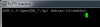
Try 'sudo ufw reload' to reapply the firewall rules after you've made changes. Or bounce the service 'sudo ufw disable' then 'sudo ufw enable' to be doubly sure.
 
since ufw has been added i've got these new ones.
1586680135488.png

do i need to remove these rules from native aws lightsail firewall ?
1586681120162.png
 
You did set the default action to deny all inbound traffic, YES
Or bounce the service 'sudo ufw disable' then 'sudo ufw enable' to be doubly sure. DONE
rebooted instance to see if a behavior change appears, fingers crossed
 
I don't understand why you are in panic mode! As correctly stated by many people, this is completely normal and no, it's not personal. The majority, if not all, of the attacks is blind and automated. My PBX is also under attack lately but I don't really care. All those bots are trying is brute-force logins. There is no chance they will ever succeed because after a very small number of tries they will get blacklisted and it will take them hundreds of years in this rate to crack any extension password. So why worry? The UA they are using is just a silly way of trying to bypass certain barriers.
 
don't understand why you are in panic mode!
Just wanted to stop blacklist increasing on cloud pbxs as this is only these ones who are targetted.

As said previously, email notification comes to my customers and blacklist stay visible in dashboard, so when customer ask you , how to stop this or is it normal having so much hack attempt, you can't say yes i know, this is like that , i can do nothing to stop.

so this is why with hobsonnet answer, i tryed to add UFW on instances but for now with no improvment , IPs are always coming.
Do you understand why if firewall is enabled and sip port restricted to SIP provider IP.
I just want to understand if something is wrongly done on my side explaining no change in filtering these attempts.
 
As florink says nothing to worry about, so long as you have done the basics, such as...

  • Enable - Disallow use of extension outside the LAN (Remote extensions using Direct SIP or STUN will be blocked). This will require use of 3CX clients / devices behind an SBC.....so if client using SIP phone remotely, look at this as a chance to up-sell and upgrade handsets / deploy SBC's ;-)
  • Use the strong auto generated extension user/password
  • Lock down countries that can be called from 3CX
  • Global Blacklist enabled
  • Make sure e164 correctly configured
  • Reduce the number of failed login attempts to trigger a ban..
  • Increase the default blacklist time (if you want to) etc.....
All this is more a 'pain in the ....' just having 'rubbish' from these flogs filling the logs. If worried about customers asking about "what your doing", explain to them that you've followed best practice for 3CX and that you've done things like the above...so you ARE doing what is required and being diligent in maintaining their systems.
 
All those steps are done, never got any piracy until now.
the fact is you know everyday someone is trying to force your door , even you have reinforced door, it's just boring you can't really stop them trying.
 
All those steps are done, never got any piracy until now.
the fact is you know everyday someone is trying to force your door , even you have reinforced door, it's just boring you can't really stop them trying.

The wind is constantly blowing against your door at home, attempting to blow it open, and blow dirt and debris into your home, can you fight the wind?

These automatic bots are just the wind of the internet, with near no intelligence behind it, blowing on your doors.

So do you fear the wind, and hide from it, or do you ensure your door is securely closed, and regularly maintained for good function, and let the wind huff and puff and have faith knowing you have done a good job securing your door.
 
Hi @BrenttG, thanks for your previous answer, could you explain me how is it possible IPs continue to access PBXs when ufw is set like i do in answer #43. SIP port 5060 is set to provider IP only
So why in that case IPs are always blacklisted 8 new until firewall has been added.

As i asked before, is it my way of adding ufw which is wrong ? Do i need to stop Lightsail native firewall?
I'm not expert in Linux nor in firewall, so advices are welcome to avoid basic errors.

Happy easter:)
 
Hi @BrenttG, thanks for your previous answer, could you explain me how is it possible IPs continue to access PBXs when ufw is set like i do in answer #43. SIP port 5060 is set to provider IP only
So why in that case IPs are always blacklisted 8 new until firewall has been added.

As i asked before, is it my way of adding ufw which is wrong ? Do i need to stop Lightsail native firewall?
I'm not expert in Linux nor in firewall, so advices are welcome to avoid basic errors.

Happy easter:)

I will do you one better, send me the IP in a PM, and i will do a little scan on it, and see how your UFW is behaving, and if it is mis-behaving or not. I will not attempt any form of entry, just a port and banner scan which is 100% harmless.
 
PM sended , thanks
 
So i wont post any sensitive info, and it wouldnt let me send screenshots in the PM btw,

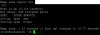
So these are the ports i see open to public
22 SSH - OpenSSH 7.4p1 Debian 10
443 HTTPS - 3CX Admin Console
5090 - 3CX Tunnel Port

1586800403332.png
1586800433146.png
1586800543644.png
 
So SSH is open to the public and you're worried about the ones hitting 3CX SIP and getting blacklisted??!?!??! Priorities my friend.
 
So SSH is open to the public and you're worried about the ones hitting 3CX SIP and getting blacklisted??!?!??! Priorities my friend.

I was helping him for a few hours getting it all buttoned up as best as possible, his UFW was having trouble binding the interface so its rules were not actually taking effect, even when properly configured and enabled.

I discovered that the 3CX ISO and the PBXExpress environments are not a complete 1:1 as far as the debian settings and configs, likely due to the needs of the cloud providers systems, the PBXExpress was a little different than my usual PBXs built from 3CX's ISO.
 
  • Love
Reactions: AWS2P
You are a kind soul. I don't mind helping folks but I'm more of a 'teach a man to fish' person. It really helps when folks understand why things are done, especially if/when something breaks.
 
Hi,
It's true Cobaltit, in perfect world, it would be better to understand alone, and to be able to do everything alone, but when we reach its limits, it is nice to be able to entrust the continuation to more competent people.

Brentt searched and struggled to replace ufw with iptable without more success, on lightsail it seems that it is hardly lost wanting to use another firewall, or it is the debian 9 base installed via PBX express which cause this concern.

Thank you Brentt for the time and effort, I really appreciated your kindness and your calm
Have a good day with the dog ;)
Christian
 
Status
Not open for further replies.

Forum statistics

Threads
112,031
Messages
590,388
Members
164,982
Latest member
Costa Georgijevski