Solved IP blacklisted but doesnot show up in IP Blacklist

Status
Not open for further replies.

bbinz

Premier Customer
Joined
Feb 19, 2020
Messages
22
Reaction score
1
I have several phones (android and ios) that cannot connect while on specific supplier network. However once they are on another network they connect.

I am not even able to open the webclient page from that specific supplier network. however i can see that the port is open and the packets go throught our firewall.

The phone app behaves like when the ip is blocked in 3cx, however there is no ip in the blacklist.

How do i disable the security to check if this is the issue.
 
Hi,

The problem must be elsewhere. If you have a blacklisted IP and try to reach the webclient, you will be still be able to reach the login screen successfully.

It will prevent your from logging in, but you will still reach it.
 
Hi John,

Thankyou for the reply.

When i do a open port check - i am able to see it is open.

My phone is also affected by this. I delete my profile and then tried to scan again i get the error
Provisioning Error
failed to connect to /10.1.50.106 (port 5001) from /10.25.240.106 (port 42630) after 5000ms.

why is it trying to connect to the local ip address, it should try to the fqdn address.
 
Depends where you scan the QR code from. the QR code is smart and will change dynamically depending whether you log in the management console from IP or from FQDN.

Locally, tt will work if both the PBX and the mobile are on the same subnet (ie the mobile is on a wifi with the same ip range as the server and they can reach each other)
 
the QR is scanned using fqdn. I am at home and if i switch to my home WiFi network it works where as on the data it doesnot. The server is in my office.

Now i uninstalled the app and tried again, now it is giving me SSL handshake timed out.

When I switched to my home WiFi, it provisioned immediately. I switch to data it is showing connecting.

Both locak and external PBX is the fqdn
 
Assuming that your home wifi connects you to the internet via a different network path, we are left with a phone that doesn't work but only from the specific GSM line provider.

You have some options now:

1. Can you use a different GSM provider SIM card (if possible of course) on your mobile and test again?

2. Use your own SIM card in another mobile, and see if it faces the same issue?

Or the following option which is the most interesting one:

3. Can you contact the GSM provider and inform them about the issue? You may have to give them the public IP of the PBX as well as the private IP. The reason is that the mobile app tries to connect BOTH to fqdn and local IP always. It will connect to whichever one replies first. Perhaps, the IP 10.1.50.106 exists somewhere in your providers network and the app is actually reaching that IP, getting a reply and waiting forever (since it is not an PBX). Many phone companies assign private IPs to 4G users, and then the users reach the internet via the providers NAT. If you are hitting a private IP they have, you may be running into the exact problem you described.
 
  • Like
Reactions: bbinz
i believe 3 is the problem, i am getting a private ip from GSM provider. 10.25.240.106 is my IP now.

however when I run ping to my fqdn it resolves to public ip of my pabx

also i have set both local and extenal pabx as fqdn. howcome it is resolving to local ip
 
Hi, All

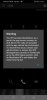
I was about to start a new thread too until I saw this post. I am also experiencing the same issue :'(. I installed Malwarebytes and scanned it that did not even work.
 

Attachments

  • WhatsApp Image 2020-04-03 at 17.24.46.jpeg
    WhatsApp Image 2020-04-03 at 17.24.46.jpeg
    43.8 KB · Views: 37
Ok I can suggest something then which may help:
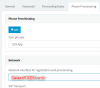
Edit your extension, select provisioning, select 3CX App from the drop down menu and change your Network interface for this extension to FQDN instead of local IP
1585928125119.png

Press ok to save, and now delete the app and reinstall it. Rescan the QR as I described earlier (via FQDN access to management console) while connected to your WiFi.

This will force the app to only populate the FQDN and not the local IP. So now, if your app works ok, close the app, disconnect wifi and connect back to 4G, and open the app again.

This time, the app will only have the option of connecting via FQDN and you should be successful!
 
  • Love
Reactions: Ethan Davids
@JohnS_3CX

This is already done from the begining.

WhatsApp Image 2020-04-03 at 20.05.22.jpeg
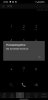
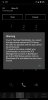
Tried to scan QR and provision via GSM data - SSL handshake error


WhatsApp Image 2020-04-03 at 20.05.22 (2).jpeg
Scanned QR via WiFi, and provisioned successfully. Both local and external is fqdn.

WhatsApp Image 2020-04-03 at 20.05.22 (1).jpeg
Switched back to GSM data, staying on connecting.
 
Last edited:
@JohnS_3CX

Now this is really crazy, in GSM data the app stays as connecting.

I tried calling my extension. IT rings and i am not abled to take the call or drop it.

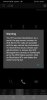
Also i get the warning the IP is blacklisted. But nothing in the black list

WhatsApp Image 2020-04-03 at 20.29.57.jpeg
 
@JohnS_3CX

I uninstalled the app, and provisioned using the config file and took a log report.

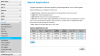
I can see that the fqdn is resolving to our public ip of the server. However the app stays in connecting status.
 
@bbinz

Have you tried to open the required ports? Please test and advise.

Regards
 

Attachments

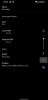
  • 2020-04-04 11_47_11-Mobile Broadband.png
    2020-04-04 11_47_11-Mobile Broadband.png
    42.3 KB · Views: 30
What version is your PBX and what version is your app?
 
@JohnS_3CX

Good day, trust you are well this issue popped up again, every time when I switch between accounts it i see this error message.

I am using v16 on 3CX App and my PBX version is v16.0.507
 
I would advise to first delete all accounts from your phone - if there is one with old/wrong credentials you will blacklist yourself. Remove and re-install the app if you want to be sure.

Then, try connecting from a different IP than the one you are using now:
If you are on 4G: Connect to a Wifi, you will be routed online with a different IP
If you are on WiFi: Switch to LTE only, or connect to another WiFi attached to a different modem

Make sure your extension provisioning settings for the 3CX App have "reprovision at startup" to avoid any future issues. You can regenerate your extension credentials as well, to get fresh passwords that are compliant (in case you have a red exclamation mark).

Finally, send yourself a new welcome email, and use the config file included in the email attachments to reconfigure your app (while you are connected under the different public IP as I describe above).
 
Good day, trust you are well this issue popped up again, every time when I switch between accounts it i see this error message.
How many accounts have you set on app?
 
@JohnS_3CX @aws2p

Good day, trust you are well I have done the following

1. Removed x2 of my 3CX extensions from the Andriod app (Different FQDN'S).
2. I cleared my app cache and data
3. I force stoped the 3CX app and then uninstalled it
4. I rebooted my LTE modem.
5. I regenerated my extension
6. I downloaded 3CX from the welcome mail.
7. I provisioned 3CX with the provisioning file attached to the email.
8. Still No Luck...
 

Attachments

  • Screenshot_20200410_093954_com.tcx.sipphone14.jpg
    Screenshot_20200410_093954_com.tcx.sipphone14.jpg
    293.6 KB · Views: 6
You mentioned LTE modem. This would imply you are behind a carrier NAT, with a shared public IP.

If the shared public has been implicated in hacking attempts it will have been globally blacklisted.

Goto your PBX > Settings > Security > Anti-Hacking tab > Disable the Automatic Global 3CX IP Blacklist.

Can you connect now?
 
Status
Not open for further replies.

Forum statistics

Threads
112,147
Messages
590,959
Members
165,167
Latest member
Finatra.us