IP Phone Fanvil problems

George Stavrianos

Customer
Joined
Apr 28, 2020
Messages
73
Reaction score
7
Hello to all,

we have a problem with Fanvil X1SP IP phones, where some users when receiving a call, the caller does not hear the user, even though we change the handset of the phone. Also to these users we have change the device with a new one but the proble persists. Other users with the same devices can accept calls with no problem.

Also to the affected devices another problem is that when they press the dial code of pick up a call (*72) of other user , they have the somw problem where the caller does not hear them.

We have change the devices, reset the users and devices but the problem persists.

Any idea?

Thanks
 
A good start would be to do a capture on the PBX and the phone to see which ports are being used, and also see the audio streams as they arrive and leave the devices.

Also, try to enable PBX delivers audio to see if that resolves the issue. This would indicate that something on your network is blocking the audio traffic.
 
Ok we will try with the capture on the PBX and devices, also we will try to enable PBX delivers audio and come back with the results

Thanks
 
A good start would be to do a capture on the PBX and the phone to see which ports are being used, and also see the audio streams as they arrive and leave the devices.

Also, try to enable PBX delivers audio to see if that resolves the issue. This would indicate that something on your network is blocking the audio traffic.
Also to the admin web client we have not the option of capture
 
You can find it under the Activity log

1731408194571.png

Then select your interface and click start

1731408258380.png

Start the capture first, then start replicating the issue. Once you've completed the call, stop the capture and download it.
 
Hello again,

i would like to inform you that , we enable the PBX deliver audio , but the problem still remains.

Also I finish the captupe, and I habe the .pcap file.What can i do with this?

Thanks
 
Hello again,

i would like to inform you that , we enable the PBX deliver audio , but the problem still remains.

Also I finish the captupe, and I habe the .pcap file.What can i do with this?

Thanks
 
Open the capture in Wiresh\ark.

Go to the "Telephony" menu, and select VoIP Calls.

This will open a window with the call legs. Select them and click on Audio streams

You should be seeing 4 audio streams here. 2 between the IPs of the PBX and your provider, and 2 from the IPs of the PBX and the phone.

If you dont see 4, then you can focus your efforts there. For example, if you dont see a stream coming from your providers IP address then it means that you are not receiving audio from the provider.

At least narow down where the audio is failing.

We will be having a webinar on Thursday at 11AM GR time to show how you can troubleshoot with Wireshark.

It is fully booked though, but let me know if you are interested in watching it and I can see what I can do.
 
  • Like
Reactions: Greg_G
Hello,

thanks for you response,

but i don't unsedratnd and cannot find the step "Select them and click on Audio streams". I find the logs but and cannot find the audio streams to click on them.

Thanks again
 
Open the capture in Wiresh\ark.

Go to the "Telephony" menu, and select VoIP Calls.

This will open a window with the call legs. Select them and click on Audio streams

You should be seeing 4 audio streams here. 2 between the IPs of the PBX and your provider, and 2 from the IPs of the PBX and the phone.

If you dont see 4, then you can focus your efforts there. For example, if you dont see a stream coming from your providers IP address then it means that you are not receiving audio from the provider.

At least narow down where the audio is failing.

We will be having a webinar on Thursday at 11AM GR time to show how you can troubleshoot with Wireshark.

It is fully booked though, but let me know if you are interested in watching it and I can see what I can do.

Hello,

thanks for you response,

but i don't unsedratnd and cannot find the step "Select them and click on Audio streams". I find the logs but and cannot find the audio streams to click on them.

Thanks again
 
1733323785453.png

This will open up a window which will show the call legs.

Select them and select Play streams

1733400844646.png

This will show you the audio streams. You should see 4 audio streams which are selectable and playable.

1733401075301.png

You will be able to see the streams to and from the problem phones.
 
Hello,

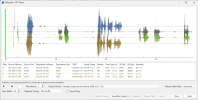
thanks again for your reply!! After the above process I send you the screenshot from Wireshark capture.

Do you understand anything about our problem?

Thanks
 

Attachments

  • Screenshot 2024-12-05 145752.png
    Screenshot 2024-12-05 145752.png
    91.1 KB · Views: 7
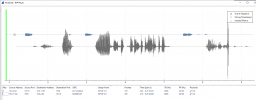
When you play the blue stream what do you (or dont hear) looks like its not sending a stream properly. This might be due to a bad handset.
 
  • Like
Reactions: Greg_G
when i played the blue stream, i hear well. Do you mean that the problem occurs because of bad handset? And all of 56 devices have problem?
 
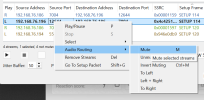
You might be hearing the other stream. Mute the other good stream

1733407438750.png
 
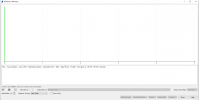
Hello, today when i started the capture-->Telephony--?Voip calls-->Play streams I get the below screenshot.

Thanks
 

Attachments

  • Screenshot 2024-12-06 100936.png
    Screenshot 2024-12-06 100936.png
    28.8 KB · Views: 6
That would indicate the phones are exchanging their audio between themselves and not going through the PBX.
 
ok and how can resolve this?
 
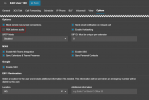
Enable PBX delivers audio on your user(s) and you will see the 4 audio streams to and from PBX and devices.

1733479662631.png
 
Good morning,

i started the capture today, but i get blank audio streams, until the extensions have the PBX deliver audio enabled.

Any idea?
 

Forum statistics

Threads
112,291
Messages
591,733
Members
165,416
Latest member
Graham Robertson