Is it possible to change size of the chat window on a mobile browser

Status
Not open for further replies.

hewso

Customer
Joined
Mar 23, 2020
Messages
41
Reaction score
13
Hi we have implemented Live Chat on our Website (not wordpress) and the size of the window / font is tiny - can this be revised in a future release please?
 
Hi @hewso,

Can you provide a bit of detail with regards to your chat? Did you use the html code generator?
 
Yes I used the HTML script generator and uploaded to the file as indicated in the guidance...

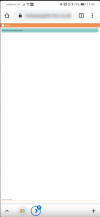
I have provided a view of the mobile browser in the attachement.

I can provide the js file if required
 

Attachments

  • 2021-01-29_13h53_40.png
    2021-01-29_13h53_40.png
    33.9 KB · Views: 19
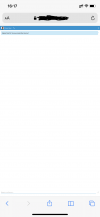
In safari on iOS, it looks the same. I consider this an unacceptable result.
 

Attachments

  • IMG_6075.PNG
    IMG_6075.PNG
    51.3 KB · Views: 14
I noticed that when I tried the function. Was the same type of size.
 
I spoke with the Dev Team and it seems that this was an issue that will be addressed in the next 3CX Update.
 
I'm wondering what this has to do with the 3CX update? the file callus.js is generated by the online generator and is located on the site, and the window display is set in it.
 
I used the plugin on my word press site, super easy to setup, and I noticed the same problem with the mobile version, the chat window pops out full screen in a new windows, and you have to try and zoom in and scroll around to read the tiny text. Other than that it is well done. Kudos!!
 
I used the plugin on my word press site, super easy to setup, and I noticed the same problem with the mobile version, the chat window pops out full screen in a new windows, and you have to try and zoom in and scroll around to read the tiny text. Other than that it is well done. Kudos!!
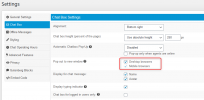
Could you check if both checkboxes are checked here?
1612167815223.png
 
I will check and get back to you

ps. I did check both boxes from memory.....
 
Last edited:
yes both check boxes are checked - should they no be?
 
Hello @hewso,

There are two issues related to mobile mode that will be resolved in the upcoming update expected approx. in 2 weeks time.
1. When you uncheck the option of desktop popout, this option is also respected by the mobile mode. This is problem that will be fixed. You can try and uncheck the desktop popout to verify that it is rendered properly on mobile device.

2. When the option to popout is enabled for both, the new window opening on PBX url was not properly scaled for mobile devices. This is something that will be resolved with the upcoming release of v16 Update 8.

Please let me know if you need anything else.
 
Many thanks for the update Constantinos.
 
ok - I have resolved my problem by disabling the use of popouts on desktop - it works well now... many thanks
 
This checkboxes don't appear in my settings. By default, my chat opens in a new window, and I want it to open on the same page, and not on a new one. Any solution?
 
the setting is in the config for the live chat.... it sits on your web server.
 
Status
Not open for further replies.

Forum statistics

Threads
112,149
Messages
590,965
Members
165,170
Latest member
SupportRock