Is it possible to disable / enable trunk individually?

Status
Not open for further replies.

Dalibor

Free User
Joined
Jul 18, 2017
Messages
22
Reaction score
1
This has been bothering me for a long time.
To disable a single trunk, I have to export the trunk, note down the credentials, delete the trunk, do what I need to do, and then restore the trunk.
There must be a better way, right?

I can only see the "Enable all" and "Disable all" options.

3cxTrunks.png
 
Seems excessive what you're doing.

if it's credentials based then just add a 0 to your username and the registrations will become invalid, SIP unregistered.

Note though, whitelist your 3CX IP with your SIP provider so they dont blacklist you.
 
Hi @Dalibor,

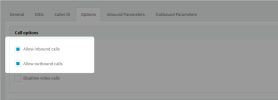
When you want a SIP Trunk to not be working for a period of time, you can go to the 'Options' tab of the SIP Trunk configuration and disable options "Allow inbound calls" and "Allow outbound calls".
This will block all calls from this trunk.

1673008708327.png
 
I appreciate this suggestion; however, I often need to block the actual registration of the trunk with the SIP provider.
 
Seems excessive what you're doing.

if it's credentials based then just add a 0 to your username and the registrations will become invalid, SIP unregistered.

Note though, whitelist your 3CX IP with your SIP provider so they dont blacklist you.
I do not have the option to whitelist it with the SIP provider.
 
Status
Not open for further replies.

Forum statistics

Threads
111,974
Messages
590,081
Members
164,899
Latest member
mazet