is my 3cx hacked?

Status
Not open for further replies.

amannick

Gold Partner
Joined
Feb 26, 2021
Messages
102
Reaction score
13
I had been getting weird calls on my 3cx. it rings and moment I answer it disconnect right away. however when I check reports with my SIP provider no call logs shows up even my 3CX had block IP.


I was kicked out of my own admin account and now not able to login to admin account.

how can I check and prevent my other customers.


Thanks
Aman
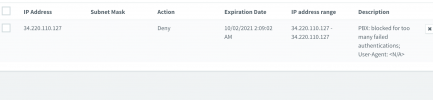
 
I am seeing common ip blocked on all my 3CX instances

1633112198117.png
 
In Security/Console Restrictions you can check "Allow Access from specific IP Addresses" and enter your IP address and any backup IPs. That's for the admin side not the web client.

You can also go to Security/IP Blacklist and enter your IP and your client's office IP so they won't ever be blocked. This also helps prevent cases where someone connects to server:5001/ and not server:5001:/webclient by mistake.

In Security/Anti-Hacking there are thresholds to the number of failed logins, and it looks like your system blocked one. We get one blocked every couple weeks, usually on all client servers we host. The default blocking period is 1 day. If "Automatic Global 3CX IP Blacklist" is on, 3CX will automatically block IPs it detects worldwide.
 
In Security/Console Restrictions you can check "Allow Access from specific IP Addresses" and enter your IP address and any backup IPs. That's for the admin side not the web client.
Only in on premise platfom, not in cloud.
 
Only in on premise platfom, not in cloud.
What do you mean ?
You can apply same way even pbx is cloud hosted, of course you need almost from your remote location a static public IP
 
What do you mean ?
You can apply same way even pbx is cloud hosted, of course you need almost from your remote location a static public IP
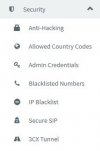
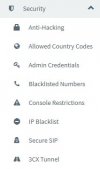
As you can see, the Console Restrictions item is missing from the Security Menu of the Cloud PBX (hosted by 3CX) dashboard. At least, in my pbx's.
(3CX pbx ver. 18.0)
 

Attachments

  • Dashboard PBX hosted by 3CX.JPG
    Dashboard PBX hosted by 3CX.JPG
    15.7 KB · Views: 3
  • Dashboard PBX on premise.JPG
    Dashboard PBX on premise.JPG
    15.7 KB · Views: 3
As you can see, the Console Restrictions item is missing from the Security Menu of the Cloud PBX (hosted by 3CX) dashboard. At least, in my pbx's.
(3CX pbx ver. 18.0)
One of the restrictions of Hosted by 3CX is the lack of control on these things.
 
Going back to one of your original issues...
I had been getting weird calls on my 3cx. it rings and moment I answer it disconnect right away.
Are your phone using STUN, or behind an SBC?. If you are using STUN, someone may be attempting Direct SIP calls to your sets. Some makes of phones do have an option to stop this, I believe Yealink is one of them, but the default template should have this already set to block. Hackers will usually scan for port 5060 being in use, then attempt to register, or place a call. Once they have your IP, and assume there is a PBX, they can be relentless.

Have a read through...
https://www.3cx.com/community/threads/block-call-from-ip-ip.70480/
https://www.3cx.com/community/threads/ghost-calls.60156/
 
Last edited:
  • Like
Reactions: Evolute IT
Only in on premise platfom, not in cloud.
We host 100% of our clients so far so I did not catch that.

If it's what @leejor suggests then on our one client with STUN (not our choice) we did limit the inbound port forwards to the 3CX server.
 
Last edited by a moderator:
  • Like
Reactions: Evolute IT
Status
Not open for further replies.

Forum statistics

Threads
111,977
Messages
590,094
Members
164,906
Latest member
Nari