Thank you for your replies! I have deployed a T53W as a Router phone and confirmed it's working. Two observations I came across that I'm hoping someone can confirm for me:
- The guides I found recommend to set the phone up from the Webclient. This won't work if the user already has one phone (on-prem) configured, as I did not see the option to add an additional phone from that UI. I was able to follow steps using the Admin Console to complete the setup.
- The option for [Block Remote Phones using STUN (insecure!)] has to be unchecked. The other option for [Block Remote Tunnel/SBC Connections] sounded more relevant but without the STUN option enabled I receive a "Block WAN request is ON" warning in my dashboard when the phone attempts to register.
Hi Justin,
It sounds like you did not configure it correctly. Here is what I recommend doing in case you have 2 phones:
1. Factory reset both phones
2. Make sure they both have the correct
firmware (important!)
3. Go to the Management Console - Delete both phones from the extension
3. Make sure the circled settings are exactly like my screenshot:
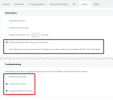
4. Now visit the
webclient admin page and add the router phone first from there
5. Reboot the router phone so that it will ask for credentials
6. enter credentials and when the phone restarts, make sure calls work.
7. Now log into the 3CX Management Console and go to the Phones page (so we can do the 2nd on-prem phone)
8. You should see the 2nd on-prem phone in bold (confirm its the correct one via MAC)
9. Select it and press the "Assign. Ext." button, then pick the extension you want to assign it to and press ok
10. It will take you to the extension's provisioning tab, you just need to press ok and the on-prem phone will now also provision
You will now end up with both phones provisioned. Make a couple of test calls to confirm and you are done.


