Is there a way to improve the AI Receptionist voice?

guzzitech

Premier Customer
Advanced Certified
Joined
May 8, 2024
Messages
30
Reaction score
9
When playing with voices on OpenAI projects page, they all seem vibrant and able to adjust their settings. But via 3CX integration, the voices always sound so robotic. Even if you try to adjust it using the AI Prompt, they still fall back into robotic sounding voices.
 
Good point. The OpenAI project page is usually the best-case demo experience. In 3CX, the voice goes through the telephony path: SIP/RTP, codecs, possible transcoding, and phone-call quality audio. That can make even a natural AI voice sound flatter or more robotic.

And what settings can you adjust? I never saw any settings. Its a list of tones.. The same list we show in the 3CX UI.

The prompt can improve the wording and style.
What voice are you using? And did you touch the prompt?

You can add this to the prompt:

Speak warmly and naturally, like a friendly customer service receptionist. Use short sentences, positive wording, and a calm upbeat tone. Acknowledge the caller before asking questions. Ask one thing at a time. Avoid robotic or formal phrases. Sound helpful, patient, and professional.

gpt-realtime 2 was released and we are working to add it to the next update.
I can tell you from now that from our tests, it sounds much much better.
 
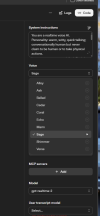
We are using "Sage" in the 3CX agent settings. Sage in the OpenAI Audio section sounds very different. But I can see how to apparent sound could change browser > call.


1782716993276.png
 
Yes you are right - you see the model named gpt-realtime 2
That model is not yet available in 3CX.
Its coming soon.
Yes of course - the gpt-realtime 2 sounds better and nicer. We cannot wait to launch it.

To make a fair comparison you need to switch to gpt realtime 1.5.
 

Latest Posts

Members Online Now

Forum statistics

Threads
111,831
Messages
589,276
Members
164,658
Latest member
gumby156