Solved Issue Accessing Webportal on Debian V18

Status
Not open for further replies.

2MT

Free User
Joined
May 6, 2022
Messages
3
Reaction score
1
Hello all,

I am having issues accessing the web dashboard after a fresh install of Debian V18. After the initial configuration, the system boots up to the screen below. I do not get the welcome screen like what is shown in the installation guide. I try to access the web dashboard to using the IP but to no avail.
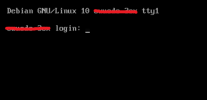
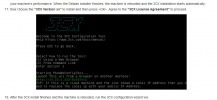
Untitled.png
 
Can you do me a favor and try:

• Redeploy using the 3CX ISO from the beginning.
• DO NOT select a static Local IP and use DHCP instead.
• Proceed with the installation and let me know if it works.

By the way, just to confirm, by "Welcome Screen" do you mean the following:
1651846211419.png


If not, are you perhaps referring to the 3CX Management Console or the screen showing you the Management Console credentials and PBX information?
 
Can you do me a favor and try:

• Redeploy using the 3CX ISO from the beginning.
• DO NOT select a static Local IP and use DHCP instead.
• Proceed with the installation and let me know if it works.
That worked, thanks!
 
  • Like
Reactions: ChrisC_3CX
Excellent! Glad I could help!

You can of course now manually configure your machines IP settings if you want a static local IP. You will have to access the Management Console and accept those settings in "Settings >> Network" after the change.

Don't hesitate to start a new thread should you need anything else!
 
Status
Not open for further replies.

Forum statistics

Threads
111,974
Messages
590,081
Members
164,899
Latest member
mazet