- Joined
- Apr 4, 2025
- Messages
- 2
- Reaction score
- 1
Good day,
I've been fighting to solve this issue for some time and I cannot find an answer.
We are based in Trinidad & Tobago and our SIP provider provided us with an IP based SIP.
We requested and were given two additional DID's apart from the main SIP number, which I intend to reach two separate digital receptionists.
On the Trunk configuration, I set the default route to a users (for the main sip number, as this is a new number that customers do not know) and assigned the two DID's to the two digital receptionists.
The issue is no matter what I do, or which DID I call, the call goes through the default route of the main trunk number, to the user. Infact, the call will only be routed to whatever the default route is for the main trunk number.
Here are the steps I've taken:
1. I double checked that, in the DID page, it does show it is assigned to the right places. In addition I also tried setting the did format to every possible combination including and excluding wildcards.
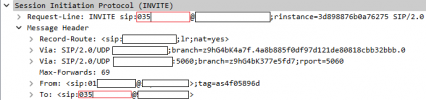
2. I've used both Wireshark and 3cx's built in activity logs to see the incoming number shown and that it infact matches the DID settings. Here is an output from wireshark:
581 18.434476 192.168.41.89 192.168.58.2 SIP/SDP 1318 Request: INVITE sip:6520510;phone-context=[email protected]:5060;user=phone |
So I can see that when a call is incoming, it identifies the DID from which the incoming call is coming through.
3. I've tried it with e164 enabled and disabled.
4. I've checked the activity logs and I can see something is happening but I am new to 3cx and I'm now very lost in what to do.
I see this in the logs which seem like its skipping any rules this happens no matter which did called. :
04/05/2025 2:14:12.528 AM [CM503012]: Inbound any hours rule (unnamed) for 10000 forwards to DN:901
04/05/2025 2:14:12.528 AM Rule matched
04/05/2025 2:14:12.528 AM Checking inbound rule '': hour type = 1; cond = 4; mask = ''
04/05/2025 2:14:12.528 AM Checking inbound rule '': hour type = 2; cond = 6; mask = '6520510'
04/05/2025 2:14:12.528 AM Checking inbound rule '': hour type = 2; cond = 6; mask = '6582010'
04/05/2025 2:14:12.528 AM Checking inbound rule '': hour type = 2; cond = 6; mask = '6124570'
Please can someone help.
I've been fighting to solve this issue for some time and I cannot find an answer.
We are based in Trinidad & Tobago and our SIP provider provided us with an IP based SIP.
We requested and were given two additional DID's apart from the main SIP number, which I intend to reach two separate digital receptionists.
On the Trunk configuration, I set the default route to a users (for the main sip number, as this is a new number that customers do not know) and assigned the two DID's to the two digital receptionists.
The issue is no matter what I do, or which DID I call, the call goes through the default route of the main trunk number, to the user. Infact, the call will only be routed to whatever the default route is for the main trunk number.
Here are the steps I've taken:
1. I double checked that, in the DID page, it does show it is assigned to the right places. In addition I also tried setting the did format to every possible combination including and excluding wildcards.
2. I've used both Wireshark and 3cx's built in activity logs to see the incoming number shown and that it infact matches the DID settings. Here is an output from wireshark:
581 18.434476 192.168.41.89 192.168.58.2 SIP/SDP 1318 Request: INVITE sip:6520510;phone-context=[email protected]:5060;user=phone |
So I can see that when a call is incoming, it identifies the DID from which the incoming call is coming through.
3. I've tried it with e164 enabled and disabled.
4. I've checked the activity logs and I can see something is happening but I am new to 3cx and I'm now very lost in what to do.
I see this in the logs which seem like its skipping any rules this happens no matter which did called. :
04/05/2025 2:14:12.528 AM [CM503012]: Inbound any hours rule (unnamed) for 10000 forwards to DN:901
04/05/2025 2:14:12.528 AM Rule matched
04/05/2025 2:14:12.528 AM Checking inbound rule '': hour type = 1; cond = 4; mask = ''
04/05/2025 2:14:12.528 AM Checking inbound rule '': hour type = 2; cond = 6; mask = '6520510'
04/05/2025 2:14:12.528 AM Checking inbound rule '': hour type = 2; cond = 6; mask = '6582010'
04/05/2025 2:14:12.528 AM Checking inbound rule '': hour type = 2; cond = 6; mask = '6124570'
Please can someone help.