Solved Issue with 3cx smtp server on vmware esxi

Status
Not open for further replies.

DBCI

Basic Certified
Joined
Nov 24, 2020
Messages
17
Reaction score
0
we are hosting a customer 3cx standard on esxi ... for some reason the 3cx smtp server gives 5.7.0 denied .. port 2528 is opened outgoing in firewall and the instance has a valid NAT+public IP and firewall test pass...

i have tried switching logs to verbose but no errors for smtp circuit (tried also welcome email to pick up more data but no luck)
 
Did you restart all services?
 
Hi .. many times .. even through the firewall checker which claims everything is green ..
 
Please check your IP adress. Public ip musst be the same bound to the FQDN. Do you have multiple networkcards on your 3cx?
 
this has been double checked already and yes it is perfectly accurate :-)
 
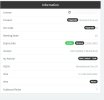
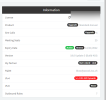
2022-10-10_111028.jpg

DNS lookup is also accurate for the host ... so i am kinda stuck on what to check next ...
 
That looks fine... please check with 3cx any problems. Maybe @Vali_3CX can help?
 
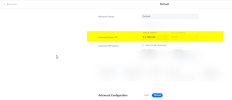
Click on the IPv4 from the screenshot above, set it to Dynamic under "External IP Configuration".

Press OK to save and give it 30 mins.
 
  • Like
Reactions: bitn2 and Vali_3CX
Maybe @Vali_3CX can help?
Unfortunately, I cannot, far beyond my knowledge, me I'm in "mobile clients" area. I suggest to open a ticket to our tech support for such troubleshooting.
 
  • Like
Reactions: DBCI and bitn2
Click on the IPv4 from the screenshot above, set it to Dynamic under "External IP Configuration".

Press OK to save and give it 30 mins.
ok i had seen that on another post .. even though we all agreee it "apparently" makes no sense given current setup i'll give it a shot ....
 
If you have more than one WAN interface on your firewall and you own multiple public IPs, you need to be careful with your network setup.

You were enforcing the IP we saw in the screenshot, but if the activation server sees you coming from another IP, you will still mismatch and the mail server will not allow you to send.
 
  • Like
Reactions: DBCI and bitn2
ok that makes a lot of sense... i do have more than one WAN interface in our DC ... i'll try to see if i can force a route
 
Force everything coming from the MAC of your PBX, not just the ports 3CX uses.

After that 3CX will eventually detect the true external IP and should sort itself out if left in Dynamic mode.
 
  • Like
Reactions: DBCI
team i just remembered we did have an public ip change last year beginning of year ... since our other instances are pro this didn't bother us too much
Force everything coming from the MAC of your PBX, not just the ports 3CX uses.

After that 3CX will eventually detect the true external IP and should sort itself out if left in Dynamic mode.
i will have to check if our FW device does that keep you posted and thanks to the team for all replies so far :)
 
i've opened a SR to our fw support team but meanwhile after 24h it happens the dynamic ip picked up to be the same as the fixe on

1665579514604.png
 
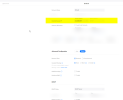
ok so this is vendor specific but basically with ubiquiti you can define in a network definition which outgoing wan ip (internet source ip ) is used....
1667837135302.png

since it is a shared network and we did not care too much we switched the lan outgoing ip to the one matching the 3cx free instance problem solved

thanks for the support guys :)
 

Attachments

  • 1667837112978.png
    1667837112978.png
    70.8 KB · Views: 1
Status
Not open for further replies.

Forum statistics

Threads
111,974
Messages
590,081
Members
164,899
Latest member
mazet