- Joined
- Apr 18, 2025
- Messages
- 5
- Reaction score
- 1
Hello,
First time poster, long time forum trawler.
We recently upgraded one of our clients from v18 to v20 on a cloud hosted Debian Server.
I went through the checklist that I found in the blog posts, although this was helpful it seems to be missing some key details.
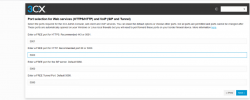
The most important one is the setting of the Listening port for the PWA, on v18 this is set to 5001, in fact all our clients have this set, I am fairy new to upgrading 3CX and to get our upgrade completed we need to image our host with the latest Debian ISO + 3CX v20, We had taken a backup of our 3CX Tenant (Full Backup) and we restored this once the server image was completed.
Everything went smoothly until this morning, when all softphone users were unable to login to the PWA app, it was stuck in a constant Disconnect/Reconnecting loop and no way to stop it.
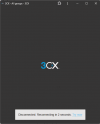
This was a bit of a head scratcher until I remove the port from the URL and was able to see the login screen again in the browser.
I was not aware that if you don't change the port as part of the server setup that this would occur, and as you are not able to reconfigure the PWA app I have had to uninstall and reinstall this for several end users, this is somewhat annoying, If the Check list had made a note about ensuring the ports were configured as part of the setup I would have done so, Yes this is partial on me for not paying much attention and just moving thought the server setup too quickly.
I have looked and cannot find anywhere on how to change this listening port, Can anyone provide any insight on how to change this or is this not possible once you have finalised the server config, also as noted we restored a full backup and this clearly doesn't set the ports as you would expect, and another reason why this should have been noted in the upgrade.
I'm curious if anyone else encountered this issue, and if there is a reason this is not mention as part of the upgrade process, its seems like a core component of the upgrade and there should have been some note about it, Oddly can't seem to find anyone else that had this issue, several other post similar not quite the same issue.
I have 2 more clients to upgrade tonight so will see how that goes when I get to the port selection, hopefully as long as I set this my issues I had today will not be a problem for our other clients as there are about 50-70 users that are currently using PWA.
Thanks
Dan
First time poster, long time forum trawler.
We recently upgraded one of our clients from v18 to v20 on a cloud hosted Debian Server.
I went through the checklist that I found in the blog posts, although this was helpful it seems to be missing some key details.
The most important one is the setting of the Listening port for the PWA, on v18 this is set to 5001, in fact all our clients have this set, I am fairy new to upgrading 3CX and to get our upgrade completed we need to image our host with the latest Debian ISO + 3CX v20, We had taken a backup of our 3CX Tenant (Full Backup) and we restored this once the server image was completed.
Everything went smoothly until this morning, when all softphone users were unable to login to the PWA app, it was stuck in a constant Disconnect/Reconnecting loop and no way to stop it.
This was a bit of a head scratcher until I remove the port from the URL and was able to see the login screen again in the browser.
I was not aware that if you don't change the port as part of the server setup that this would occur, and as you are not able to reconfigure the PWA app I have had to uninstall and reinstall this for several end users, this is somewhat annoying, If the Check list had made a note about ensuring the ports were configured as part of the setup I would have done so, Yes this is partial on me for not paying much attention and just moving thought the server setup too quickly.
I have looked and cannot find anywhere on how to change this listening port, Can anyone provide any insight on how to change this or is this not possible once you have finalised the server config, also as noted we restored a full backup and this clearly doesn't set the ports as you would expect, and another reason why this should have been noted in the upgrade.
I'm curious if anyone else encountered this issue, and if there is a reason this is not mention as part of the upgrade process, its seems like a core component of the upgrade and there should have been some note about it, Oddly can't seem to find anyone else that had this issue, several other post similar not quite the same issue.
I have 2 more clients to upgrade tonight so will see how that goes when I get to the port selection, hopefully as long as I set this my issues I had today will not be a problem for our other clients as there are about 50-70 users that are currently using PWA.
Thanks
Dan