Issues Reprovisioning SNOM D865 After Deregistration

Pfortje

Customer
Joined
Nov 9, 2024
Messages
4
Reaction score
0
I had previously provisioned a SNOM D865 phone successfully, but I deregistered it after noticing that the configured extensions were not functioning properly. Since then, I have made several attempts to reconnect and reprovision the phone. According to the logs, the data is being sent successfully, but the phone does not apply or reflect these settings. Additionally, during this process, my IP was blocked (a support ticket has already been opened for this).

What steps should I take to reconnect and properly provision my SNOM D865? Any insights or recommendations would be greatly appreciated.

Version: 3CX SMB PRO 20 Users hosted by 3CX
 
Delete the phone from 3CX and then proceed to factory reset it
https://www.3cx.com/sip-phones/factory-reset-snom/

Wait 24h until the ban is lifted, you will be able to log back into 3CX.

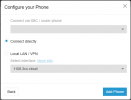
Add the phone again, but make sure you use the correct MAC and you add it as Connect Directly

1731313831818.png

Once added, factory reset again and wait.

The phone may reboot a few times, and may automatically upgrade its firmware.

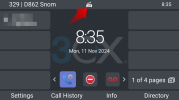
When finished, you will see a little router icon if the phone connected successfully.
1731314176059.png

You need to be behind IPv4, you cannot be behind IPv6 only.
 
I have tried, but even a new Yealink T58W cannot be provisioned. After creating a new instance, provisioning works as expected. What frustrates me is that the support team, for 75 CHF, only reads half of the request and sends a response that makes no sense.

Since the phones work on the new instance, it is quite clear to me that there is an issue with this particular instance, as the new one functions perfectly.
 
Not so clear on this end, we saw phones added as non-router and some as Generic.
Please follow instructions as above and it should come up fine.

Can also confirm the T58W (which was set as router) was up and running successfully.
 
Thank you for your response.

In the first instance, I was unable to provision any phones after deleting the Snom device. However, after setting up a new instance, I was able to provision all phones without any issues.

In the old instance, the event log indicated that the phone had received all data, but it did not connect and displayed an error message regarding WAN block.

Why am I able to successfully provision the phones in the new instance but not in the old one? This inconsistency is puzzling, especially since the T58W (which I purchased new, thinking the Snom had an issue) showed the same behavior and could not be provisioned, which points to a potential issue in the first instance.

Both phones, as you mentioned, are now connected to the new instance and are working perfectly. Given that the Snom device was functioning properly before being deleted from the old instance, I suspect it might be a cache problem. However, I cannot be sure, as I am using the SMB version initially, with plans to upgrade later.

Thank you for your assistance in resolving this matter.
 
but it did not connect and displayed an error message regarding WAN block.
This is the hint that the phone was not added correctly the first time around or that it did not yet have the correct firmware when first connected.

Just to keep in mind, any time you add a phone without an SBC (or router mode) the phone will try to connect via SIP over WAN. This is of course blocked by default since its a common attack vector on SIP systems.

Same goes if you try to connect a router phone with an older firmware that does not contain the router functionality yet. However, once the correct firmware is installed and you set it up in 3CX as router mode, the phone is smart enough to not try and connect via WAN SIP so it will not cause your IP to be blocked.

I'm guessing you probably got the right firmware installed eventually, and when you tried on a different instance everything was ready to go so it came up without issues :)
 
I followed the instructions on the 3CX website precisely. I first installed the necessary firmware on the phones, then reset them, and set them up in 3CX using the MAC address in router mode. The phone rebooted, showed that it was being provisioned, restarted again, and then went into IP setup mode. An internal IP was not displayed in the 3CX admin console, and the phone remained in a "red" status. Multiple restarts did not resolve the issue.

With the same firmware, I connected the phones to the new instance, and they worked immediately without any issues.

But now, with the new one everything is fine.
 

Members Online Now

Forum statistics

Threads
111,832
Messages
589,278
Members
164,662
Latest member
DejanMDS