IVR Missing Action

Status
Not open for further replies.

LH74

Customer
Joined
Nov 19, 2019
Messages
49
Reaction score
10
Hello,

we have different departmens with different Office Hours. These are set within Inbound Rules. No Problem so far, but I'd like to use not only DID to call each Department, but also have IVR available to reach each department. Is there a way to "Transfer to Inbound Rule", so after the caller's DTMF-Input the caller is transfered according Inbound Rule (and specific Office Hours) either to Queue of that Department or Group Mailbox.

I searched to apply a virtual Extension Number to the Inbound Rule which can be set as Destination for IVR, but there is no way.

Any Idea how to apply this Scenario?
 
Correct way to do it: Send to CFD, have CFD apply time logic and route call.

Bad hacky way:
Transfer to external DID via first transfer to ext with forwarding rule.
It will use an extra SC while doing so.
 
The second way was exactly what I thought but also felt like a bad Solution. The correct way sounds good, but I'm new to 3CX and don't understand what you mean with "Send to CFD". Do you mean Call Flow Designer? And if so, do I need to hard Code the same time logic or is there a way to refer to Office Hours set in 3CX Admins Area so I have to Change them only once (not in CFD a second time) in case there are Change requests?
 
you can use an ivr forwarding on several dummy extensions with autoswitch enabled, thoses extensions are forwarding to Qs during office hours (you need to set hours on dummy EXT.) and goes elsewhere when DND for example your Voicemail
 
you can use an ivr forwarding on several dummy extensions with autoswitch enabled, thoses extensions are forwarding to Qs during office hours (you need to set hours on dummy EXT.) and goes elsewhere when DND for example your Voicemail

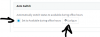
Good idea. But does the Option Extension / Forwarding Rules / "Set to Available during office hours" also mean, that the System set back to unavailable outside These Office Hours?
 
Yes auto switch , does switch from OH to OOH automaticly related to your time settings

So you can choose working days and hours like you want for each department
 
Excellent. This way I avoid multiple (and same) Office Hours for different DID's too. (Direct Number, Incoming 0800-FreeCall displayed as FreeCall) but for the same Department.
 
Yes auto switch , does switch from OH to OOH automaticly related to your time settings

So you can choose working days and hours like you want for each department

Are you sure, that it does switch from OOH to OH back? I've tried and it remains on "Away". Of course, there is no phone registered on this (dummy) Extension, but Maybe it's necessary in order to enable Auto Switch?. This Extension is not visible in my 3CX Windows Client, too. I just check the Status in the 3CX Phone System Manager on Extensions / Status and see there, that it remains on "Away".
 
yes i'm sure , i use this on certains of my customers for example 3 dentists, they don't work same time, not same days, with only 2 assistants who take calls from Qs.
and everything is working like they want and switch automaticly.

If there's away status so you use breaks? how are set your office hours and where?
 
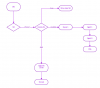
DID--> IVR --> Choice 1-----> dummy ExT ---> available ----> Q 1
|-------------> Away(if break) --> Where you want , a VM or other IVR
|-----------> DND ---> night IVR (we are closed, and VM or End call)

13323

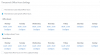
Dummy ext need to be set with hours and days for concerned department, example
13319
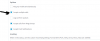
Extension need also
13320

13322

13321
 
Last edited:
Thanks a lot for your detailed answer! I had done everything exactly as you described already. But now it works (without I have done any changes) and I think the reason was, that the PBX needed a trigger (being currently OOH and came into OH by Clock, not by adjusting OH).

Just for understanding:
We do not have break times. The current Status toggles between "Available" and "DND" (not "Away"), Right?
Do you have experience what happens if someone cames earlier and wants to manually switch to available (before OH) or leaves the Office earlier and wants to manually switch to DND. Does the PBX still changes to DND after OH or to Available after OOH?
I found, that the Routing after OH is correct (thus the PBX obviously switched to DND), but in the Phone System Manager View it still Shows me "Available". Is there a way to see the real Status of this (offline, dummy) Extension in my 3CX Windows Client?

Best regards from Germany
 
But now it works
this is because when you have set range hours you were already in, so extension status need to be forced manually first time . After that everything goes zen.
The current Status toggles between "Available" and "DND" (not "Away"), Right?
Yes if no break so only 2 statuses are used , Available and DND

If you want to use automatism with PBX, you need to let it do his job, and of course if your night IVR give message like:
We are open from Monday to Wednesday from 9AM to 5PM and you want to answer at 8AM or leave before 5 PM,, this is not very PRO, don't you think?

But to answer your question, technically yes you can force OH or OOH just changing manually status of dummy ext.

I found, that the Routing after OH is correct (thus the PBX obviously switched to DND), but in the Phone System Manager View it still Shows me "Available". Is there a way to see the real Status of this (offline, dummy) Extension in my 3CX Windows Client?
This is only dummy ext status that changes, your extension can stay available no matters
 
Last edited:
Status
Not open for further replies.

Latest Posts

Forum statistics

Threads
111,934
Messages
589,821
Members
164,813
Latest member
divdigital