- Joined
- Oct 25, 2022
- Messages
- 4
- Reaction score
- 0
Hi
Can i please get some help?
We have a Jabra Evolve 40 MS Stereo Headset Head-band 3.5 mm connector Black (6399-823-109)
That just does not want to work in 3cx APP or Web portal. Tested on another machine and it works perfect.
Replicated the settings back to the other machine, still not working.
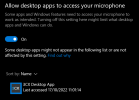
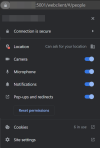
Tried through USB and 3.5mm headphone jack not working. All other audio streaming platforms work ie Teams, Youtube and so just not 3cx
It's a Windows 10 Pro HP ProDesk 400 G5 MT
Windows is updated and restarted machine many times
Tried it without Jabra software and with Jabra software.
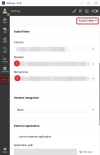
Disabled Headset integration and enabled it within 3cx
Removed USB driver and reinstalled it.
Just not having any luck.
Can i please get some help?
We have a Jabra Evolve 40 MS Stereo Headset Head-band 3.5 mm connector Black (6399-823-109)
That just does not want to work in 3cx APP or Web portal. Tested on another machine and it works perfect.
Replicated the settings back to the other machine, still not working.
Tried through USB and 3.5mm headphone jack not working. All other audio streaming platforms work ie Teams, Youtube and so just not 3cx
It's a Windows 10 Pro HP ProDesk 400 G5 MT
Windows is updated and restarted machine many times
Tried it without Jabra software and with Jabra software.
Disabled Headset integration and enabled it within 3cx
Removed USB driver and reinstalled it.
Just not having any luck.