Jabra issues since last update

Status
Not open for further replies.

Tyler.Calhoun

Trial User
Joined
Sep 30, 2021
Messages
99
Reaction score
44
Hi,
over the weekend I updated our 3CX to version 18.0 (build 418). The desktop clients are on version v18.10.461.

Since then all users complain about problems with the Jabra 930 headsets. Sporadically calls can not be accepted.

Is this problem already known?
Is there a downgrade possibility to an older client version?
 
  • Like
Reactions: MG_VOIP
Info:
Accept via the green button in the Desktop-Client works without problems.
 
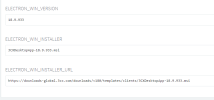
via the parameters I have set the version 18.9.933. The change from 18.10.461 to 18.9.933 was performed on 50 clients.

The Jabra headsets work again without problems.
Monday I will continue downgrading 50 clients.

Of course we would like to use the new version. Does this problem only occur with us?

What can we do?

Thanks
1664549545621.png
 
Same problem here, a fix will be appreciate :).
 
  • Like
Reactions: Tyler.Calhoun
Our call centers make calls much more often than I do. Unfortunately, I could not reproduce the problem myself. I will ask the users to make sure that the headset is not connected at that moment.

A downgrade really helps. Almost all users (100) have confirmed that the headsets with the older version work again.


I think it's sad, that no one from the 3CX team has said anything about the problem yet. Can you reproduce this? Is there anything I can do? Send log files or something similar?

We have had very few problems and the cooperation with the 3CX team has always been great.

Edit:
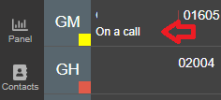
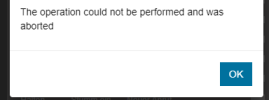
Friday I got a screenshot from a user with the new version. I don't know if this is related to the problem.

1665381806440.png
 
Last edited:
We have also been seeing problems since the new update. We use Yealink WH63's integrated to the 3CX Windows client and the integration is lost almost daily. We have to exit the 3CX client from the system tray and re-open which seems to temporarily resolve this.
Urgent attention on this would be greatly appreciated.
 
  • Like
Reactions: Tyler.Calhoun
I can also confirm this. After closing the 3CX app completely and reopening it, the headsets work again for a few hours.
 
Same problem here, not only with Jabra headsets, it also concerns Yealink WH6x headsets.

We also have another problem: calls hang up just after picking it up... Again, Jabra and Yealink headsets are concerned with 3CX Desktop App in version 18.10.461. No difference if accepting call manually via green button, however I didn't try to disable headset integration.

No problem if using a deskphone (with the same headset connected to the phone).

I tried to downgrade using the above method, but 3CX app updates itself to last version available on first start. How can I keep the older version, at least for a few days testing purpose and to be sure?
 
Sorry, I did not describe all the steps.

Last week I spoke to one bronze and two silver partners to ask if they were experiencing the same problems.
All three told me the same thing. Many customers are running the new version without any problems, but some customers are having the same problems as us.

My solution did not work immediately for all of them. The msi setup needs to be replaced. After that it works.
The partners were happy about my solution and confirm that their customers can work with the headsets again without any problems.

I can only help you with the Debian version.
Either exchange the file via FTP, or via SSH and wget.

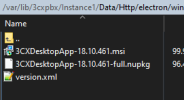
You can find the file in:
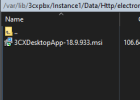
/var/lib/3cxpbx/Instance1/Data/Http/electron/windows

Since the problems seem to affect customers and partners who are not active here in the forum, the problem seems to be bigger.

I'm sure with the next version the guys from 3CX will have solved the problem. :cool:

EDIT:
It would help me and certainly the support of 3CX if you give a short feedback if the solution helps. :)
 
Hi all,

I've read this thread but I have not seen an good description of what the issue is, so I'm afraid I have not yet understood it very well.

1. Can someone help describe the issue in detail? Post screenshots if you think it would help :)

- What happens when a call arrives
- What action you take
- What you expect to see
- and what you see happening instead


2. Can you suggest a way for someone to replicate it?
 
  • Like
Reactions: Tyler.Calhoun
Hi John,

Thank you for joining us! :)


Here is our big problem with last version of client (18.10.461):
  • When using Jabra or Yealink headset integration (Jabra 930Pro and Yealink WH62 here)
    • Call arrives
    • Picked up (with green button or headset - no matter)
    • Call immediately hangs up (sometimes in call, but more often immediately after picking up)
    • No problem if we disable headset integration in 3CX app
    • Sadly this is a random behavior, and not all our users are concerned
    • Seems not to concern Sennheiser headset integration (but we haven't a lot of Sennheiser)
    • Sporadically lost headset integration with the message seen above "the operation could not be performed and was aborted"


By the way, we also have another specific problematic with Yealink integration, if you could check that at the same time:
  • When using Yealink headset integration (WH62 here) - may be older than last version of 3CX app

Thank you all, and thank you @Tyler.Calhoun, I'll try that quickly!
 
Last edited:
  • Like
Reactions: Tyler.Calhoun
Hi @JohnS_3CX ,
thanks a lot for helping us with a troubleshooting:). Really cool.:cool:
I'll try to describe the problems in detail. Together we will definitely get the problem solved.

I can only describe the failures that have been reported by our users. We only use Jabra headsets and Snom M900/M70. I can't say anything about Yealink.

There are two problems.
1. sporadically answering and hanging up via the headset button does not work. The green button in the dialer always works.

2. calls are lost.
After several analyses I noticed that the calls are not lost at all. I describe now:
- An employee accepts a call. No matter if by headset or dialer.
- The call is conducted normally.
- Spontaneously the call is ended at the dialer.
- But the agent still has the status yellow.
- In the Management Console I also see the call as active.
- The caller doesn't hear anything anymore and hangs up at some point.
- Then the status of the agent also changes.

The call remains in the PBX and is not lost. Only the connection to the client is interrupted.

Screenshots:
A normal call
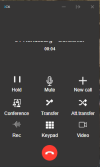
Call1.PNG
After a few seconds (between 2-30 seconds). Is the call disconnected
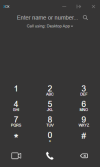
call2.PNG
The agent retains the status Yellow
call4.PNG

the call is active in the management console
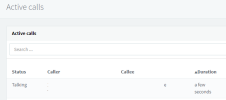
call3.PNG
After the caller ends the call, the agent is available again.

Here again my solution.
@DSI_RM Sorry, I forgot something earlier. You still need to clean appdata

1. via FTP delete the 18.10.461 msi and upload 18.9.933
2. change the parameters in the PBX
3. restart services
4. on the client uninstall the version 18.10.461
5. in %appdata%\Roaming\3CXDesktopApp delete everything except config.json
6. install the version 18.9.933 manually via msi

With the solution I have been able to help 200 agents in our company. Additionally supported 3 partners last week. All of them confirmed after the first day that everything works as usual.

The big problem is that these issues are not reproducible. It seems that not all 3CX customers are affected. After a "lost call" I was able to create a support package. But I am not sure if this will help you. In the PBX the call is still active.

no problems with the M900 and M70
 
Last edited:
Thank you all for the detailed report, I will pass the information along.
Hopefully we can find a way to generate this error and see what is happening.

Edit: can you also tell me if the client PCs are on WiFi VS LAN?
 
  • Like
Reactions: Tyler.Calhoun
On LAN for us, not on Wifi.
 
And are you running any specific antivirus program that could be blocking something?
 
  • Like
Reactions: Tyler.Calhoun
We work with WithSecure Elements (ex F-Secure). No alert receive on console, no visible block.

Since changing the 3CX client version or disabling headset integration seems to eliminate the problem, I suspect it's not related to the antivirus, but you had to ask, I agree! ;)
 
Here again my solution.
@DSI_RM Sorry, I forgot something earlier. You still need to clean appdata

1. via FTP delete the 18.10.461 msi and upload 18.9.933
2. change the parameters in the PBX
3. restart services
4. on the client uninstall the version 18.10.461
5. in %appdata%\Roaming\3CXDesktopApp delete everything except config.json
6. install the version 18.9.933 manually via msi
Hey @Tyler.Calhoun

I followed your instructions but when I restart the services, msi and settings are updated to last version, which is also proposed to the client...

I am totally unable to keep 18.9.933... Any chance you forgot a part in your written instruction set?
 
And are you running any specific antivirus program that could be blocking something?
Hi,
we use Bitdefender. The server logs do not show blocked connections.

Edit: All clients are connected via LAN
 
Last edited:
Hey @Tyler.Calhoun

I followed your instructions but when I restart the services, msi and settings are updated to last version, which is also proposed to the client...

I am totally unable to keep 18.9.933... Any chance you forgot a part in your written instruction set?
oh i don't like to hear that.

So far it has worked like this on all systems.
Today I changed another 3CX. I still quickly created screenshots
There are more files in the folder. All of them must be deleted

1666850304436.png

You have to make sure that the 18.9.933 is the only file in the folder

1666850079913.png

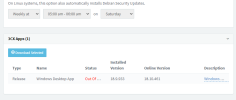
afterwards the update page should look like this

1666849999015.png
 
@Tyler.Calhoun hi!

Well, client keep to be updated to last version if I restart 3CX services here... Weird that you don't have the same behavior on your side...

Last try this evening: I deleted all files in directory (didn't delete xml file before), uploaded version 18.9.933, changed the parameters in admin console and... That's all!

Now it seems that the version is kept in 18.9.933 (on my computer I don't get the update notification). I will try tomorrow morning to install 18.9.933 for users who encountered the issue, and will post here the result!

I hope that there's no other case of services restart or client auto update than reboot of the server, manual restart of services or 3CX server update...
 
Status
Not open for further replies.

Latest Posts

Forum statistics

Threads
111,962
Messages
589,987
Members
164,867
Latest member
swegner