Latest Windows Softphone Release Adds More Chat Functionality

ThomB_3CX

Staff member
Joined
Apr 28, 2022
Messages
839
Reaction score
1,291

New BETA adds media & message forwarding and chat transfer.​

This BETA release of the Windows Softphone focuses on easier collaboration between 3CX users by adding the ability to transfer chats and forward media and content to other team members. Read on for more details.

Transfer Chats​

Transfer a chat to an...
Continue reading the Original Blog Post.
 
Last edited by a moderator:
Does this version have the autopopup of the CRM URL? We have a link but we need the automatic popup for some customers.
 
Hello @ThomB_3CX

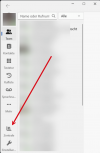
the button for the queues in German Zentrale is no longer available. In the app version 20.0.580.0

Best regards
 
hello

unfortunately the beta is a downgrade.
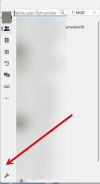
the centre is now missing, see printscreen.

1726152215707.png1726152229504.png

but unfortunately it is still not possible to automatically change the status in case of absence.

greetings
mgb
 
hello

unfortunately the beta is a downgrade.
the centre is now missing, see printscreen.

View attachment 43785View attachment 43786

but unfortunately it is still not possible to automatically change the status in case of absence.

greetings
mgb
Read the blog post. It's mentioned that the Panel is now between the _ and the X upper-right of the window.
 
  • Like
Reactions: bitn
It is great the 'chat'-icon is now always visible! That was really waaaay too hidden, chat is really important

I do find the new location of the 'panel'-icon a bit strange.
Between the _ and X (minimize and close) buttons, should be the maximize/restore button.
That's what people expect, that's how it's been since Windows 3.11 and it should stay that way forever :)

No, all kidding aside: people do not at all expect a button to open a new window (panel) or anything, at that location. So it has a very, very low discoverability. Take @mgb , who was specifically looking for where the icon had gone, and he couldn't even find it there.

Thanks as always for the hard work!

(and can the window already be resized? I will check it later when I have the beta installed. It is my #1 wish :))
 
Last edited:
Why not put all the icons in one row... the three points are also useless.. The window isnt resizeable und enough space for the stuff.
 
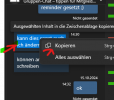
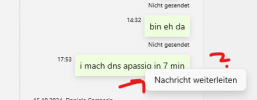
Today we rolled out the Softclient version 20.0.580.0 to a handful of users - but the immediate feedback was why you can no longer mark the content of chat messages? In an older V20 version it was possible to simply mark and copy the content of the chat message (numbers, URLs, passwords, etc.) with the mouse in order to use it in other applications or something. Now the chat message can no longer be selected, you can only "forward" the entire message internally - that's not what you want, is it? Users have to laboriously type out URLs or numbers, something we often use in chat messages.

Am I missing something here? Is there a setting for this somewhere? Maybe a permissions issue in the MS Store regarding apps?
 

Attachments

  • New V20 Client Chat.png
    New V20 Client Chat.png
    9.2 KB · Views: 8
  • Old V20 copy possibility.png
    Old V20 copy possibility.png
    15.9 KB · Views: 8

Latest Posts

Forum statistics

Threads
112,131
Messages
590,898
Members
165,137
Latest member
Steve0792