Launch Calls in your CRM with Windows Softphone RC2

ThomB_3CX

Staff member
Joined
Apr 28, 2022
Messages
833
Reaction score
1,268

RC2 adds more settings for calls & audio​

3CX V20 is just around the corner and our softphone team is working full steam ahead to finalize the new Windows Softphone for the release. With RC2 we’ve added the ability to launch calls in your CRM or any external app, as well as to set your default microphone or speaker.
[HEADING=1...[/QUOTE] Continue reading the Original Blog Post.
 
Last edited by a moderator:
Thank you for adding in the option to launch an executable. This will be very helpful.

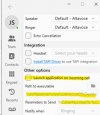
It has the option to run it "Notify when Ringing" or "Notify When Connected".
If you set it to notify when connected, it changes the BLF panel to Initials. If you change BLF back to Full name it changes the notify to Ringing. Its not apparent right away but when you click off you will see the issue.
In short you can't have "Notify When Connected" turned on at the same time as "BLF to Full Name".

The phone can still be closed completely by clicking the X at the top right. I see if I click it during a call I get a warning, but can you make the warning happen during idle as well (or at least until Push is functional).

I'm testing against a v18 system in case any of the above are related to that let me know and I can try against v20 if needed.
 
  • Like
Reactions: CallingFromMars
I'm testing against a v18 system in case any of the above are related to that let me know and I can try against v20 if needed.
The release blog says it requires RC3....
1708442390370.png

Don't know how true it is, just saying...
 
The release blog says it requires RC3....
View attachment 39821

Don't know how true it is, just saying...
I did see a note before how v20 RC3 is needed for the MS365 integration, but there may be other items that require 20 RC3 or higher to function better.
 
I did see a note before how v20 RC3 is needed for the MS365 integration, but there may be other items that require 20 RC3 or higher to function better.
I did just test against rc3 and latest softphone and you are correct - it does not allow full name and an external app when set to connected. Nice bug catch.
 
@CentrexJ thanks for your feedback.
We have replicated the External app issue and we will fix it.

We will take the rest into consideration
 
@CentrexJ we have uploaded a hotfix version 20.0.418 which fixes the Change in BLF issue when switching the External app dropdown setting.
 
I am confused.

I have been using 3cx for over 10 years and the ability to launch an app on ring or connected has always been there and certainly is in V18 which I am currently running.

In what way is this different?
 
I am confused.

I have been using 3cx for over 10 years and the ability to launch an app on ring or connected has always been there and certainly is in V18 which I am currently running.

In what way is this different?
The ability to launch external app is now in the v20 Store app. It wasn't before.
 
So it is not that the ability to launch an app that is new, it is just it is on the "V20 store"?

I haven't attempted to use V20 so I am not familiar with how it works. or is configured yet.
 
are we going to be able to continue to use the 3CX Desktop App that Im currently using with v18 with v20 ?
 
Another question... Are we going to have the ability to set settings remotely either with reg keys or a config file or something i can push with a gpo this time around. Its really not fun going around 70 PCs and Laptops adding Hot key settings, and integration strings etc. manually - I cant imagine how frustrating it would be for customers with 100s or even 1000s of desks...

Instead of writing a new client / softphone with what seems like every release of the back end so far, perhaps you should work on adding some useful functionality like this to one of the clients you have already built.
 
So it is not that the ability to launch an app that is new, it is just it is on the "V20 store"?

I haven't attempted to use V20 so I am not familiar with how it works. or is configured yet.
Yes
are we going to be able to continue to use the 3CX Desktop App that Im currently using with v18 with v20 ?
It still works now, but don't expect it to work forever.
 
My client still uses V18 desktop app because the V20 version doesn't have the ability to easily configure it open up Zoho CRM on incoming calls. Zoho is fully integrated with the 3CX V20 instance so in V18 desktop app, we would just select the open option.
 
Hi there! I am currently making a migration from 3CX PRO (18.0) to 3CX (20) (Server and Clients). So, I need to deploy a mass configuration in 3CX windows clients version 20.0.491.0 . I cannot find a xml where I could make this changes whit scripting, in 3cx (18) is located in “C:\Users\%username%\AppData\Roaming\3CXPhone for Windows\3CXPhone.xml” and go fine. But in 3CX Softphone version 20.0.491.0 doesn't exist a xml file for apply this changes. Anyone know how or where is located this file for apply this mass clients config?
 

Attachments

  • 4.jpg
    4.jpg
    27.1 KB · Views: 15
I cannot find a xml where I could make this changes whit scripting
...
Anyone know how or where is located this file for apply this mass clients config?
In v20 there is no such config file. It's a binary:
“C:\Users\%username%\AppData\Local\Packages\3CXDMCC.3CX_97f1hnz6y6tba\Setting\..."

One option: install the app (for example via Add-AppxPackage), start it once to accept the EULA (if someone shows us how to do this automatically we would be happy, but please no AutoIt again), close the app (kill em) and then start e.g. via Powershell .\your3cxprovisioningfile.3cxconfig
 
Last edited:
Hi
In the new 3CX application for Windows, there is no possibility to integrate 3CX with HubSpot CRM. It is important for us to connect these two applications. So far, we have been using the "old" application, which had this integration. When our clients called us and their profile was in our HubSpot CRM, the web page with their profile would open automatically.

We thought about using the Web App (PWA), but this app doesn’t have shortcuts that help with a quick response when we have many other apps open (we wouldn’t need to find the dialer to answer).

We need "integrate with the HubSpot CRM" option in the 3CX Windows application to automatically open the client's CRM page and enable shortcut keys, as it was available in the previous version, v18.

Br.
 
Hi
In the new 3CX application for Windows, there is no possibility to integrate 3CX with HubSpot CRM. It is important for us to connect these two applications. So far, we have been using the "old" application, which had this integration. When our clients called us and their profile was in our HubSpot CRM, the web page with their profile would open automatically.

We thought about using the Web App (PWA), but this app doesn’t have shortcuts that help with a quick response when we have many other apps open (we wouldn’t need to find the dialer to answer).

We need "integrate with the HubSpot CRM" option in the 3CX Windows application to automatically open the client's CRM page and enable shortcut keys, as it was available in the previous version, v18.

Br.
The integration still works. Just the autopopup isn't there.
 
  • Like
Reactions: N_G

Forum statistics

Threads
111,993
Messages
590,175
Members
164,931
Latest member
admintest