





RC2 adds more settings for calls & audio
3CX V20 is just around the corner and our softphone team is working full steam ahead to finalize the new Windows Softphone for the release. With RC2 we’ve added the ability to launch calls in your CRM or any external app, as well as to set your default microphone or speaker.
Launch Calls in your CRM
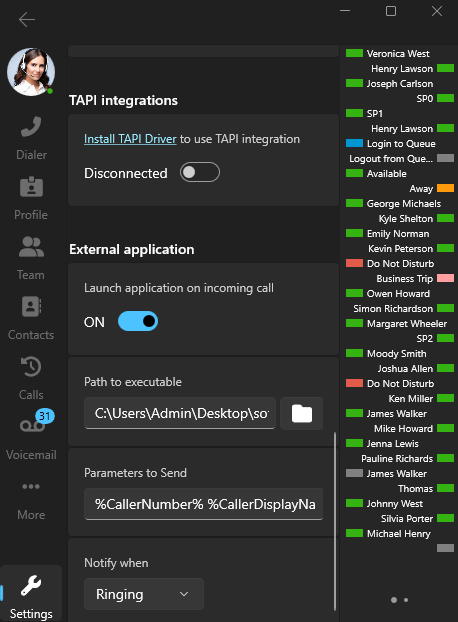
RC2 introduces the new “External Application” setting. This setting enables you to launch an external application, such as your on-premise CRM or any script which integrates with applications that do not offer a web-API, when Ringing or Connected. Simply set a caller number or display name in the softphone which will then be displayed in your CRM.
Note: This feature is mostly used for any type of automation scripts or unsupported CRMs.
Set your Preferred Default Audio Options
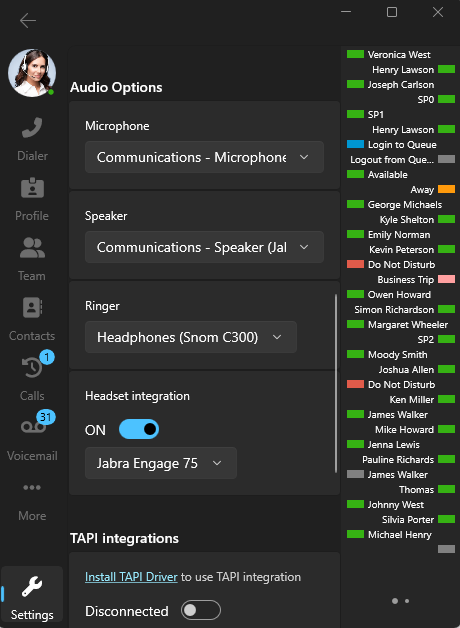
In the combo boxes for Microphone and Speaker, RC2 adds the option for you to set your default audio options. This includes microphone, speaker, ringer and headset.
Once you set these, all audio input and output will use the configured device(s).
Other Fixes
- Update to use the latest .NET8
- Contact resolution fixes
- Call Quality improvements
Try the Windows Softphone RC2
The latest Windows Softphone is available for try-outs from the Microsoft Store. It requires V20 RC3.
Head over to the Windows Softphone Forum to give us your feedback and/or ask questions.
Read the Windows Softphone guide.









 Copyright © 2026