Launch CFD with API?

PC974

Premier Customer
Joined
Sep 22, 2024
Messages
19
Reaction score
8
Hello,

I’m a bit lost with the 3CX documentation.
Is it possible to launch a CFD script with the 3CX API and pass some data to it?
The idea is to be able to start a script while passing data as parameters, for example text.
Through the CFD, I would retrieve this text to execute TTS and play it during the phone call.
Thank you for the answers.

regards,
 
No, a CFD App is triggered when it receives a call. What are you trying to achieve exactly? Can you provide more details?
 
Hello Edossantos

The idea is simple. It’s to trigger a phone call through an event from our internal software. The goal is to generate a call in which we pass data as parameters (text, for example) that 3CX will convert using TTS and play the file.

Regards
 
I understand, but unfortunately that's not something you can do. You could initiate a call with a CFD dialer, but once the call starts, there is no way to pass this context information from the dialer to the call flow processing the generated call, so that's not a valid approach for your use case either...

As an alternative solution, I encourage you to take a look at SIP Caller. This is a cloud based dialer which can do exactly what you need. You can create a campaign to call your customers and play the prompt you need taken from a variable. And then you can use our REST API to upload numbers to the campaign, so they're immediately called, and the message you provide is played. You can try this for free to confirm that it works for you, the setup is very simple. Let me know if you need any help with it.
 
After the audio is played, what do you want to happen to the call? Hang up? Transfer to a queue? You could do this with a cfd that runs in a loop checking an API or file for calls to be placed.

Are the needed calls done in batch on a scheduled basis or is it important to place the call urgently?

We could help with a custom service, or if done in batch, you can look at our 3CX Power Dialer.
 
Hi @PC974

I managed to trigger a CallFlow-Script via the 3CX Call Control API by assigning it but there is still a major step missing.
I've only recently started working with the 3CX API and the Call Flow Designer, so I'm probably using many of the terms incorrectly. Here are a few screenshots:

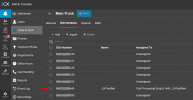
Be sure a dedicated DID exists (the assignment is done after the CFD-Script is uploaded):
1764846665334.png

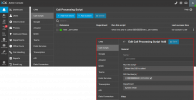
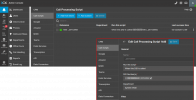
Upload you CFD Script. In the CFD use the same project extension as your DID!
1764847012540.png

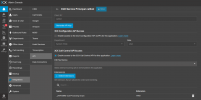
Create an API Service Principal - I called mine 'callbot' - and add your selected Extension:
1764846090200.png

When now using the API and call the Extension or CallID you can trigger the CFD-Script - here is my python example:
Code:
---8<---
      # attachedData must be string value!
      payload = {
              "destination": "1440",
              "timeout": 30,
              "attacheddata": {
                  "public_CallerID": "callbot",  # or extension 1440
                  "public_DID": "*******440",
                  "public_TargetNumber": f"{mobile}",  # mobile number to call
                  "public_ticketID": f"{tckt_id}",
                  "public_de_audio": snd_name.replace('{lang}', 'de'),
                  "public_en_audio": snd_name.replace('{lang}', 'en'),
                  "public_beep_file": "beep.wav",
                  "public_initial_wait": "1",  # seconds
                  "public_repeat_wait": "2",  # seconds
                  "public_repeats": "3",
                  "public_final_wait": "3",  # seconds
                  "public_retry_wait": "10",  # seconds
                  "public_max_retries": "6",
                  },
              }
      return payload

---8<---

      # execute Call via API/CallFlow
      client_id = payload['attacheddata'].get('CallerID', '1440')  # dial code: 1440, ServicePricipal: callbot
      api_url = f"{base_url}/callcontrol/{client_id}/makecall"
      headers = {"Authorization": f"Bearer {_token}",
                        "Content-Type": "application/json; charset=utf-8"}    
      response = requests.post(api_url, headers=headers,
                         data=json.dumps(payload), verify=False, timeout=30)
      response.raise_for_status()
---->8----

The only breaking problem I still have is that the attacheddata from the payload is not accessible in the CallFlow-Script - or maybe I didn't figured it out yet...
Any Idea or hint is very much appreciated because that is the last step to make this work!
 

Attachments

  • 1764847241220.png
    1764847241220.png
    100.1 KB · Views: 8
Last edited:
  • Like
Reactions: PC974
Hello,

If you can not pass the information within the request... pass it externally.

As example you can save a file, and read this from the CFD.
You can also do this in a web request or database... many other options.

Would you have an option to do that?

Paulo
 
Hello,

If you can not pass the information within the request... pass it externally.

As example you can save a file, and read this from the CFD.
You can also do this in a web request or database... many other options.

Would you have an option to do that?

Paulo
The problem is that I need to identify the call because there can be multiple. If the Info is externally I have no way to relate the call to the correct information!
 
If you are triggering the call via the API, you should be getting identifying parameters back, that should allow you to associate them with the external data.

As a basic method you could create 100 DIDs or similar that trigger the CFD and it loads the external file associated with that DID. You just need to make sure not to reuse the same concurrently, and that can probably be handled through some file locking mechanism.
 
Hello,

Not sure if it does help, but have you seen this function of make call:
https://www.3cx.com/docs/call-control-api-endpoints/#h.k8kldqyusu63

It seems to be able to pass up to 3 Properties (strings).

Paulo
I actually use the exact call but way more parameters - see the
Code:
      payload = {
              "destination": "1440",
              "timeout": 30,
              "attacheddata": {
                  #"public_CallerID": "callbot",  # or extension 1440
                  #"public_DID": "*******440",
                  "public_targetnumber": f"{mobile}",  # mobile number to call
                  "public_ticketid": f"{tckt_id}",
                  "public_audioid": f"{snd_name}",
                  #"public_de_audio": snd_name.replace('{lang}', 'de'),
                  #"public_en_audio": snd_name.replace('{lang}', 'en'),
                  #"public_beep_file": "beep.wav",
                  #"public_initial_wait": "1",  # seconds
                  #"public_repeat_wait": "2",  # seconds
                  #"public_repeats": "3",
                  #"public_final_wait": "3",  # seconds
                  #"public_retry_wait": "10",  # seconds
                  #"public_max_retries": "6",
                  },
              }
      return payload

So maybe only 3 parameter are possible? No, I reduced them to 3 and this didn't do the trick:

Code:
2025/12/04 16:58:15.944|0016|Info| [_3CX.Script] _1440_16.Main.2174.[C:646.1]-LoggerStart - CallFlow.CFD.LoggerComponent 'LoggerStart' - 24-7-Notifier CallFlow started...
2025/12/04 16:58:15.944|0016|Info| [_3CX.Script] _1440_16.Main.2174.[C:646.1]-LoggerData_TN - CallFlow.CFD.LoggerComponent 'LoggerData_TN' - target_number: ''
2025/12/04 16:58:15.945|0016|Info| [_3CX.Script] _1440_16.Main.2174.[C:646.1]-LoggerData_TID - CallFlow.CFD.LoggerComponent 'LoggerData_TID' - ticket_id: ''
2025/12/04 16:58:15.945|0016|Info| [_3CX.Script] _1440_16.Main.2174.[C:646.1]-LoggerDATA_AID - CallFlow.CFD.LoggerComponent 'LoggerDATA_AID' - audio_id: ''
 

Attachments

  • 1764865336702.png
    1764865336702.png
    6.5 KB · Views: 11
Last edited:
If you are triggering the call via the API, you should be getting identifying parameters back, that should allow you to associate them with the external data.

As a basic method you could create 100 DIDs or similar that trigger the CFD and it loads the external file associated with that DID. You just need to make sure not to reuse the same concurrently, and that can probably be handled through some file locking mechanism.
If one can't use the attacheddata in the API payload what is it for in the first place, or did I got it wrong?
 
Last edited:
Hello,

So you will need to combine strings in an JSON or XML way, so you can have more options :)

Option1 = {"parameter1":"here is one thing", parameter2":"here is two thing"}
Option2 = {"parameter3":"here is three thing", parameter4":"here is four thing"}
Option3 = {"parameter5":"here is five thing", parameter6":"here is six thing"}

Paulo
 
Hello,

So you will need to combine strings in an JSON or XML way, so you can have more options :)

Option1 = {"parameter1":"here is one thing", parameter2":"here is two thing"}
Option2 = {"parameter3":"here is three thing", parameter4":"here is four thing"}
Option3 = {"parameter5":"here is five thing", parameter6":"here is six thing"}

Paulo
This might work indeed - I was blind not seeing this method!
But currently it doesn't help because I couldn't figure out how to access attacheddata within the CF Designer!
1764865256728.png
 
  • Like
Reactions: KyriacosS_3CX
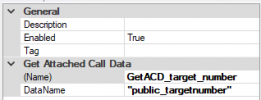
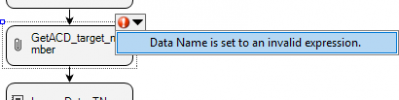
Well, the only problem with this is:
1765181875944.png
 
Hello

I do think you want to pass multiple data in 1 string.
In this case, you will need to extract 'parts' of data from the string passed.

1765183256406.png

1765183412522.png1765183447554.png1765183481005.png1765183491701.png
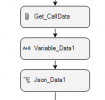
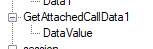
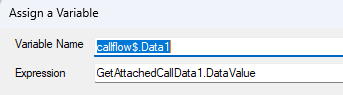
Get the Passed Data in the "GetAttachedCallData1.DataValue"
Than set this to a "Variable"
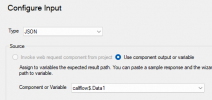
Last part is to, extract the parts from JSON variable with the JSON/XML component.

Paulo
 
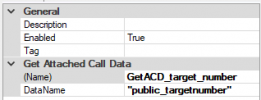
Well, the only problem with this is:
sorry, really, my bad
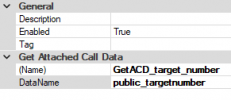
It has to be a string and therefore double quotes.
When I tested it myself (for the pic) then there was no error at first.

The rest remains: pack all the data into an single attachment and unpack it from there when needed.
 
Hello, @univention-stoeckigt

Great idea
I tried it on my side, but I’m experiencing a side effect.

I created a simple Call Flow Designer script with a MakeCall and a prompt playback.
However, when I send the API request, the script runs multiple times, i received 3 or 4 calls.
 

Forum statistics

Threads
112,283
Messages
591,701
Members
165,406
Latest member
ARKC