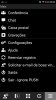
I am trying to provision an extension on a Lenovo K5 running Android 5.1.1 and the provisioning filetype is not recognized by the phone as 3cx file to configure the application.
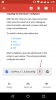
1. Resend the Welcome email on your email address and then click to download it (look screenshot).
2. Go to the top notification area on your android phone and you will see the 3cxconfig and click on it
In that case you will need to use a file explorer software on your android device. Personally i use an app called explorer. Open the app and then navigate to your downloads and find the welcome email. Select and choose open with. Choose 3CX client