Let's Encrypt Cert Not Renewing

Status
Not open for further replies.

AE-IT

Customer
Joined
Jul 12, 2017
Messages
20
Reaction score
5
I was just forced to update from v14[newest service pack] to version 15.5.13103.5 (if it's not broken don't mess with it). Now my Let's Encrypt certificate won't renew and it is going to expire in a few days. 3CX is installed on premise on Windows Server 2008-R2.
 
Hello @AE-IT

Do you get an email that the renewal failed? Are you using a 3CX FQDN? Does your FQDN resolve to the correct public IP?
 
Yes, the Let's Encrypt Expiry Bot emailed me to tell me the certificate is about to expire and has not been renewed. My FQDN is voip.[mydomain].com, this is a migration from 14 so I left everything the same as it has been for years.
 
Ok so the 3CX LE only works with a 3CX provided FQDN. You have a custom FQDN so you will have to do your renewal manually. 3CX has never managed SSL for custom domains. This is just coincidence.
 
I'm having the same issue also.
3CX FQDN
Current on maintenance plan
local PBX
Error message is: NET::ERR_CERT_DATE_INVAILD
 
Ben I think you are having a different problem. The person above was using his own domain. To solve your problem, you may want to try this.

These are the instruction I received from 3CX

TO FORCE THE UPDATE:

  • If version is lower than v15.5 SP2 skip this step:
    • Starting from v15.5 SP2, go in Settings / Parameters:
    • Set or Add TEMPORARY_SELF_SIGNED_CERTIFICATE_GENERATED and give it value of 1.
  • Linux:
    • Log in via SSH.
    • Type: /usr/lib/3cxpbx/PbxConfigTool -renew-certificates
  • Windows:
    • Go to Command Prompt.
    • Type: “C:\Program Files\3CX Phone System\Bin\PBXWizard\PbxConfigTool.exe” -renew-certificates
    • Press Enter and the result should look something like this:
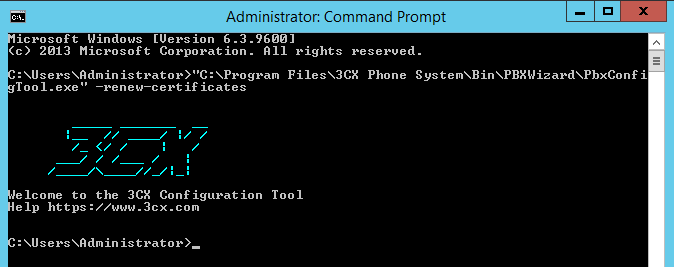
    • Restart nginx just to be sure and the certificate should have been renewed (service nginx restart)
 
Ok so the 3CX LE only works with a 3CX provided FQDN. You have a custom FQDN so you will have to do your renewal manually. 3CX has never managed SSL for custom domains. This is just coincidence.

3CX didn't have to manage the cert for my custom FQDN, win-acme-letsencrypt.exe did a mighty fine job of managing the cert until I upgraded from version 14-sp3(?) to version 15.5.

Now it doesn't work because the binding for the FQDN and port 80 have been removed from IIS.
 
Last edited:
Ben I think you are having a different problem. The person above was using his own domain. To solve your problem, you may want to try this.

These are the instruction I received from 3CX

TO FORCE THE UPDATE:

  • If version is lower than v15.5 SP2 skip this step:
    • Starting from v15.5 SP2, go in Settings / Parameters:
    • Set or Add TEMPORARY_SELF_SIGNED_CERTIFICATE_GENERATED and give it value of 1.
  • Linux:
    • Log in via SSH.
    • Type: /usr/lib/3cxpbx/PbxConfigTool -renew-certificates
  • Windows:
    • Go to Command Prompt.
    • Type: “C:\Program Files\3CX Phone System\Bin\PBXWizard\PbxConfigTool.exe” -renew-certificates
    • Press Enter and the result should look something like this:
    • Restart nginx just to be sure and the certificate should have been renewed (service nginx restart)
Were those directions for Ben or me? They didn't work for me.
 
@AE-IT

Yes. That would be because the webserver changed in v15 to nginx so you will need to modify your LE configuration to update the cert.
 
Ben I think you are having a different problem. The person above was using his own domain. To solve your problem, you may want to try this.

These are the instruction I received from 3CX

TO FORCE THE UPDATE:

  • If version is lower than v15.5 SP2 skip this step:
    • Starting from v15.5 SP2, go in Settings / Parameters:
    • Set or Add TEMPORARY_SELF_SIGNED_CERTIFICATE_GENERATED and give it value of 1.
  • Linux:
    • Log in via SSH.
    • Type: /usr/lib/3cxpbx/PbxConfigTool -renew-certificates
  • Windows:
    • Go to Command Prompt.
    • Type: “C:\Program Files\3CX Phone System\Bin\PBXWizard\PbxConfigTool.exe” -renew-certificates
    • Press Enter and the result should look something like this:
    • Restart nginx just to be sure and the certificate should have been renewed (service nginx restart)
Please note that by using the above you run into the danger of Let's Encrypt blocking the certification renewal process for at least a week due to their policy so do not use the above if not absolutely necessary.
Also if the certification renewal failed then wait 24 hours so the PBX tries again before attempting any manual intervention. Chances are the certificate will renew in the next attempt so be patient.
 
The instructions are out there on the internet in the same place you found the instructions for setting up LE with Abyss. If there is no native client to work with Nginx on Windows then you'll have to do a manual process or a generic renewal and then script copying the cert files into the appropriate location and restarting the services to reload the certificate. Or yes get a paid cert or use the 3CX provided FQDN and let them manage it all for you.
 
I never set up LE for Abyss. This is Windows Server 2008-R2, I run a Windows shop, I'm pretty sure 3CX v14 was using IIS as a web server. In any event, I didn't do anything special to make the "Let's Encrypt Win-Simple" ACME client work with the previous v14 install, it just worked out of the box.
 
Sorry IIS. The point being that 3CX did not provide the LE ACME client as part of the install for v14 so you did something on your end to make that work. That same 'something' will need to be done for v15 using Nginx or else your options are the 3CX provided FQDN managed by 3CX, a paid cert per the guide, or your own 'homebrew' solution of LE, ACME and scripts to update and install the LE cert under nginx.
 
The LE Clients are standalone programs. I ran the program letsencrypt.exe and it did the rest including setting up a scheduled task to renew itself - but it requires port 80 to be bound to the FQDN in IIS.

Has ANYONE been able to run LE on v15 with a "custom" FQDN? I've read many references to workarounds and "solutions" but never actually seen any of these workarounds and "solutions"... only references to these fictional solutions.
 
You can run a custom FQDN and have a Let's Encrypt certificate in V15.5, however you need to manage it your self. The following guide contains the path the certificates are stored and how to manually replace them. https://www.3cx.com/docs/self-hosted-instances-ssh/
Hope it helps
 
Status
Not open for further replies.

Latest Posts

Forum statistics

Threads
111,888
Messages
589,565
Members
164,753
Latest member
GemmaC