License activation failed

Status
Not open for further replies.

Rasheeq

Joined
May 15, 2017
Messages
2
Reaction score
0
Hi,

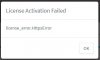
My operating system is Windows Server 2012 R2. Installed the free edition of 3cx and recieved the license key on my email. Installed the software and selected the web browser based install. Everything was fine until the last step when I got the license key activation failed error code. I have a static IP and I am using 3cx FQDN. I have attached an image for further understanding. Any and all help would be much appreciated.

Thanks,

Rasheeq
 

Attachments

  • Untitled.jpg
    Untitled.jpg
    10.3 KB · Views: 22
Hello @Rasheeq

Please try the following steps and let us know if that works for you.

Change your DNS on the PBX server to google DNS (8.8.8.8)
Perform a flushdns through a command prompt (ipconfig /flushdns)
Restart the management console and Nginx service.
Restart the configuration wizard. (close the browser and re-open it)

Let us know if that worked
 
Tried everything in that order. Did not work. It is still turning up the same error. Any other solutions?
 
Check that you can reach activation.3cx.com and make sure deep packet inspection is disabled on the firewall. Disable windows firewall and un-install antivirus if there is any
 
I'm stuck in similar situation when migrating to V15.5.
All local security is cut down, hence disabling the corporate firewall's deep packet inspection is likely to get very political.
Are there any other possibilities to get this through?
(As the license basically has been activated before anyway as I'm coming from V14)
 
I have an issue but on the Debian version.
Just upgraded from 15 to 15.5 and license information just gives me the License_error.
At one time, after flushing the DNS server on a Windows 2012 R2, it accessed the information but then it gives me the error again.
It seems even that certain action buttons just got deactivated, like "Register SIP trunks".
 
@marcZ

I'm stuck in similar situation when migrating to V15.5.
All local security is cut down, hence disabling the corporate firewall's deep packet inspection is likely to get very political.
Are there any other possibilities to get this through?
(As the license basically has been activated before anyway as I'm coming from V14)

If you cannot disable the deep inspection please add an exception for communication with domain *3cx.com, especially with activation.3cx.com as the activation might fail if the packets are opened and let us know of the results.
 
It's been a while.....
Now the firewall has been opened / deep packet inspection disabled.
Local Firewall disabled.
No anti virus present.
dns flushed.
resolution to activation.3cx.com works fine.

No luck at all.
Any other clues?

"License Activation Server cannot be reached.
Check your network and DNS settings."

Frankly, I consider it a bit worrying that an activation requires the complete shutdown of any reasonable security.

Any other way to get this through?
 
Try using the google DNS for the activation purpose on the PBX machine. Then flush DNS again and restart all 3CX services including the Nginx service then try activating again
 
Hi Yiannis,

Thanks a bunch - already did all of that, except for restarting the 3cx-services inbetween :(

Will check again tonight; otherwise it becomes likely we stay on v14 for now.

EDIT: ah, Nope - although I didn't restart the services, there was a complete reboot in the meantime. I fear we have to rule that one out as well, I'm afraid.

Cheers,
Marc
 
Status
Not open for further replies.

Forum statistics

Threads
111,872
Messages
589,493
Members
164,718
Latest member
appservices@bergmanbrothe