License Issue: A networking problem occurred while activating your license key: (Error code: 401)

Networkbug

Customer
Basic Certified
Joined
Jun 10, 2022
Messages
28
Reaction score
4
Hello,

my 4sc enterprise existing key is expired, and my channel partner is not able to see the 3cx key in his portal, they issued a new one, but it is not getting activated. getting above error.

my 3cx is on V18 (Build 31)
3cx 4SC enterprise - Self hosted.

new key is also for 4sc enterprise

any help would be great.

thanks
 
Why not ask your partner to help? Did the firewallcheck goes green?
 
I do not know what "error 401" means. In http 401 means unauthorized. That does not seem to apply in this case? As mentioned by @bitn2, perhaps you have a firewall that blocks outbound traffic to the 3CX Activation servers?
 
Just an update on this.

The backup of v18 was linked with previous license key/ FQDN and it will not restore on v20 due to new license key.

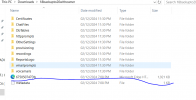
I just deleted the FQDN and registered it again with new license key, went into the backup of v18, edited the .xml, changed the old license key with new one and voila it just restored it without any issue.

thanks.
 
Just an update on this.

The backup of v18 was linked with previous license key/ FQDN and it will not restore on v20 due to new license key.

I just deleted the FQDN and registered it again with new license key, went into the backup of v18, edited the .xml, changed the old license key with new one and voila it just restored it without any issue.

thanks.

I'm having the exact same issue. 401 license error when trying to replace an existing key that's been upgraded to v20. Where did you find the .xml for the license within the backup?
 
I'm having the exact same issue. 401 license error when trying to replace an existing key that's been upgraded to v20. Where did you find the .xml for the license within the backup?
Just open the backup and you will see ;-)
 
I'm having the exact same issue. 401 license error when trying to replace an existing key that's been upgraded to v20. Where did you find the .xml for the license within the backup?
Never mind - found it. For anyone else it's right in the root of the .zip :)
 
  • Like
Reactions: bitn2
Just an update on this.

The backup of v18 was linked with previous license key/ FQDN and it will not restore on v20 due to new license key.

I just deleted the FQDN and registered it again with new license key, went into the backup of v18, edited the .xml, changed the old license key with new one and voila it just restored it without any issue.

thanks.
+1 for this, got me out of a hole. Thanks.
 
  • Like
Reactions: Greg_G
sorry for late reply,

it is inside zip file, just search the license key and make sure the owner email is not used twice as it will not send forgot password if you get locked out, this can also be edited in .xml

1733901412726.png
 

Latest Posts

Members Online Now

No members online now.

Forum statistics

Threads
111,794
Messages
589,018
Members
164,590
Latest member
Infinitas