License Key revoke

Status
Not open for further replies.

TayZaLinZaw

Platinum Partner
Advanced Certified
Joined
May 30, 2024
Messages
49
Reaction score
5
hi 3cx team,
We installed Linux OS on VMware and started 3cx phone system. Once we registered with customer information on the customer portal and bound with 32SC Pro license, then there was a VM issue from the server side. We cannot access the management console of the PBX system that we have installed, but the license is activated after binding with that system. So, we try again to install 3CX window version 20 on the window server and want to reuse the license again. How can I revoke the license and put it back? Untitled.png
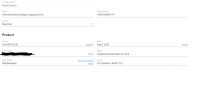
 
isn't there an UNLINK button at the bottom of that page?
 
Yes,

Isn't that unlinked from our company portal?
 
If I unlink, can I use that license again? The Linux running with that license got an error and was deleted, so I want to reinstall the window OS and use that license again. Can it be possible ?
 
@TayZaLinZaw

Dont unlink the key, that will remove it from your partner account

Just uninstall the current install from the os level with " apt purge 3cxpbx".

Then, in the key info (screenshot you sent) just press "install" > "on premise", select your preferences then select windows from the dropdown and download the installer and the config file.

You can use those to redeploy on windows.
 
@TayZaLinZaw

Dont unlink the key, that will remove it from your partner account

Just uninstall the current install from the os level with " apt purge 3cxpbx".

Then, in the key info (screenshot you sent) just press "install" > "on premise", select your preferences then select windows from the dropdown and download the installer and the config file.

You can use those to redeploy on windows.
We don't have the OS bound with that license anymore. Server error occurred and everything went down. How can we get another solution? It's only been 2 days since I uploaded it. We haven't even used anything yet. How can we find a solution for that?
 
You dont need to do anything apart from just making sure that the first machine you tried to install this license on is offline or youve uninstalled 3cx from it.

Then you can install the key by following the steps in my previous post wherever you want.
 
We don't have the OS bound with that license anymore. Server error occurred and everything went down. How can we get another solution? It's only been 2 days since I uploaded it. We haven't even used anything yet. How can we find a solution for that?

You should try 3CX Hosted! It eliminates all the hassles associated with operating system management!

It's so much simpler! Just log into your account at customer.3cx.com, click on the license, and then click "Switch to Hosted."

The cost is minimal. Moreover, it's nothing compared to the resources and time you would need to run 3CX on your own server.
 
Status
Not open for further replies.

Forum statistics

Threads
111,953
Messages
589,913
Members
164,847
Latest member
mike.carter.991